Play together with parties, chat, emotes and spectating
Players group up, talk, wave at each other and watch each other's matches. The SDK does this the way the platform's other clients do, so a player on Unreal, CrowdyCPP or CrowdyJS finds the same party, reads the same chat and sees the same emote:
- A party is a team named
party:<name>that only its members can add players to, and a chat channel of the same name. A guild is the same withguild:<name>, a team players ask to join, with roles. A chat room is one channel, found or made by its name. - An emote is a short name, such as
wave, that a player sends to the players near them, optionally aimed at one actor. - A spectator is a player with no avatar in the world who still receives what happens near the place they watch.
Parties, guilds and chat are in the Crowdy SDK|Game Kit|Social category, emotes in Crowdy SDK|Game Kit|Emotes and the spectator in Crowdy SDK|Game Kit|Spectate.
Make a party and talk in it
Create Party makes the team party:<Name>, whose policy is invite only, and its chat channel, and makes the player its leader. It answers Completed with the party's Group, an FCrowdyKitGroup: its full Name, Team Id, Channel Id and Owner User Id. It answers Failed when either cannot be made, for example when the name is taken. Find Party finds a party by its name, and Invite To Party adds a player, by their user id, to the team and its channel; only a member with the manage members permission can invite, as for any team. Join Party joins a party whose team is open, Leave Party leaves its channel and then its team, and Get Party Members lists its team's members.
Send Chat sends text of at most 1024 bytes of UTF-8 to a group's channel. Its result is an exec pin each: Sent, Empty Text, Too Long, No Channel (the group has none) and Not Connected (the realtime connection is not up). Sent means the message left this client: the server delivers it to the channel's members and drops it from a player who is not one, or from any player whose access tier does not grant the use_text_chat permission; On Send Refused is where that refusal shows. On Chat Message on the Crowdy Kit Social subsystem fires for each message from a party, guild or chat room this player has, with the Group, the sender's Sender Uuid and the Text. A player's own messages do not come back to them.
Anyone can make a team named party:Bob before Bob does. Find Party only pairs a team with a channel of the same name when one player owns both, and Owner User Id says whose they are, so a game that looks up a friend's party can check it is the friend's. The sender of a chat message is what the sender's client says; treat it as a name to show, not as proof.
In Oakford, the lamplighters go out together at dusk. In Blueprint, on the lamplighters' board:
- Add Create Party with Name
lamplighters. From Completed, setRoomto its Group, then add Invite To Party with the Group and a friend's User Id. - On the chat box's commit, add Send Chat (Crowdy Kit Social) with the Group and the text; on Too Long, ask for a shorter line.
- At Event BeginPlay, from the Crowdy Kit Social subsystem getter, bind On Chat Message and add Text to the chat box.
FriendUserId and Room are the board's variables: the friend's user id, and the party's Group, which the chat sends to.
In C++:
#include "Subsystem/CrowdyKitSocial.h"

void ALamplighterBoard::StartParty(int64 FriendUserId)
{
	UCrowdyKitSocial* Social = GetGameInstance()->GetSubsystem<UCrowdyKitSocial>();
	Social->OnChatMessage.AddDynamic(this, &ALamplighterBoard::ShowChat);
	Social->CreateParty(TEXT("lamplighters"),
		FCrowdyKitGroupDone::CreateWeakLambda(this, [this, Social, FriendUserId](const FCrowdyKitGroup& Party)
		{
			LamplighterParty = Party;
			Social->InviteToParty(Party, FriendUserId, FCrowdyKitGroupDone(), FCrowdyKitFailed());
		}),
		FCrowdyKitFailed::CreateWeakLambda(this, [](const FCrowdyTeamError& Error)
		{
			UE_LOG(LogTemp, Log, TEXT("No party: %s"), *Error.Message);
		}));
}

void ALamplighterBoard::Say(const FString& Text)
{
	const ECrowdyKitChatResult Result = GetGameInstance()->GetSubsystem<UCrowdyKitSocial>()->SendChat(LamplighterParty, Text);
	UE_CLOG(Result != ECrowdyKitChatResult::Sent, LogTemp, Log, TEXT("Not sent: %s"), *UCrowdyKitSocial::DescribeChatResult(Result));
}
ShowChat is a UFUNCTION taking FCrowdyKitGroup Group, FString SenderUuid, FString Text. Every call answers through exactly one of its two delegates, including when the request never reaches the server; a group with no team is Not Found, and no connection to the game's API is Network Error.
Found a guild and let players in
Create Guild makes the team guild:<Name>, players asking to join by default (its Membership Policy), and its chat channel. Find Guild finds it. A player calls Join Guild, which asks to join the team; a member with the manage members permission sees the request in Get Guild Roster, which lists pending requests too, and calls Accept Into Guild with the player's user id, which lets them into the team and adds them to the guild's channel. Promote In Guild replaces a member's roles with the role ids it is given; make the roles with Create Team Role on the guild's Team Id.
A step that was done before is not an error the second time: inviting a player already in the party, or leaving a channel the player has left, goes on to the next step, so a call that failed half way can be made again.
Claim Guild Territory grants the guild's members, or only the holders of one role, permission keys on a grid of the app: access and update_voxel_data when its Permission Keys are empty. It needs grid admin rights on the app, so it fails Forbidden for a player who has none; call it from a tool or a server's account, not from a player's game.
Open a chat room
Find Or Create Chat Room finds the channel with that exact name, or makes it, and joins it unless the player is already in. Its Group has a Channel Id and no team. Chat in it with Send Chat and On Chat Message as in a party. The first player to make a room owns it, as for any channel.
In Oakford, everyone talks on the square. In Blueprint, add Find Or Create Chat Room with Name oakford-square at Event BeginPlay, and keep its Group for Send Chat. In C++, Social->FindOrCreateChatRoom(TEXT("oakford-square"), OnDone, OnFail).
Send an emote
Send Emote sends an emote from the local player's pawn to the players within two chunks of it, aimed at Target, an actor, or at nobody. It answers false, with Reason saying why, when nothing went out: the emote is empty, the emote and its target do not fit in 1024 bytes, the player is not signed in or not connected, there is no local pawn, or the target is not a replicated actor this client has heard from. True means the connection took it, not that anyone saw it.
On Emote on the world's Crowdy Kit Emotes subsystem (Get Kit Emotes) fires for each emote that reaches this client, with the Sender Actor and Target Actor (None when this client has no such actor), their Sender Uuid and Target Uuid (empty when it is aimed at nobody) and the Emote. Nothing about an emote is kept or checked: the sender and the text are what the sender's client says. Map the text through your own list of emotes before playing an animation for it, and use a Server Object for anything a player must not fake.
Inbound emotes are limited twice. Each sender has a small budget of their own, crowdy.kit.emotes.persender.maxpersecond (default 4) refilling up to crowdy.kit.emotes.persender.burst (default 4), so one player flooding emotes runs out of their own and no longer silences everyone else. It is checked ahead of the shared one, and an emote the shared budget then drops costs its sender nothing. Every emote also has to fit one budget shared across all senders, since a sender id is only what the sender claims: crowdy.kit.emotes.maxpersecond (default 64) refills it, up to crowdy.kit.emotes.burst (default 16). An emote over either budget is dropped before it is read, with one Warning in the log. A client tracks at most 256 senders; when that is full, the sender that has been silent longest is forgotten.
Because the sender id is what the sender claims, a peer that forges a player's id can use up that player's per-sender budget. That only costs that player their own emotes, which are cosmetic. See Console variables.
In Oakford, a villager waves at the one in front of them. In Blueprint:
- On the wave key, add Send Emote with Emote
waveand Target the actor the player looks at. - At Event BeginPlay, from Get Kit Emotes, bind On Emote; when Emote is
wave, play the wave montage on Sender Actor.
The graph's Target is left empty, so it waves at nobody in particular; wire the actor the player looks at into it. Where the game plays the montage, the graph prints who waved:
In C++:
#include "Subsystem/CrowdyKitEmotes.h"

void AVillager::Wave(AActor* LookedAt)
{
	FString Reason;
	UE_CLOG(!UCrowdyKitEmotes::SendEmoteInWorld(this, TEXT("wave"), LookedAt, Reason), LogTemp, Log, TEXT("No wave: %s"), *Reason);
}

void AVillager::BeginPlay()
{
	Super::BeginPlay();
	if (UCrowdyKitEmotes* Emotes = UCrowdyKitEmotes::GetKitEmotes(this))
	{
		Emotes->OnEmote.AddDynamic(this, &AVillager::HandleEmote);
	}
}
HandleEmote is a UFUNCTION taking AActor* SenderActor, const FString& SenderUuid, const FString& Emote, AActor* TargetActor, const FString& TargetUuid.
Watch a match without an avatar
A player's game receives what happens near its own avatar: other players moving, a starter's actors, emotes. A player who is only watching has no avatar, so add a Crowdy Spectator component to the actor that stands for them, a camera or a spectator pawn. While it is spectating it tells the realtime tier where that actor is: at once, every Interval (2 seconds, at least 0.25) and at once when the actor moves into another chunk, reaching Distance chunks around it (8, at most 8). With Auto Start on, it starts when play begins; Start Spectating, Stop Spectating and Is Spectating do it by hand. Other players' games draw nothing for a spectator.
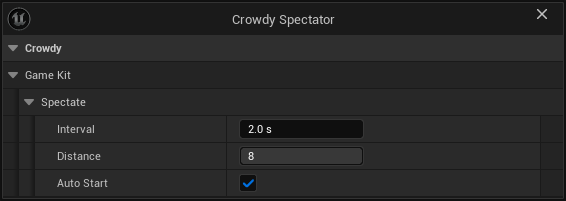
The spectator speaks for the player only while the player has no avatar of their own in the world: while their pawn is live, it waits. A player who leaves their pawn to watch keeps their pawn on other screens until it times out, 12 seconds later by default.
Watching the match itself is reading its Server Object: Get Server Object on the match's session, such as a CSO_Kit_Session or a CSO_Kit_Race with its Instance Id, without Join, and the On Changed node of each variable to follow, such as On Racers Changed (CSO_Kit_Race).
In Oakford, villagers watch the cart race from the mill. In Blueprint, give the mill's camera actor a Crowdy Spectator component, and on the camera's Event BeginPlay add Get Server Object for CSO_Kit_Race with mill-loop-1 and wire it as the Target of On Racers Changed (CSO_Kit_Race), which updates the race board. In C++:
#include "Replication/Components/CrowdySpectatorComponent.h"

AMillCamera::AMillCamera()
{
	Spectator = CreateDefaultSubobject<UCrowdySpectatorComponent>(TEXT("Spectator"));
	Spectator->Interval = 1.0f;
}
The C++ names
| In Blueprint | In C++ |
|---|---|
| The Crowdy Kit Social subsystem | UCrowdyKitSocial, a game instance subsystem. Its calls take an FCrowdyKitGroupDone (or, for the two that list members, an FCrowdyKitMembersDone with the group and its TArray<FCrowdyTeamMember>) and an FCrowdyKitFailed with an FCrowdyTeamError: CreateParty, FindParty, InviteToParty, JoinParty, LeaveParty, GetPartyMembers, CreateGuild, FindGuild, JoinGuild, AcceptIntoGuild, GetGuildRoster, PromoteInGuild, FindOrCreateChatRoom and ClaimGuildTerritory, whose default keys are DefaultTerritoryPermissionKeys(). |
| The party, guild, chat room and territory nodes | One async action each, UCrowdyKitSocial_CreateParty, UCrowdyKitSocial_FindParty, UCrowdyKitSocial_InviteToParty, UCrowdyKitSocial_JoinParty, UCrowdyKitSocial_LeaveParty, UCrowdyKitSocial_GetPartyMembers, UCrowdyKitSocial_CreateGuild, UCrowdyKitSocial_FindGuild, UCrowdyKitSocial_JoinGuild, UCrowdyKitSocial_AcceptIntoGuild, UCrowdyKitSocial_GetGuildRoster, UCrowdyKitSocial_PromoteInGuild, UCrowdyKitSocial_FindOrCreateChatRoom and UCrowdyKitSocial_ClaimGuildTerritory, on UCrowdyKitSocialGroupAction (pins FCrowdyKitGroupAsyncResult) or UCrowdyKitSocialMembersAction (pins FCrowdyKitMembersAsyncResult). |
| On Chat Message | UCrowdyKitSocial::OnChatMessage, an FOnCrowdyKitChatMessage |
| Send Emote, On Emote | UCrowdyKitEmotes::SendEmote on the world's subsystem, or the static SendEmoteInWorld; OnEmote, an FCrowdyKitOnEmote |
| Crowdy Spectator | UCrowdySpectatorComponent |
A game that changes channels outside these calls, such as with Join Channel, can have the signed-in player's channel list read again with UCrowdyChannels::RefreshMyChannels.
Related
- Teams and Channels: the groups and the messaging these are made of
- Use the Game Kit starters: sessions, races and the other matches to watch
- Game Kit on the platform: its client conventions