Turn Mass on for a map
Mass is a rendering backend, so you turn it on per map, on the map profile. This page sets Backend Class, shows the options the backend reads, lists the project settings you are likely to touch, and walks the material change every crowd needs. By the end the Oakford map draws every other player as a crowd row.
When you need this
When a map should draw its remote players as a crowd. A map that sets nothing keeps the actor pool, and nothing on this page changes it.
Pick the backend on the map profile
The switch is on a Crowdy Map Profile data asset, under Actor Management. For Oakford:
- In the Content Browser, Add, Miscellaneous, Data Asset, pick Crowdy Map Profile, and name it
DA_OakfordProfile. - Open it. Under Actor Management, set Backend Class to Crowdy Mass Rendering Backend.
- Leave Backend Config empty for now. The backend then reads everything from the project settings below.
- Open Project Settings, Plugins, Crowdy SDK, find Map Profiles, and add the Oakford map with
DA_OakfordProfileas its profile. Use Default Profile instead to draw every map through Mass.
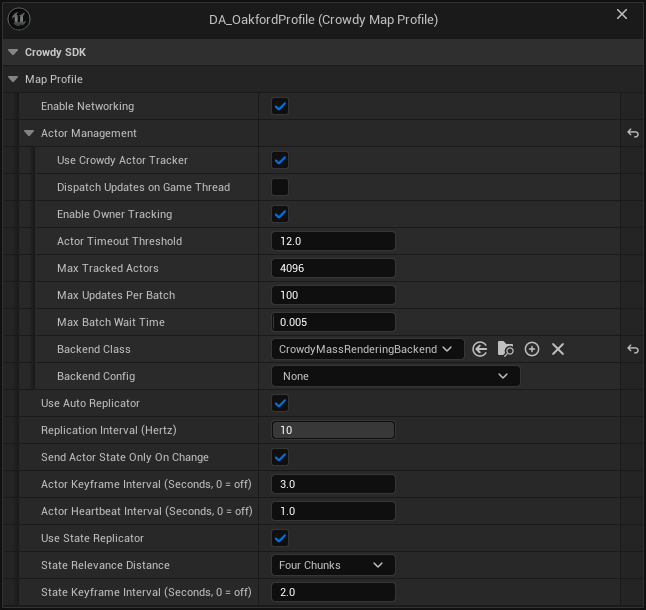
The map profile page covers the asset and how a profile is found: Create the asset and Assign the profile.
| Field | Set it to |
|---|---|
| Backend Class | Crowdy Mass Rendering Backend. The default is Actor Pool Rendering Backend. |
| Backend Config | A Crowdy Mass Backend Config, or leave it empty. |
Installing or updating the SDK changes no map. A project that sets no profile runs on the profile the SDK ships, and that profile draws actors.
The Mass subsystems are created only in a Play In Editor or game world whose map profile has Backend Class set to Crowdy Mass Rendering Backend. On an actor pool map, the Crowdy Mass nodes and C++ calls that need them do nothing, quietly. A Crowdy Mass Area Spawner spawns nothing and warns once. Set Crowdy Mass Hit Zone Table warns once and hits use the default zone. Receive Crowdy Event on Entity and Receive Server Values Changed on Entity log once and receive nothing. Play Crowdy Mass Action still works, because it reads the actor's class.
The rest of the Mass module stays out of the way on such a map too. Its two per-frame processors sit out that world, and a Crowdy Mass Near Tier component does not tick there until something binds it.
In C++, UCrowdySDKDeveloperSettings::ProfileDrawsCrowdRows(Profile) tells you whether a profile selects a backend that draws crowd rows.
Backend Class and Backend Config are greyed out when bUseCrowdyActorTracker is off on the profile. Without the tracker there is no backend at all.
The Mass backend ignores a Backend Config of another class without a word and reads the project settings instead, so none of its overrides apply. (The actor pool backend is the one that refuses a mismatched config and then draws nothing.) Pair Crowdy Mass Rendering Backend with a Crowdy Mass Backend Config or with nothing.
Success signal. Two clients on the Oakford map: the other player appears as a crowd row and moves. If nothing appears, start at "Nothing appears at all" on Fix a crowd that does not look right.
Start from the shipped profile
/CrowdySDK/Mass/Data/DA_CrowdyMassDefaultProfile is a ready-made profile that selects the Mass backend with an empty Backend Config and Enable Networking on. Use it as a starting point, or to try Mass before you author your own.
Nothing registers it for you. Point Map Profiles at it, as the Default Profile to draw every map through Mass or as the entry for one map, and that map is on Mass.
Set the backend's options
A Crowdy Mass Backend Config (UCrowdyMassRenderingBackendConfig) is created inline on the profile's Backend Config field. Its properties are under Mass Backend:
| Label | Default | What it does |
|---|---|---|
Remote Entity Config Override (RemoteEntityConfigOverride) | unset | The Mass entity config for every class this backend does not bind by name. Unset means the project-wide Remote Entity Config. It must include the Crowdy Remote Entity trait. |
Per Class Entity Configs (PerClassEntityConfigs) | empty | Rows of Entity Class and Entity Config (FCrowdyMassEntityConfigBinding). A class in a row is built from the config beside it. Subclasses inherit the row. |
Smoothing Duration Override (SmoothingDurationOverride) | -1.0 | Seconds a movement segment is replayed over. A negative value uses the project's Default Smoothing Duration. |
Render Local Owner (bRenderLocalOwner), under Mass Backend, Debug | off | Also draw your own entity as a crowd row, overlapping your real pawn. A single-client check; leave it off in a shipped game. |
Which config a class is built from, and how to author one, is on Make a character draw as a crowd row. Most projects leave all of this at its default.
A row with only Entity Class or only Entity Config logs per-class entity config entry ignored, class '<class>' and config '<config>' must both resolve, and that class falls back to the next config. A row with both empty is skipped without a word. Swapping the backend replaces the whole set of rows; they are never merged.
Tune the project settings
Project Settings, Plugins, Crowdy Mass (UCrowdyMassDeveloperSettings) holds the project-wide defaults, saved to Config/DefaultGame.ini under [/Script/CrowdyMass.CrowdyMassDeveloperSettings]. The backend config above overrides a few of them per map profile. The ones you are likely to touch:
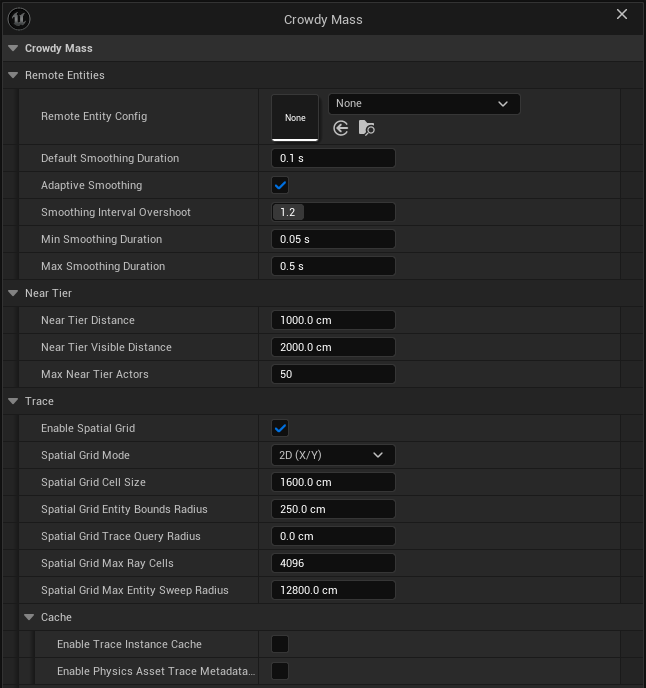
Remote Entities
| Label | Default | What it does |
|---|---|---|
Remote Entity Config (RemoteEntityConfig) | unset | The Mass entity config for every class no per-class row or backend override answers. Unset means each class is built from itself. |
Default Smoothing Duration (DefaultSmoothingDuration) | 0.1 s | Seconds a movement segment is replayed over until an arrival interval has been measured, and for every update when adaptive smoothing is off. |
Adaptive Smoothing (bAdaptiveSmoothing) | on | Replay each segment over the interval measured between arrivals instead of a fixed time. |
Smoothing Interval Overshoot (SmoothingIntervalOvershoot) | 1.2 | How much longer than the measured interval a segment is replayed over. Above 1 removes the stall at the cost of sitting slightly behind. Only used with adaptive smoothing. |
Min Smoothing Duration (MinSmoothingDuration) | 0.05 s | Shortest span a measured segment may be replayed over. |
Max Smoothing Duration (MaxSmoothingDuration) | 0.5 s | Longest span any segment may be replayed over, including one a sender asked for. |
Near Tier
Near Tier Distance (NearTierDistance), Near Tier Visible Distance (NearTierVisibleDistance) and Max Near Tier Actors (MaxNearTierActors) decide when a close row becomes a real actor. They are described, with their defaults, on Promote close entities to actors.
Trace
Traces and overlaps against the crowd find candidates through a spatial grid first, then test exact shapes. The defaults suit a ground-based crowd.
| Label | Default | What it does |
|---|---|---|
Enable Spatial Grid (bEnableSpatialGrid) | on | Use the grid. Off, every trace scans all tracked entities. |
Spatial Grid Mode (SpatialGridMode, ECrowdyMassSpatialGridMode) | 2D (X/Y) | Split the grid on X and Y only, or on X, Y and Z (3D (X/Y/Z)). |
Spatial Grid Cell Size (SpatialGridCellSize) | 1600 cm | Smaller cells give fewer candidates but make a long trace visit more cells. |
Spatial Grid Entity Bounds Radius (SpatialGridEntityBoundsRadius) | 250 cm | The radius used to place an entity in the grid. Exact mesh bounds still decide hits. |
Spatial Grid Trace Query Radius (SpatialGridTraceQueryRadius) | 0 cm | Extra radius around a ray when collecting cells. |
Spatial Grid Max Ray Cells (SpatialGridMaxRayCells) | 4096 | The most cells one trace or overlap visits, and the most one entity may cover. A straight trace longer than this, or a sweep whose radius or end points are not finite or are out of range, is not answered from the grid: it tests every tracked entity instead, which is slower but finds far entities it used to miss. |
Spatial Grid Max Entity Sweep Radius (SpatialGridMaxEntitySweepRadius) | 12800 cm | Ceiling on the radius one position update may claim, so a forged jump cannot cover unbounded cells. |
Enable Trace Instance Cache (bEnableTraceInstanceCache) | off | Cache each entity's visual instance lookup, at a small memory cost per entity. |
Enable Physics Asset Trace Metadata Cache (bEnablePhysicsAssetTraceMetadataCache) | off | Cache trace metadata per mesh and physics asset pair. Turn it off while you edit physics assets live. |
The four settings under Trace, Debug (SpatialGridDebugColor, SpatialGridDebugLineThickness, SpatialGridDebugTwoDimensionalHeightPadding, SpatialGridDebugTwoDimensionalCornerLineHalfLength) only change how the grid is drawn when a trace node's Draw Spatial Grid Cells is on.
In a Development build, crowdy.mass.interp.adaptive, crowdy.mass.interp.overshoot, crowdy.mass.interp.min and crowdy.mass.interp.max change the four smoothing values in a running session. A negative value (for crowdy.mass.interp.adaptive, -1) leaves the setting in charge. See Fix a crowd that does not look right.
Flag the material
This is the most common reason a crowd looks wrong, and it is a material setting, not a Mass one.
A material draws through the instanced skinned mesh path only if its base material carries the instanced skinned usage flag. Without it the engine silently draws the default material: the row spawns, animates and can be hit, and it is grey.
- Open the parent Material of the character's materials, not a material instance. Instances inherit the flag.
- Under Usage, tick Used with Instanced Skinned Mesh.
- Save the material. A flag that is set in the editor and never saved is gone on the next launch.
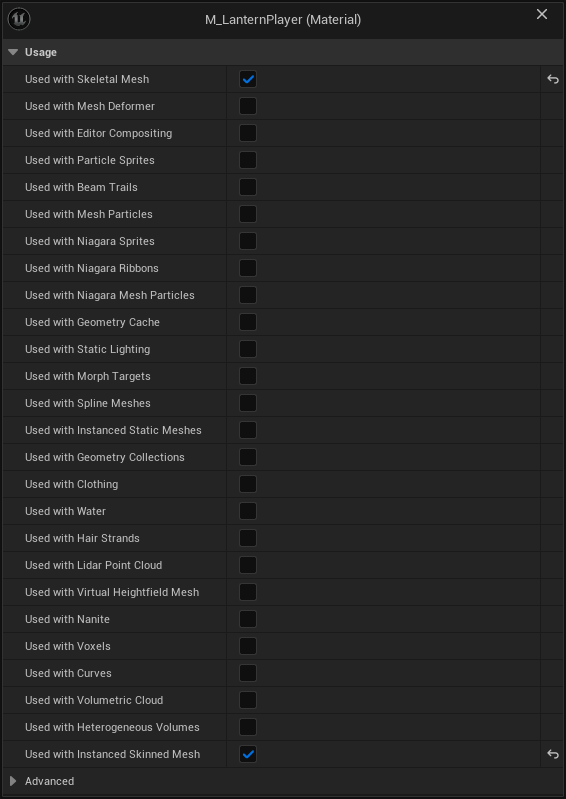
The SDK checks the flag for you. When it builds a crowd row from a class it logs, once per material, how many material slots are not flagged and which base material to flag, and crowdy.mass.derive prints the same verdict. The flag's evidence is in LogMaterial; no crowd log line reports the substitution itself, because the engine does it quietly.
If you author the entity config yourself, its mesh was chosen for a crowd and its material was prepared with it. The check matters most for a class the SDK derives a config from, since an ordinary character material has no reason to carry the flag.
The engine's animation pass
The SDK hands each row's animation to the renderer itself, in place of the engine's own pass. With both running, every row is handed over twice and the animation of one row can land on another. The CrowdyMass module turns the engine's pass off when the game starts, so your project does not need a DefaultMass.ini for it.
If the project uses the MetaHuman crowd plugin, that plugin's own pass is left alone. To turn it off as well, add this to Config/DefaultMass.ini, with the editor closed:
[/Script/MetaHumanCrowd.MetaHumanMassSimpleAnimationProcessor]
bAutoRegisterWithProcessingPhases=False
Write the file rather than unticking the setting in the editor: the checkbox is not saved and is back on at the next launch.
Success signal. With crowdy.mass.anim.dump 1, LogCrowdyMass reports as many animation entries as instances on each crowd mesh. If it warns, once a second, that more than one processor is filling the batch, something turned the engine's pass back on; see Fix a crowd that does not look right.
The SDK's pass animates moving skinned rows. The engine's pass, now off, also animated skinned entities Mass keeps as stationary instances. If your project runs its own Mass crowd of stationary skinned characters, they hold their last pose. Crowdy crowd rows are not affected.
Add the module dependency
A Blueprint-only project needs no Build.cs change. A C++ module that uses the Mass types of Crowds with Mass lists the CrowdyMass module:
PublicDependencyModuleNames.AddRange(new string[]
{
    "Core", "CoreUObject", "Engine",
    "CrowdySDK", "CrowdyNet", "CrowdyReplication", "CrowdyServices", "CrowdyMass",
});
CrowdyMass brings MassCore, MassEntity and MassSpawner with it. List them yourself only if your module declares Mass types of its own; see Add your own crowd data.
Check it with one client
The Mass backend skips your own entity on purpose, so on one client you see nothing. Two ways to see a crowd:
Draw yourself as a row. Give the profile a Crowdy Mass Backend Config and tick Render Local Owner. Your own pawn is then also drawn as a crowd row, overlapping it. Render Local Owner exists only on the backend config, so with an empty Backend Config the option is off.
Place a Crowdy Mass Area Spawner. Drop a Crowdy Mass Area Spawner (ACrowdyMassAreaSpawner) in the level of a map that selects Mass. It spreads entities on an even grid over its Spawn Area box, a box with extent 1000 x 1000 x 100 (2000 by 2000 by 200 cm) by default. They stand where they are placed; they do not move.
Set Entity Class to the actor class they stand for. A spawner entity with no class renders from the fallback config, and no Crowdy event can ever be sent to it.
| Label | Default | What it does |
|---|---|---|
Spawn Area (SpawnArea) | box extent 1000 x 1000 x 100 | The box entities are spread over. Resize and move it in the level. |
Entity Count (EntityCount) | 100 | How many to spawn. |
Entity Class (EntityClass) | none | The actor class the entities stand for. Set it for anything you intend to trace or send events to. |
Spawn on Begin Play (bSpawnOnBeginPlay) | on | Spawn when the level begins play. |
Destroy Spawned on End Play (bDestroySpawnedOnEndPlay) | on | Destroy the entities when play ends. |
Clear Before Spawn (bClearBeforeSpawn) | on | Destroy what this spawner made before spawning again. |
Position Jitter (PositionJitter), under Distribution | 0.0 | Moves each entity off its grid point by up to this fraction of a cell, from 0 to 1. |
Use Deterministic Seed (bUseDeterministicSeed) | off | Use Random Seed so the layout is the same every run. |
Random Seed (RandomSeed) | 1337 | The seed, when Use Deterministic Seed is on. |
Randomize Yaw (bRandomizeYaw) | off | Give each entity a random facing. |
Project to Ground (bProjectToGround), under Grounding | off | Drop each entity onto the first surface a line trace finds. |
Ground Trace Distance (GroundTraceDistance) | 10000 | How far above and below each entity the ground trace reaches. |
Ground Trace Channel (GroundTraceChannel) | WorldStatic | The collision channel the ground trace uses. |
The spawner also has Blueprint-callable functions. Spawn Entities and Respawn Entities return the number spawned, Destroy Spawned Entities removes them, and Get Spawned UUIDs and Get Spawned Entities list them.
Success signal. In play, a grid of crowd rows stands in the spawn box, drawn from the entity class you set.
Gotchas
- Map profile matching is by the map's short name.
/Game/Maps/Oakfordand/Game/Test/Oakfordboth match the keyOakford; give two maps different names. - A Default Profile or map row that names an asset that fails to load does not fall through to the shipped default. It resolves to nothing and the SDK is inactive on that map; see Assign the profile.
- The Mass entity subsystem exists only in a Play In Editor or game world whose map profile selects the Mass backend, so nothing here runs in the editor viewport or on an actor pool map.
Related
- Map Profiles: the asset, the Project Settings entries and how a profile is found.
- Rendering Backends: the actor pool, and what a backend is.
- Make a character draw as a crowd row: the entity, its payload and its mesh.
- Promote close entities to actors: the Near Tier settings and what they apply to.
- Fix a crowd that does not look right: the crowd is grey, nothing appears, and the diagnostics.