Play poses and one-shot actions
A crowd row has no animation graph, so you cannot tell it to sit or wave from a graph of its own. You tell it from your character class instead. A held pose rides a replicated enum property. A one-shot action rides a Crowdy event.
Both are authored once on the actor class. Every observer that draws the player as a crowd row animates it from the rows of your anim set; Set up the animation set builds it. This page makes the Oakford player sit, fall, wave and cheer.
Pose or action
| Pose | Action | |
|---|---|---|
| What it is | A held state: sitting, fallen, mounted | A one-shot: a wave, a swing, a flinch |
| Driven by | A replicated enum property | An event, or Send Crowdy Action |
| Late joiners | See it, once the heartbeat re-sends it | Miss it. An action is a moment. |
| Row in the set | Poses, matched by enum entry name | Actions, matched by id |
A pose value, an action id and a play rate come from the observed client. They decide what is drawn, never what is true. Whether a player is really fallen is a hit-point question that belongs to your server code. The owning client sets Stance from that truth. See The Two Planes.
Hold a pose from replicated state
A pose is not derived from motion, so something has to say which pose a player is in. That something is one replicated enum property on your character. The SDK matches the arriving value against the enum your anim set names and shows the row that value selects.
Declare the enum and the property
The Oakford stance is ELanternStance, with the entries Standing, Sitting and Fallen. The Stance property on ALanternPlayer is marked CrowdyState and CrowdyHeartbeat.
- C++
- Blueprint
// LanternPlayer.h
UENUM(BlueprintType)
enum class ELanternStance : uint8
{
	Standing,
	Sitting,
	Fallen
};

UPROPERTY(BlueprintReadOnly, Category = "Lantern", meta = (CrowdyState, CrowdyHeartbeat))
ELanternStance Stance = ELanternStance::Standing;
The type is the contract and the name is yours. The SDK binds its pose writer to whichever CrowdyState property is declared as the enum your anim set names.
- Add a variable named
StancetoBP_LanternPlayer. Make its type theELanternStanceenum. A project with no C++ enum creates a Blueprint Enumeration asset and uses that. - In the variable's details, set Replication under Crowdy Replication to Replicated. Keyframe heartbeat is ticked by default for a newly replicated variable. Leave it ticked.
- Compile.
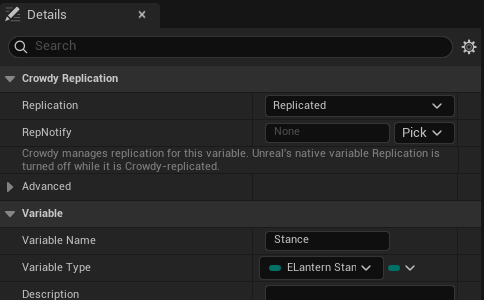
Declare it as enum class ELanternStance : uint8. The value rides one byte on the wire, so a wider enum cannot carry a pose. A Blueprint Enumeration is always one byte.
Declare only one property of that enum on the class. Two properties ask for the same pose rows: the first declared drives the pose, the other is never read, and the log names both. A class whose anim set names no enum, or that has no property of that enum, binds no pose, and the log says which of the two it is.
Keep the heartbeat on
CrowdyHeartbeat is not optional in practice. Crowdy State rides unreliable multicast, and an enum is held state: it is sent when it changes and never again. One dropped delta leaves a fallen player standing on every other screen until something else changes the value. The heartbeat re-sends the value on a timer so observers converge.
Two other settings must allow it:
- The map profile's State Keyframe Interval (Seconds, 0 = off) must not be 0. It defaults to
2.0. - The entity component's State Heartbeat must not be Off. The default, Inherit, follows the map profile.
The SDK warns once per property for any Crowdy State enum outside the heartbeat. crowdy.state.heartbeat.advisories lists them all. See The metadata keys, What ships, and when and Settings for the keys and the cadence.
Name the enum on the set and author the rows
Open DA_LanternPlayerAnims. In Pose State, leave Pose State Enum Is on Native By Name, the default and the right answer for a C++ enum, and pick ELanternStance from the Pose State Enum dropdown. For a Blueprint Enumeration, switch the first field to Blueprint Asset and pick the asset. Then add rows to Poses. Each row is an FCrowdyMassPoseEntry:
| Label | Default | What it does |
|---|---|---|
| Pose Name | None | A dropdown of the enum's entries. The row shows when the arriving value is that entry. |
| Sequence | None | The clip. It must already be in the bank, in a slot no gait, other pose or action uses. |
| Rank | Below Actions | ECrowdyMassPoseRank. Above Actions makes the pose beat a one-shot action while it is held. See Pose rank. |
| Hold Last Frame | Off | Stops on the last frame instead of looping. Tick it for a fall or a corpse. |
| Play Rate | 1.0 | Playback rate. Cannot be negative. |
The Oakford set authors two rows:
| Pose Name | Rank | Hold Last Frame |
|---|---|---|
Sitting | Below Actions | Off |
Fallen | Above Actions | On |
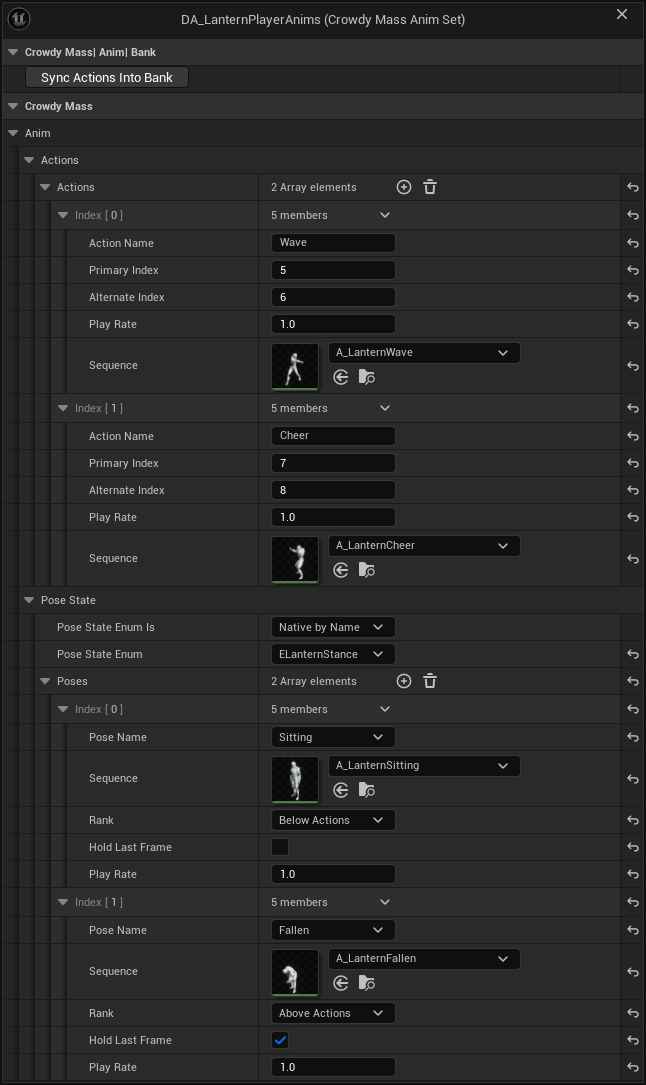
Row order is free. A value's meaning comes from your enum, and the row's id is worked out for you. A value no row names clears the pose and drops the row through to locomotion. That is why Standing has no row: a standing player walks, runs or idles.
The class must also name the set, with a Crowdy Mass Anim Set component on BP_LanternPlayer. See Bind the set to the class. A class without it, or whose set names no Bank, stands in bind pose.
What validation rejects
- Poses has rows but Pose State Enum is empty. The error reads:
Poses has rows but no state enum is set, so no replicated state value can select any of them and this set cannot pose a crowd entity at all. - A Pose State Enum name that no enum matches, or a Blueprint Enumeration named as a string instead of picked under Blueprint Asset. A string leaves nothing referencing the asset, so a cooked game would not find it.
- A Pose Name that is not an entry of the enum, or left empty.
- Two rows on the same entry, or on two entries that share one value.
- A row with no Sequence, or a Sequence that does not load.
- A pose entry whose value falls outside 0 to 255.
Two cases are warnings. A row on enum value 0 means entities in the resting state never walk or run, because a pose that resolves always outranks locomotion. A pose ranked Above Actions without Hold Last Frame loops, which is rarely what a fall or a stun wants.
Set the pose
Write the property on the machine that owns the player. The owning client diffs it and ships the change, and every observer applies it. There is no pose id to look up and no set to have loaded. The Oakford sit key, X, toggles Stance between Standing and Sitting. The C++ OnSit below also sets the player's torch brightness, 0.3 while seated and 1.0 standing. That part belongs to Add your own crowd data, and the Blueprint steps leave it out.
- C++
- Blueprint
// LanternPlayer.cpp
#include "LanternPlayer.h"

void ALanternPlayer::OnSit()
{
	Stance = Stance == ELanternStance::Sitting ? ELanternStance::Standing : ELanternStance::Sitting;
	// A seated player's torch burns low, here and on every crowd row that draws this player.
	TorchBrightness = Stance == ELanternStance::Sitting ? 0.3f : 1.f;
	Torch->SetIntensity(TorchBrightness * 2000.f);
}
- In
BP_LanternPlayer, add a key event for the X key, the sit key. - From the event, call Is Crowdy Entity Locally Controlled and feed a Branch, so only the owner writes.
- On the true pin, feed a second Branch from an Equal (Enum) that compares Get Stance to
Sitting. - On its true pin call Set Stance with
Standing. On its false pin call Set Stance withSitting.
Pan a Blueprint figure with the right mouse button. Press Copy nodes, then Ctrl+V in your own event graph.
On an observer drawing the player as a row, the byte arrives, is matched against ELanternStance because that is the enum the set names, becomes a pose row id, and lands on the row's pose. The animation pass picks it up on its next run. The observer's own machine holds a real actor, so it does not need any of this to see its own player sit.
Set a pose locally, by name
Set Crowdy Mass Entity Pose (UCrowdyMassTargetLibrary::SetEntityPose) puts one row in a pose by name and replicates nothing. It is for presentation on your own machine: a held pose in a menu, a cutscene, a test. The next update that carries a pose overwrites it.
| Pin | What it takes |
|---|---|
| Target | The row, from a Crowdy Mass trace or an event. See Target an entity, from Blueprint. |
| Pose Name | An authored pose name. None clears the pose. |
The name is resolved against the anim set of the class the target stands for, never the caller's class. The node returns false when it refused: off the game thread (an error in the log), while Mass is processing, or when the target's class is not yet known and you named a pose. Add the class to Preloaded Entity Classes under Project Settings, Plugins, Crowdy SDK, Replication; see Entities and Spawning. UCrowdyMassEntitySubsystem::SetEntityPose does the same thing addressed by entity UUID.
It resolves to id 0, and 0 is the value that clears. The node still returns true. An entity with no recorded class is refused instead, so a misspelled name on a known class is the case to watch.
Play a one-shot action
An action is a row in the set's Actions array. Action ids start at 1 and follow the row order, and 0 means no action. In DA_LanternPlayerAnims, Wave is id 1 and Cheer is id 2. Only the id travels on the wire. Each observer resolves it against the set of the class the player is, so ids mean nothing across two different sets.
Author the action rows
Each row is an FCrowdyMassActionEntry:
| Label | Default | What it does |
|---|---|---|
| Action Name | None | The name Send Crowdy Action resolves to an id. |
| Primary Index | -1 | A bank slot. Filled in by Sync Actions Into Bank. |
| Alternate Index | -1 | The second slot, holding the same clip. |
| Play Rate | 1.0 | The row's rate. A crowd row plays at the rate the event carries, not this one. |
| Sequence | None | The clip an actor plays. Unset means crowd only. |
Primary Index and Alternate Index must be two different slots holding the same clip. An unsynced row has both at -1, which is the same error as identical slots: retriggering it will not restart playback. Press Sync Actions Into Bank on the asset, as Set up the animation set describes. Set Sequence too if actors should play the action, as Play it on an actor explains.
Send an action by name
If all you want is a row to play a named action on everyone's screen, you do not need to declare an event. Send Crowdy Action takes a target and an action name. The Oakford player aims at another player's row and presses C to cheer it on.
- C++
- Blueprint
TracedTarget is the member the trace in Target an entity, from C++ fills in.
// LanternPlayer.cpp
#include "LanternPlayer.h"
#include "Target/CrowdyMassTargetLibrary.h"

void ALanternPlayer::OnCheer()
{
	if (!UCrowdyMassTargetLibrary::IsTargetLive(TracedTarget))
	{
		return;
	}
	UCrowdyMassTargetLibrary::SendEntityAction(TracedTarget, TEXT("Cheer"), 0, 1.0f);
}
- Get a Target with Crowdy Mass Line Trace Single, and keep the hit's Target in a variable named
TracedTargetwhen Hit Mass Entity is true. See Target an entity, from Blueprint. - Add a key event for the C key, the cheer key. Call Is Crowdy Mass Target Live with
TracedTargetand feed its result into a Branch, so a stale target sends nothing. - On the true pin, call Send Crowdy Action (
UCrowdyMassTargetLibrary::SendEntityAction). PlugTracedTargetinto Target and typeCheerinto Action Name. - Under the node's advanced pins, Variant defaults to 0 and Play Rate to 1.0.
The name is resolved here against the set of the class the target is recorded as, and only the resolved id is sent. Everyone who draws that player as a crowd row or as a near tier actor sees the action, this client included.
A player's own machine holds a real ALanternPlayer, not a row, so the cheered player does not see the cheer on themselves. It reaches only machines that draw the player as a row or a near tier actor. For an action the sender's own pawn also shows, declare an event.
The node returns false and logs when it did not send. It logs each of these reasons once per class and name:
- The class is not yet known on this client. List the class under Project Settings, Plugins, Crowdy SDK, Replication, Preloaded Entity Classes, as Entities and Spawning describes.
- The class names no anim set.
- The set authors no action with that name.
It refuses in two more cases and logs an error: when it is called off the game thread, and while Mass is processing. A target that names no live entity returns false without a log, because a held target hits that every frame. There is no ownership check: any client may play an action on any row. It is a visual.
Declare an event an action
To run your own code with the action as well, such as a sound or a spark, declare a Crowdy event and mark it an action. Then a client that draws the player as a row starts the matching action with nothing to register and no graph to author.
The Oakford event is WaveTorch. It is a SpatialMulticast event on ALanternPlayer taking ActionId, Variant and PlayRate.
- C++
- Blueprint
The CrowdyAction meta key joins the routing keys on the receiver.
// LanternPlayer.h
#include "Replication/RPC/CrowdyEvent.h"

UFUNCTION(meta = (CrowdyEvent, CrowdyRecipient = "SpatialMulticast", CrowdyAction))
void WaveTorch_Implementation(int32 ActionId, int32 Variant, float PlayRate);
CROWDY_EVENT(WaveTorch)
- Add a Custom Event named
WaveTorchtoBP_LanternPlayerand tick Crowdy Replicates. - Leave Recipient on Spatial Multicast. See Pick the recipient.
- Tick Is A One-Shot Action, the row below Crowdy Replicates.
- Press Add Parameters. It creates the three pins the SDK reads:
ActionId,VariantandPlayRate. - Compile.
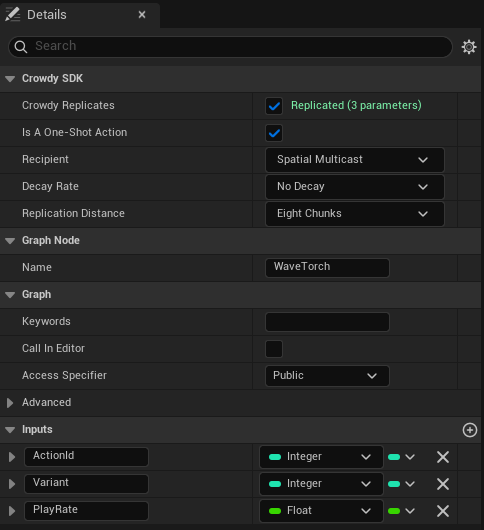
Is A One-Shot Action is visible only once a map profile assigned in Project Settings, Plugins, Crowdy SDK (a Map Profiles entry or the Default Profile) selects a backend that draws crowd rows, and Crowdy Replicates is ticked. A project whose maps all use the actor pool never sees it.
An observer drawing the player as a row reads ActionId off the arriving call and starts the matching row of that class's set. The parameters are read by name. Like every FName match, the match ignores case.
| Parameter | Type | Rules |
|---|---|---|
ActionId | int32 input | Required. A missing one, an int64, or a value of 0 or less starts nothing. |
Variant | int32 | Clamped to 0 to CrowdyMassMaxActionVariant (63). A missing one reads 0. It selects nothing. Pass 0. |
PlayRate | float or double | Clamped to CrowdyMassMinActionPlayRate (0.1) to CrowdyMassMaxActionPlayRate (4.0). A value that is not a finite number becomes 1.0. A missing one reads 1.0. |
The clamps exist because every one of these values came off the network from the observed client and is forgeable. CrowdyMassClampActionPlayRate applies the same clamp if you write your own handler.
An event that spells the parameters differently still works, but needs a registered handler built with CrowdyMassMakeActionEventHandler and the three names.
A handler registered in C++ replaces both the event body and the automatic action write. A handler you register for an action event, such as WaveTorch, must write the action itself. A bound Receive Crowdy Event on Entity node replaces the body only, and the row still plays the declared action. See Receive its events, from C++, Receive its events, from Blueprint and Run your code on a crowd row.
An event marked an action that carries no int32 ActionId starts nothing, and the SDK reports that once per function. From the outside it looks exactly like an event nobody sent.
The marker lives on the node and is read from the compiled function. If the box is ticked but the class was not recompiled, the event replicates and its body runs, and no crowd row ever animates from it. Check with crowdy.rpc.dumpfn BP_LanternPlayer_C WaveTorch on the sender and on the receiver. Both should print action=1.
Play it on an actor
Marking an event an action animates the crowd. It does not animate an actor, because an actor has a body and the body has to play the same clip, or the two representations of one event drift apart. UCrowdyMassActionLibrary::PlayCrowdyMassAction closes that. It takes the clip from the same authored row the crowd renders. The WaveTorch body calls it, and the input handler that waves calls WaveTorch.
- C++
- Blueprint
// LanternPlayer.cpp
#include "LanternPlayer.h"
#include "Mass/CrowdyMassActionLibrary.h"

void ALanternPlayer::WaveTorch_Implementation(int32 ActionId, int32 Variant, float PlayRate)
{
	UCrowdyMassActionLibrary::PlayCrowdyMassAction(GetMesh(), ActionId, Variant, PlayRate);
}

void ALanternPlayer::OnWave()
{
	// Action ids are one-based rows of the anim set, and Wave is its first action.
	WaveTorch(1, 0, 1.f);
}
- In the
WaveTorchevent, call Play Crowdy Mass Action (PlayCrowdyMassAction). Plug the event's pins into Action Id, Variant and Play Rate, and the character'sMeshinto Mesh. - For the sender, add an input action event for the wave key. Call Is Crowdy Entity Locally Controlled into a Branch so only the owner sends.
- On the true pin, call
WaveTorchwith Action Id set to 1,Wave's id. To look it up by name instead, call Find Action Id onDA_LanternPlayerAnimswithWave.
The figure shows the body from step 1: the WaveTorch event feeds Play Crowdy Mass Action, with its three pins plugged in and the character's Mesh as the target mesh. The sender in steps 2 and 3 is not in the figure.
That one call is right on every machine:
| The machine holds the player as | What plays the action |
|---|---|
| Its own pawn, or any real actor | The body runs, and this call plays the clip. |
| A crowd row | The row starts the same action from the arriving event. |
| A near tier actor drawn in place of the row | The body runs on the stand-in, as for a row, and the row starts the action. The near tier actor then plays it through its animation Blueprint. See Promote close entities to actors. |
On a machine that draws the player as a row or as a near tier actor, your body runs on a stand-in with no animation instance, so the call finds nothing to play on and does nothing. That is expected. See Run your code on a crowd row.
An action id is a row position in one class's set, so the call resolves the set of the class of the actor it was given and never a class-less lookup. The full signature quoted from the library:
PlayCrowdyMassAction(USkeletalMeshComponent* Mesh, int32 ActionId, int32 Variant = 0, float PlayRate = 1.0f, FName SlotName = TEXT("DefaultSlot"), float BlendInSeconds = 0.1f, float BlendOutSeconds = 0.1f, float StartSecondsIntoAction = 0.0f)
| Pin | Default | What it does |
|---|---|---|
| Mesh | Self | The skeletal mesh to play on. The action's set comes from this mesh's owning class. |
| Action Id | The row to play. | |
| Variant, Play Rate | 0, 1.0 | As above. The rate is clamped. |
| Slot Name (advanced) | DefaultSlot | The slot node the montage plays through. |
| Blend in Seconds, Blend Out Seconds (advanced) | 0.1, 0.1 | Blend times. |
| Start Seconds Into Action (advanced) | 0.0 | Seeks the clip forward before it starts. |
UCrowdyMassActionLibrary::PlayCrowdyMassActionFromSet(Mesh, AnimSet, ActionId, Variant, PlayRate, SlotName, BlendInSeconds, BlendOutSeconds, StartSecondsIntoAction) is the C++ twin that takes the UCrowdyMassAnimSet as an argument instead of working it out from the mesh's owner. Use it when the actor stands in for an entity of a different class, so the action id is looked up in the set it was authored in. It returns the UAnimMontage it started, or null, so you can stop it again.
Both calls read the actor's class, not the Mass subsystem, so they work on an actor pool map too.
The action plays as a dynamic montage into a slot, never through PlayAnimation, which would put the component into single-node mode and discard your animation Blueprint for good.
The engine default is DefaultSlot, which the stock mannequin animation Blueprint already has. Without a slot of that name you get a warning of this shape: '<mesh name>' refused action <id>; its animation graph has no 'DefaultSlot' slot node.
The call returns false, with one warning per action id, when the class names no anim set, when the id names no row, or when the row authored no Sequence. For an unauthored row the log says the crowd may still render it from its slot pair. If a row's Sequence disagrees with the clip its Primary Index slot holds, validation reports an authoring error, because that would show one player a wave and another an emote for the same event. FindCrowdyMassActionSequence returns the clip an actor of a class would play, for a body that does something other than play it into a slot.
Pose rank
ECrowdyMassPoseRank decides what happens when an action starts while a pose is held. A pose ranked Below Actions, the default, lets the action play over it and the pose returns after. A pose ranked Above Actions overrides actions for as long as it is set. The composition order on a crowd row is: an Above Actions pose, then an active action, then any pose, then the gait.
So Sitting lets a seated player wave. Fallen does not, so a fallen player cannot wave from the ground.
On a near tier actor the action plays into its slot whatever the pose, so a pose that should suppress actions there has to be handled in the animation Blueprint itself. See Promote close entities to actors.
Check it in Oakford
Run two clients on a map whose profile selects the Crowdy Mass Rendering Backend. Each client draws the other as a row.
- On client A, press X to sit. Client B sees A's row take the
Sittingpose and hold it. Press it again and the row returns to idle, walk or run. - On client A, press the wave key. Client B sees A's row play
Waveonce. A's own screen plays it through theWaveTorchbody. - Aim at B's row from A and press C to cheer. Only machines that draw B as a row or a near tier actor see
Cheer, so A sees it and B does not, because B holds its own player as a real actor.
Gotchas
- A pose and a field cannot share one property. A
CrowdyStateproperty can feed your own state fragment field or the pose, not both. The log says so. See Add your own crowd data. - An action is a moment. A player who arrives after the wave sees nothing. Use a pose for anything a late joiner must see.
- Unauthored means no animation. A class with no set, a set with no Bank, or a set with no row for an arriving value, shows locomotion or bind pose. That is not an error.
Related
- Set up the animation set: the set, the bank and Sync Actions Into Bank.
- Run your code on a crowd row: what an event body does on a machine that draws a row.
- Promote close entities to actors: the animation Blueprint side of poses and actions.
- Call an event on it, from Blueprint and Call an event on it, from C++: Send Crowdy Action and Call Crowdy Event on Entity.
- Crowdy State and RPC Events in C++: the properties and events these use.