Add your own crowd data
A crowd row carries the data the SDK needs to draw it: a transform, a pose, an action. It has no place for a value that belongs to your game. This page adds one. You write a small Mass fragment to hold the value, a trait that puts the fragment on the row, and a processor that acts on it each frame. Then you land a replicated Crowdy State property on the fragment, so the value an actor would read from its own property arrives on the row too.
The fragment, the trait, the processor and the field registration are C++. A Blueprint graph can read the result afterwards; see Read and write its fields, from Blueprint.
The page is about crowd data, not Mass in general. For the engine model of fragments, traits and processors, read Epic's Mass Entity documentation.
When you need this
On a machine that holds a remote player as a real actor, a replicated view value is free. The SDK writes it onto the actor's property and your code reads the property. On a machine that holds the same player as a crowd row there is no actor, so the value has nowhere to go. It is decoded and then dropped, unless you registered a field for it and the row carries a fragment to land it in.
Reach for this page when:
- A Crowdy State property such as
TorchBrightnessonALanternPlayershould change how the row looks, and the row has no pose, action or transform to carry it. - You want something per row that a processor eases, counts down or draws from, such as a torch that fades toward the replicated brightness instead of snapping.
Do not use it for anything the game must trust. Every value that reaches a row this way came off the observed player's own client, so it is a visual and can be a lie. Health, loot and the like belong in a record the server keeps; see Read its server values, from Blueprint and Keep a record per entity.
The Oakford example: on market night every other player in the square is a crowd row of ALanternPlayer. Each player's torch has a brightness, replicated as the float property TorchBrightness. You will put it on FLanternTorchFragment, ease it with ULanternTorchFadeProcessor, and add the fragment through ULanternTorchTrait.
Write the fragment, the trait and the processor
A game module that declares Mass types lists "MassCore", "MassEntity" and "MassSpawner" next to "CrowdyMass" in its Build.cs:
PublicDependencyModuleNames.AddRange(new string[] { "CrowdyMass", "MassCore", "MassEntity", "MassSpawner" });
The fragment
A fragment is plain data. TargetBrightness is the value the replicated property lands on. Brightness is the value the row shows now, and the processor eases it toward the target.
// LanternCrowd.h
#include "CoreMinimal.h"
#include "Mass/EntityElementTypes.h"
#include "LanternCrowd.generated.h"

// Wider members come first: this fragment is read for every crowd row every frame.
USTRUCT()
struct FLanternTorchFragment : public FMassFragment
{
	GENERATED_BODY()

	UPROPERTY()
	float TargetBrightness = 1.f;

	UPROPERTY()
	float Brightness = 1.f;
};

static_assert(sizeof(FLanternTorchFragment) == sizeof(float) + sizeof(float),
	"FLanternTorchFragment has gained padding. Declare wider members before narrower ones.");
- Derive from
FMassFragment. It comes fromMass/EntityElementTypes.h, which lives in MassCore, not MassEntity.FTransformFragmentcomes fromMass/EntityFragments.h. - Declare wider members before narrower ones and pin the layout with a
static_assertwritten in terms of the members. A processor reads this struct for every row every frame, so padding is a cost on every row. - Mark a member
UPROPERTY()if you want to reach it by name. A plain C++ member of aUSTRUCThas no reflection entry, so nothing can find it by name. Registering one is refused up front. You need this for the Blueprint field nodes below. - Never make "is this active" a Mass tag. Adding or removing a tag moves the row to another archetype, which is the dominant per-row cost. Use a sentinel value in a field instead, the way the SDK's action fragment treats an action id of 0 as no action.
The trait
A trait is what puts the fragment on a row.
// LanternCrowd.h
#include "CoreMinimal.h"
#include "MassEntityTraitBase.h"
#include "LanternCrowd.generated.h"

UCLASS(EditInlineNew, CollapseCategories, meta = (DisplayName = "Lantern Torch"))
class ULanternTorchTrait : public UMassEntityTraitBase
{
	GENERATED_BODY()

public:
	virtual void BuildTemplate(FMassEntityTemplateBuildContext& BuildContext, const UWorld& World) const override;

	// Copied onto every entity built from this trait.
	UPROPERTY(EditAnywhere, Category = "Lantern")
	float StartingBrightness = 1.f;
};

// LanternCrowd.cpp
#include "LanternCrowd.h"
#include "MassEntityTemplateRegistry.h"

void ULanternTorchTrait::BuildTemplate(FMassEntityTemplateBuildContext& BuildContext, const UWorld& World) const
{
	FLanternTorchFragment& Torch = BuildContext.AddFragment_GetRef<FLanternTorchFragment>();
	Torch.TargetBrightness = StartingBrightness;
	Torch.Brightness = StartingBrightness;
}
BuildTemplate adds the fragment. Two rules to know:
- The trait's
.cppincludesMassEntityTemplateRegistry.h, which is whereFMassEntityTemplateBuildContextis defined (module MassSpawner). The header only needsMassEntityTraitBase.h. - Add what you own, require what another trait owns.
AddFragmentputs your fragment on the row.RequireFragmentasks for a fragment another trait adds, and a missing requirement fails template validation with a message naming the trait and the type. Adding a fragment another trait already added only logs at Info. Adding the same tag from several traits is fine.
The trait class needs EditInlineNew so it shows up in the picker described in the next section, and a DisplayName meta if you want a friendlier label than the class name. Properties you put on the trait are authored once and copied onto every row built from it.
The processor
A processor is what makes the fragment do something each frame. This one eases Brightness toward TargetBrightness.
// LanternCrowd.h
#include "CoreMinimal.h"
#include "MassEntityQuery.h"
#include "MassProcessor.h"
#include "LanternCrowd.generated.h"

UCLASS()
class ULanternTorchFadeProcessor : public UMassProcessor
{
	GENERATED_BODY()

public:
	ULanternTorchFadeProcessor();

protected:
	virtual void ConfigureQueries(const TSharedRef<FMassEntityManager>& EntityManager) override;
	virtual void Execute(FMassEntityManager& EntityManager, FMassExecutionContext& Context) override;

private:
	FMassEntityQuery EntityQuery;
};

// LanternCrowd.cpp
#include "LanternCrowd.h"
#include "MassExecutionContext.h"

ULanternTorchFadeProcessor::ULanternTorchFadeProcessor()
	: EntityQuery(*this)
{
	// A dedicated server has nothing to draw.
	ExecutionFlags = static_cast<int32>(EProcessorExecutionFlags::Client | EProcessorExecutionFlags::Standalone);
	ProcessingPhase = EMassProcessingPhase::PrePhysics;
	bRequiresGameThreadExecution = false;
}

void ULanternTorchFadeProcessor::ConfigureQueries(const TSharedRef<FMassEntityManager>& EntityManager)
{
	EntityQuery.AddRequirement<FLanternTorchFragment>(EMassFragmentAccess::ReadWrite);
}

void ULanternTorchFadeProcessor::Execute(FMassEntityManager& EntityManager, FMassExecutionContext& Context)
{
	EntityQuery.ForEachEntityChunk(Context, [](FMassExecutionContext& Context)
	{
		const TArrayView<FLanternTorchFragment> Torches = Context.GetMutableFragmentView<FLanternTorchFragment>();
		const float DeltaTimeSeconds = Context.GetDeltaTimeSeconds();
		for (FMassExecutionContext::FEntityIterator EntityIt = Context.CreateEntityIterator(); EntityIt; ++EntityIt)
		{
			FLanternTorchFragment& Torch = Torches[EntityIt];
			Torch.Brightness = FMath::FInterpConstantTo(Torch.Brightness, Torch.TargetBrightness, DeltaTimeSeconds, 2.f);
		}
	});
}
The processor follows these rules in UE 5.8:
- Override
ConfigureQueries(const TSharedRef<FMassEntityManager>& EntityManager). The no-argument overload isfinal, so overriding it does not compile. - Build the query in the constructor's initializer list, as
EntityQuery(*this). - Set
ExecutionFlagstoClient | Standalonefor a processor that only feeds a visual. A dedicated server has nothing to draw. - Set
bRequiresGameThreadExecutionto true for anything that touches a world subsystem or the representation subsystem. This processor touches only its own fragment, so it leaves it false. - Never change an archetype inline. Adding or removing a tag or fragment from inside the loop goes through the command buffer:
Context.Defer(). - Do per-row work per chunk. Fetch the fragment view once for the chunk and index it. No allocation and no
Castin the per-row loop.
Processor ordering and query pruning are engine behavior; see Epic's Mass Entity documentation above.
Put the trait on the entity
You do not have to author a whole Mass entity config to add one trait. The SDK works out a config from the actor class (mesh, transform, trace collision, animation), and the Crowdy Mass Entity Traits component (UCrowdyMassEntityTraitsComponent) adds your traits to it. It is read off the class, so every row of that class gets them.
- Open
BP_LanternPlayer. - In Components, choose Add, then Crowdy Mass Entity Traits.
- In the Details panel, under Crowdy Mass|Traits, find Traits and add an element.
- Pick your trait class in the element's dropdown, here Lantern Torch, and set its properties inline.
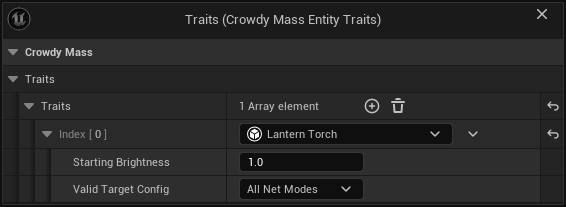
| Label | Default | What it does |
|---|---|---|
| Traits | empty | The traits added to the config worked out for this class, in the order listed. Each row is an inline object with its own settings, not an asset reference. |
A class whose config you authored by hand is built from that config alone, and the component is not read. The log says so once per class. If you author the config, add your trait to it directly.
How the component combines with the derived config:
- Your traits are added last. Mass combines a config's traits by class and keeps the last of each class, so a trait of the same class as a derived one replaces it. That is how you change a derived trait as well as extend the config.
- The config holds a copy of your trait, not the instance on the component. Editing the trait in the editor drops the cached config so the next one picks the change up.
- A second visualization trait of a different class is refused, with a message. Both would build, and only the first to write the representation parameters keeps them. A visualization trait of the same class as the derived one is allowed and warned about, because it takes the mesh, the level-of-detail table and near tier promotion with it.
- Put every trait on one component. The first component that lists anything answers and the rest are counted and warned about. A component declared in C++ is read before one added in a Blueprint, whatever the inheritance order.
- An empty list and a row set to none are different mistakes and get different messages. A class with no component at all says nothing, because that is the ordinary case.
Land a Crowdy State property on the fragment
The fragment is on the row. Now the replicated value has to reach it.
Mark the property
Declare the property on ALanternPlayer and mark it CrowdyState. Add CrowdyHeartbeat so a player who arrives late is sent the current value on the next keyframe instead of waiting for it to change. The keyframe needs the map profile's State Keyframe Interval (Seconds, 0 = off) to be non-zero. Play poses and one-shot actions covers the heartbeat in full.
In Oakford the sit key (OnSit) is the only thing that sets TorchBrightness: 0.3 while the player sits and 1.0 while they stand.
CrowdyOwnerOnly property never reaches a crowd.An owner-only value goes only to the entity's own owning client, and an observer drawing a row is never the owner. Registering a field for it reads nothing. Drop CrowdyOwnerOnly if the crowd should see the value, or read it on the actor representation. The log says this once per class and property.
Register the field
Register once per world, from a world subsystem, because the registration lives on the world's UCrowdyMassEntitySubsystem and a new world starts empty. ULanternCrowdSubsystem does it in Initialize, when the world's subsystems start. It asks the collection for the Mass entity subsystem with Collection.InitializeDependency<UCrowdyMassEntitySubsystem>() first, so that subsystem exists when the call is made.
The entity subsystem exists only in a world whose map profile selects the Crowdy Mass Rendering Backend. Gate your own subsystem the same way, in ShouldCreateSubsystem: return Super::ShouldCreateSubsystem(Outer) && GetDefault<UCrowdyMassEntitySubsystem>()->ShouldCreateSubsystem(Outer). Your subsystem then exists only on maps that draw crowd rows. On an actor pool map it is never created, and the log stays free of the engine's "Failed to initialize subsystem dependency" line, which a bare InitializeDependency would print there. The snippet still checks the result for null, as a guard.
// LanternCrowd.h
#include "CoreMinimal.h"
#include "Subsystems/WorldSubsystem.h"
#include "LanternCrowd.generated.h"

UCLASS()
class ULanternCrowdSubsystem : public UWorldSubsystem
{
	GENERATED_BODY()

public:
	virtual bool ShouldCreateSubsystem(UObject* Outer) const override;
	virtual void Initialize(FSubsystemCollectionBase& Collection) override;
	virtual void OnWorldBeginPlay(UWorld& InWorld) override;
};

// LanternPlayer.h
UPROPERTY(BlueprintReadOnly, Category = "Lantern", meta = (CrowdyState, CrowdyHeartbeat))
float TorchBrightness = 1.f;

// LanternCrowd.cpp
#include "LanternCrowd.h"
#include "Subsystems/CrowdyMassEntitySubsystem.h"
#include "Target/CrowdyMassFieldAccess.h"

bool ULanternCrowdSubsystem::ShouldCreateSubsystem(UObject* Outer) const
{
	// Only where the Mass subsystem is created: a play world whose map profile selects the Mass backend.
	return Super::ShouldCreateSubsystem(Outer) && GetDefault<UCrowdyMassEntitySubsystem>()->ShouldCreateSubsystem(Outer);
}

void ULanternCrowdSubsystem::Initialize(FSubsystemCollectionBase& Collection)
{
	Super::Initialize(Collection);
	// The transient world at engine start has no game instance yet.
	if (!GetWorld()->GetGameInstance())
	{
		return;
	}
	UCrowdyMassEntitySubsystem* Mass = Collection.InitializeDependency<UCrowdyMassEntitySubsystem>();
	if (!Mass || Mass->IsStateFragmentFieldRegistered(TEXT("TorchBrightness")))
	{
		return;
	}
	Mass->RegisterStateFragmentField(TEXT("TorchBrightness"), ECrowdyMassStateFieldType::Float,
		[](const void* PropertyValuePtr, const FCrowdyMassViewStateContext& Context)
		{
			FLanternTorchFragment* Torch = Context.GetFragment<FLanternTorchFragment>();
			if (!Torch || !PropertyValuePtr)
			{
				return;
			}
			Torch->TargetBrightness = *static_cast<const float*>(PropertyValuePtr);
		});
	CrowdyMassFields::RegisterField<FLanternTorchFragment>(TEXT("TorchBrightness"), TEXT("TargetBrightness"));
}
The ingestor writes TargetBrightness, the value that arrived. ULanternTorchFadeProcessor eases Brightness toward it every frame. The same ULanternCrowdSubsystem also registers the WaveTorch handler in OnWorldBeginPlay, shown on Receive its events, from C++. Declare both functions on the one class.
RegisterStateFragmentField(PropertyName, FieldType, Ingestor) takes the name of the Crowdy State property, the ECrowdyMassStateFieldType it is declared as, and an ingestor: a FCrowdyMassViewStateIngestor that runs for each arriving value with a pointer to it and an FCrowdyMassViewStateContext. The pointer already has the property's offset applied, so the ingestor never sees the containing struct. The context's GetFragment returns the row's fragment of that type, or null if the row does not carry it.
- Check
IsStateFragmentFieldRegisteredfirst. A registration cannot be removed. A second one under the same name is accepted, warned about with a line saying the earlier one keeps the field, and never called. - Hold your owner weakly if the ingestor captures one. The registration lives on a world subsystem, and a game-instance object can be shut down before the world is cleaned up while its pointer still looks alive.
- Register before values arrive if you can. Registering later works, because it drops the cached per-class resolution. It does not replay values already received, so the fragment holds what arrives from then on.
- The name must match the property name, and the type must match the property's declared type. Names are claimed per world, across every class, and each carries one type.
Types that can land
ECrowdyMassStateFieldType has six values. An enum is read as the type it is declared over, so enum class EMyStance : uint8 is a UInt8 field.
| Registered as | A property declared as | Notes |
|---|---|---|
UInt8 | uint8, TEnumAsByte<E>, or enum class E : uint8 | One byte exactly. An enum declared over something wider is refused. |
Int32 | int32, or enum class E : int32 | |
Int64 | int64 | |
Float | float | |
Double | double | |
Bool | a plain bool member | A bitfield bool is not accepted here. A Blueprint field read by name does accept one. |
What is refused
- A name match with the wrong type. The property is skipped and the log names the registered type, what the property is declared as, and the fix. Where the property reads as an accepted type, the line tells you to register for that one.
- A bitfield. It shares its byte with the flags beside it. Declare it as a plain
boolmember, or read it on the actor representation. - Anything else, such as a struct, an
FName, anFString, anFVectoror anint16. Read it on the actor representation, or split it into properties that do land. - Two classes that declare the same name as different types. Only one binds. Give the other property a name of its own.
The pose collision
A field you register by name is offered every property before the SDK's own pose field, whatever the registration order. If the property is the enum your anim set names as its pose state, such as Stance, your field claims it and nothing poses rows of that class. The log reports it. Register your field against a second property, or drop it and let the pose do its job.
If a class replicates two properties of the pose enum, only one drives the pose and the other is never read. The log names both. See Play poses and one-shot actions.
The rules every ingestor obeys
An ingestor runs per arriving value, on the game thread, for a value that came from another player's machine.
- Never change the row's archetype. No adding or removing a fragment or a tag, no destroying the row, no trace collision changes. The context remembers the fragment pointers for the rest of the update. After an archetype move a later field writes into the archetype the row just left, and after a destroy the next lookup crashes.
- Never keep the fragment pointer past the call. Mass moves a row's data whenever its archetype changes.
- Only produce a visual. Every byte is forgeable. A player who lies about
TorchBrightnessdecides what their torch looks like on your screen and nothing else. Nothing mechanical may be decided from it. - Keep it small. Do not loop over other rows.
Check it with crowdy.mass.state.verdict
A property that no registered field claims is decoded and then dropped. The log warns once per class and property, names the call to make and the type to give it. Ignore the warning if the property is only meant for actors.
To see the whole picture, run this in a play session, on a client that holds rows:
crowdy.mass.state.verdict
It prints one block. Paste the whole block when you report a problem.
- Every Crowdy State property no fragment field claims, with its class and how many times it was decided. A property you registered a field for leaves the list, so you confirm the fix by its absence.
- How many rows are held, how many have a recorded class, and how many fields are registered.
- Deltas claimed, applied and delivered, and how many were not claimed.
- Each drop reason: class id mismatch, no layout, no buffer, decode failed.
- Deltas claimed but refused because the row has no recorded class. This is the one refusal that does not mean something is broken.
- The pose writes, and how many carried a real pose rather than the 0 that means no pose.
IsStateFragmentFieldRegistered answers whether your own registration ran at all, which is otherwise silent. The command is a diagnostic for development builds; Fix a crowd that does not look right says which builds.
Landing a value makes it available, not visible. Acting on it takes a processor like the one above, or a Blueprint field read.
Read a value that rides your position payload
RegisterViewStateField(PropertyName, Ingestor) is the other way in. It reads a named byte off the wire struct your state executor sends, such as FLanternPlayerState, instead of off a Crowdy State property. It takes no type: the field must be a single byte (uint8, TEnumAsByte, or an enum class over uint8), and a property of that name that is anything else is skipped with a warning. It matches per struct, IsViewStateFieldRegistered is its check, and it obeys every rule above.
Use it when the value already rides the position payload and a second property would be a second thing to replicate. Use RegisterStateFragmentField for everything else: it is typed and it works per class. The SDK's own pose arrives on the Crowdy State road, so a byte called PoseId on your wire struct is ignored unless you register that name yourself.
Read the field from a Blueprint
A graph reads and writes the fragment through the Blueprint field nodes, which find a field by name. Register that name in C++ beside the ingestor with CrowdyMassFields::RegisterField, which binds a name to one UPROPERTY of one fragment. The snippet above binds TorchBrightness to TargetBrightness, the member the ingestor writes. A graph that reads TorchBrightness gets the target. A graph that writes it sets a new target, and the crowd eases toward that until the next replicated value replaces it.
The rules for what can be registered, and the fact that a registered field gives a graph write access, are on Read and write its fields, from C++. Read and write its fields, from Blueprint has the nodes and their pins.
Gotchas
- A fragment is local. The same field on the same row holds different values on two machines, because each machine runs its own processors.
- A value you land is only as fresh as the last delta. A property that rarely changes needs
CrowdyHeartbeatso a late joiner is not left on the fragment's default.
Related
- Make a character draw as a crowd row: the entity component, the mesh and the config the traits are added to
- Play poses and one-shot actions: the pose road and the heartbeat
- Run your code on a crowd row: what an event does to a row
- Read and write its fields, from Blueprint: the Blueprint field nodes
- Read and write its fields, from C++: the rules for registering a field
- Read its server values, from Blueprint: values the server owns
- Fix a crowd that does not look right: symptoms and the diagnostics reference