Use the Game Kit starters
The platform's Game Kit ships starters: ready-made server code for systems most games need, such as a world clock, matchmaking and a game session. In Unreal a starter is not a new kind of thing. It is an ordinary Server Object type whose Code Source is Game Kit Starter: a definition asset with variables and Server Functions, and a Rust crate under Server/<Type Name>/ that is the starter's own code instead of code Generate writes. You add it to the project once, deploy it with your own types, and use it with the same nodes and the same C++ calls as any other Server Object.
The starters
Add starter offers seventeen of the platform's starters. Each becomes a type of the project with the Type Name of the starter:
| Type Name | Definition | What it keeps | Instance Id |
|---|---|---|---|
world | CSO_Kit_World | The game day's clock, the weather, resource nodes that grow back, liveops events with their modifiers, and the players online. While the project has it, it is the app's root. | None: it has Only One Instance. |
matchmaker | CSO_Kit_Matchmaker | One matchmaking queue per Instance Id, with a rating window that widens while players wait, and a match every player must accept, which reserves a session. | The queue's name, such as ranked or casual. |
session | CSO_Kit_Session | One game session per Instance Id, from lobby to result: a host, ready checks, turns with a time limit, scores and a winner. With a board in its Config, a finished session posts each player's score to that leaderboard. | The session's key, such as the one a match reserved. |
leaderboard | CSO_Kit_Leaderboard | One leaderboard per Instance Id: it ranks the scores your server code submits, with ties, seasons that end on a schedule, and the last season's standings. Players read it; they never submit to it. | The board's name, such as weekly-score or fastest-lap. |
player | CSO_Kit_Player | One hub per player: their items, in-game soft currency, crafting, loot, idle production, levels, achievements and quests. Only that player reads their inventory, wallet and progress; anyone reads their profile. | The player's user id; empty for the signed-in player. |
market | CSO_Kit_Market | One market per Instance Id: vendors with fixed prices, an order book for each item it lists, and trades between two players. It holds nothing itself: what a player puts up waits in their own player hub until it settles. | The market's name, such as town or harbor, at most 48 bytes. |
npcs | CSO_Kit_Npcs | One area per Instance Id: six mobs that wander, chase the nearest player and take players' hits, two NPCs that walk their routes and talk, and the pets players adopt there. They are shown to the players near them as actors. | The area's place on a grid of 4 by 4 chunks, x,y, such as 10,-4: the key This Actor's Area gives for a player standing in it. |
minigame | CSO_Kit_Minigame | One duel per Instance Id: two players each throw rock, paper or scissors, the hub keeps both throws hidden until both are in or the round's time runs out, and the first to win a majority of the rounds wins (best of 3 by default). | Any name you choose, such as tavern-1. |
tactics | CSO_Kit_Tactics | One turn-based grid battle per Instance Id, up to 4 players: each brings a unit, the host starts it, every unit moves and attacks once in the players' phase, then the hub's enemies move and strike, until one side has no unit standing. | Any name you choose, such as skirmish-1. |
director | CSO_Kit_Director | One tower defence per Instance Id: waves of enemies walk a lane to the players' base, players build towers with the gold kills pay and strike enemies themselves, and the last wave brings a boss that changes phase as it weakens. It sends its events as one message, EncounterEvent. | Any name you choose, such as gate-defense. |
instance | CSO_Kit_Instance | One dungeon run per Instance Id for a party: floors the hub generates from the run's seed, room by room (fight, treasure, rest, boss), until the party clears the last floor, is wiped, abandons the run or leaves it idle. With a board in its Config, a cleared or wiped run posts each member's depth to that leaderboard. | Any name you choose, such as cellar-run-7. |
territory | CSO_Kit_Territory | One war over control points per Instance Id: players join a faction, a faction captures a point by having more members standing on it than any other, points pay income, and the first faction to the winning score wins. It reads where players are in the world, and sends its events as one message, TerritoryEvent. | The map's name, such as valley. |
zone | CSO_Kit_Zone | One shrinking circle per Instance Id, as in a battle royale: it holds, then shrinks phase by phase, and wears down every player outside it until one is left. It reads where players are in the world, and sends its events as one message, ZoneEvent. | The match's name, such as match-1. |
deck | CSO_Kit_Deck | One card table per Instance Id, two to six players, playing crazy eights: the hub keeps the deck's order and every hand, the table shows only how many cards each player holds, and each player reads their own hand with a call of their own. | Any name you choose, such as tavern-2. |
arena | CSO_Kit_Arena | One real-time fight per Instance Id, up to 10 players: each picks a class, warrior or mage, with abilities the hub referees, a strike on the fighter nearest the aim, a projectile or an area that goes off after a delay. Each player's client reports where they are a few times a second and the hub keeps what their class's speed allows. The fallen come back after a few seconds, and the first to ten kills, or the most kills when the time runs out, wins. It sends its events as one message, ArenaEvent. | Any name you choose, such as yard-1. |
race | CSO_Kit_Race | One race per Instance Id, up to 8 racers: a countdown on the start line, then a course of gates in order for a number of laps, with checkpoint and lap times, places and the winner's run as a ghost. Each racer's client reports where they are, and the hub times the positions it kept. With a board in its Config, a finished race posts each finisher's time to that leaderboard. It sends its events as one message, RaceEvent. | Any name you choose, such as mill-loop-1. |
ball | CSO_Kit_Ball | One ball game per Instance Id, red against blue, up to 5 a side: a ball the hub moves, claimed near it, passed and shot, a goal in each end, the first to the winning score or the better score when time runs out. Each player's client reports where they are, and the ball is shown to the players near it as an actor. It sends its events as one message, BallEvent. | The match's name, such as green-1, of at most 29 characters, with no @ or spaces, when its ball is shown. |
The player and market starters keep in-game soft currency, such as gold and gems, which is game state like a score. It is never real money, and nothing in them buys, sells or pays out real money.
What each one does, function by function, is on the platform's pages: World and liveops, Matchmaking, Sessions, Leaderboards, Player, Market, NPCs, Duels, Grid battles, Waves and bosses, Private runs and Control points and circles, which also covers the zone, Card tables, Arenas and Races and ball games. The SDK names the functions in Unreal style, so the platform's harvest is Harvest, state is GetState, status is GetStatus and me is GetMyPlace.
A starter brings the starters it needs. The matchmaker runs under the world and calls the session, and the session runs under the matchmaker, so adding session or matchmaker adds those three, and adding world adds only world. The leaderboard runs under the world, so adding it adds world and leaderboard. A session calls a leaderboard only when its Config names a board, so adding the session does not add the leaderboard: add it yourself when you want one. The player runs under the world; the market runs under the world and calls the player, so adding market adds world, market and player. The npcs starter runs under the world and reads its day and night, so adding npcs adds world and npcs. The six game-mode starters, minigame, tactics, director, instance, territory and zone, each run under the world and call nothing that they need, so adding one adds world and itself. An instance calls a leaderboard only when its Config names a board, as the session does. The deck runs under the world and calls nothing either, so adding it adds world and deck. The arena runs under the world and calls nothing too, so adding it adds world and arena, and the ball the same. The race runs under the world and calls a leaderboard only when its Config names a board, as the session does.
Add starter is not Deploy starter pack. The starter pack deploys every starter of the platform as it is, in place of your project, to try the platform out; see Deploy starter pack. Add starter makes a starter part of your project, deployed with your own types.
Add a starter
On the Server Compute page, the strip under the tabs has an Add starter menu beside Deploy starter pack. Pick any of the seventeen, from world to ball. It asks first, naming every starter it adds:
Adds world, matchmaker, session to the project as Server Object types: each one's Rust under
Server/<Type Name>, which you can change, and its definition under /Game/ServerObjects/GameKit. With world, world is the app's root from the next deploy in place of the Crowdy SDK's: your own types run under it, and Get Players Online reads it.
Confirm, and for each starter it:
- copies the starter's crate, its
Cargo.tomlandsrc/lib.rs, from the Crowdy SDK intoServer/<Type Name>/, and - saves its definition under
/Game/ServerObjects/GameKit/:CSO_Kit_World,CSO_Kit_Matchmaker,CSO_Kit_Session,CSO_Kit_Leaderboard,CSO_Kit_Player,CSO_Kit_Market,CSO_Kit_Npcs,CSO_Kit_Minigame,CSO_Kit_Tactics,CSO_Kit_Director,CSO_Kit_Instance,CSO_Kit_Territory,CSO_Kit_Zone,CSO_Kit_Deck,CSO_Kit_Arena,CSO_Kit_RaceorCSO_Kit_Ball.
A notice says "Added world, matchmaker, session; deploy to run them". The types appear on the Overview tab as New, and the next Deploy sends them with your own types. A starter the project already has is skipped, and picking one the project has whole says "The project already has the world starter."
Nothing is written when something is in the way, and the message says what to do:
- "The project already has a Server Object type named session (...), which the session starter needs; rename that type first"
- "... already exists, so the world starter's server code would replace what it holds; move that folder first"
- "/Game/ServerObjects/GameKit/CSO_Kit_World already exists; move or delete it to add the world starter"
Commit the new Server/<Type Name>/ folders and the definitions with the rest of your project.
From the command line, -op=addstarter does the same without asking:
UnrealEditor-Cmd.exe Oakford.uproject -run=CrowdyServerCompute -op=addstarter -starter=session
It changes only the project, so it needs no -yes and no sign-in. It logs "added world, matchmaker, session", and its -out= result has starter and added, the Type Names it added. -config= sets the named starter's Config as it is added, as JSON or as @ and a file holding it, so -starter=session -config=@session.json with {"board": "weekly-score"} in session.json adds a session that posts its scores to that board; the starters it brings keep an empty Config. A Config that is not a JSON object is refused before anything is written: "the Config for session is not a JSON object: ...". So is a world Config whose day_ms, nodes, node_amount or regrow_ms is not a whole number without a decimal point or exponent, from 0 (nodes at most 65535), in the editor's Add starter too; Change a starter says more. So is a Config for a starter the project already has, which it would not use: "The project already has the session starter, so this Config would not be used; set Config in its definition's Game Kit category instead". See From the command line.
The world becomes the app's root
Every app has one root type, which every other type runs under. Without starters it is the Crowdy SDK's own root, which keeps the players online for Get Players Online. Once the project has world, world is the root instead: Deploy does not send the SDK's root, your own types run under world, and the first deploy lists root among what it removes.
Adding world also sets Project Settings, Crowdy SDK, Server Objects, Game Kit World (GameKitWorld in Config/DefaultGame.ini) to CSO_Kit_World. Get Players Online reads the count from the definition that setting names, the Online variable of the world, and from the SDK's root when it is empty. Commit Config/DefaultGame.ini too, so a packaged game reads the same root the app runs. When the setting and the project disagree, Deploy warns, for example "Get Players Online reads ..., but this deploy's root is world; set Game Kit World to ... in Project Settings, Crowdy SDK".
Until the app runs a deploy with world, Get Players Online returns false and logs "This app has no Game Kit world, so Players Online has no count: deploy the app from Server Compute, or clear the Game Kit World setting if the project no longer has the world starter. It is asked again every minute." See How many players are online.
Get Players Online also returns false, with 0, for good when the world's snapshot carries no player count: a world deployed from the platform's own starter pack sends none, where the SDK's world starter does. The log says why once. FCrowdyKitWorldConditions has a bHasOnline flag for this, so read it before Online in C++, or call UCrowdyServerObjectLibrary::ReadKitWorldOnline(Target, World, Online, bUnsent), which returns false with bUnsent set when the world sent no count. A world definition saved with an earlier SDK reports "has changed since ... was saved" until you save it again.
Use it from Blueprint and C++
A starter is used like any other Server Object type, so the pages on getting one, reading its variables, hearing its messages and calling its functions apply as they are, from Blueprint and from C++:
- Get the object with Get Server Object, a typed node with Find By Asset, or the Crowdy Server Object component, given the starter's definition and its Instance Id. The world has Only One Instance, so its nodes need neither a Target nor an Instance. In C++,
Acquirethe definition with the Instance Id. - Its variables are what the starter shows every player: the world's conditions, a queue's counts, a session's whole state. Get and On Changed read and follow them, such as Get Online (CSO_Kit_World) or On Phase Changed (CSO_Kit_Session). In C++,
GetState()holds the State struct andWatchValuesreports each change. - Values only this player reads. A player's inventory, wallet and progress, and a market's orders and trades for this player, are variables too: Get Wallet (CSO_Kit_Player), On Wallet Changed (CSO_Kit_Player), On Orders Changed (CSO_Kit_Market) and
GetState()hold them. See Values only the player reads. - Its functions have a Call node each, such as Call Harvest (CSO_Kit_World), and
Callin C++. The answer comes back as for any Server Function, with the outcome and code below. - Its messages. A hub's
eventmessages reach the game as the type's server messages, matched by their topic, which is the message's server name. The world, matchmaker and session starters put everything in their state and send no events, so their definitions declare no messages. Thedirector,territoryandzonestarters send their events as one message each, and thearenasends ArenaEvent, described in Fight in an arena. If you change a starter to send one, add the message to its definition.
What is particular to a starter:
- Its records. A starter whose hub keeps a collection, a set of members it changes one at a time, holds them as records, one per member, keyed by the member's id as text. The world's resource nodes are its records: Find Record with
3gives node 3's values (FCrowdyKitWorldNode:Id,Amount,RegrowAt), Get Record Ids lists every node, On Records Changed and On Records Updated report each harvest and regrowth, and Watch Record follows one node. A record has no owner or team. The object is Ready once both its variables and its records are read, so a record is there when On Status Changed says Ready. The events come back from Call GetState (Events), and a player's place in a queue from Call GetStatus. - Pacing and resending. Calls to starters go through the Game Kit's own client, which keeps them under the platform's limit and sends one again when that is safe. The SDK's own retry of a busy call is not added on top.
- A starter that will not let this player read it fails with "The server code for session refused to let this player read it (forbidden): ..." and stays Failed, as an Owner Only object of someone else's does. A refusal coded
cooldownorunavailableis waited out like any other.
The values in C++
The State, inputs and outputs of the starters are C++ structs and enums the SDK declares in CrowdyGameKitTypes.h, in the CrowdyExec module, and Blueprint sees them too:
| Starter | Structs and enums |
|---|---|
| world | FCrowdyKitWorldConditions (the State: TimeOfDay, bNight, Weather, Modifiers, Online with bHasOnline), FCrowdyKitWorldView (what GetState answers: Conditions, ClockMs, Nodes, Events, Online), FCrowdyKitWorldNode, FCrowdyKitWorldEvent, FCrowdyKitHarvestInputs, FCrowdyKitHarvestReply, FCrowdyKitCancelEventInputs, FCrowdyKitCancelEventReply, ECrowdyKitWeather |
| matchmaker | FCrowdyKitQueueCounts (the State: Waiting, Proposals, Forming), FCrowdyKitMatchJoinInputs, FCrowdyKitMatchPlace (what Join, Accept and GetStatus answer), ECrowdyKitMatchState, FCrowdyKitMatchmakerConfig |
| session | FCrowdyKitSessionState (the State, which GetState answers too), FCrowdyKitSessionConfig (with Board), FCrowdyKitSessionMove, FCrowdyKitSessionReadyInputs, FCrowdyKitSessionReadyReply, FCrowdyKitSessionActInputs, FCrowdyKitSessionActReply, ECrowdyKitSessionPhase |
| leaderboard | FCrowdyKitBoardView (the State: Season, SeasonStarted, Entries, Top), FCrowdyKitBoardPlace (Rank, Player, Score; what GetMyPlace answers), FCrowdyKitBoardPlaces (what GetTop and GetAround answer), FCrowdyKitBoardPageInputs, FCrowdyKitBoardAroundInputs, FCrowdyKitBoardSeason, FCrowdyKitBoardSubmitInputs, FCrowdyKitBoardSubmitReply, FCrowdyKitBoardConfig, FCrowdyKitBoardRollReply, ECrowdyKitBoardKeep, ECrowdyKitBoardOrder |
| player | FCrowdyKitPlayerState (the State: the public profile, Player, Level, Achievements, QuestsDone, and the player's own Inventory, Wallet and Progress), FCrowdyKitBundle (Items and Currency, each a TMap<FString, int64>: a price, a reward, an offer), FCrowdyKitPlayerMe (what GetMe answers), FCrowdyKitInventory (GetInventory: Slots, Stacks of FCrowdyKitStack, Mail, Held), FCrowdyKitWallet (GetWallet: Balances, Held), FCrowdyKitProgress (GetProgress: Level, Xp, Next, TotalXp, Achievements of FCrowdyKitAchievement, Quests of FCrowdyKitQuest, each with FCrowdyKitObjectives), FCrowdyKitProduction and FCrowdyKitProducer (in GetMe), FCrowdyKitPlayerProfile (GetProfile), FCrowdyKitPlayerRules (GetRules: the FCrowdyKitItemDef items, soft currencies, FCrowdyKitRecipes, FCrowdyKitLootTables with their FCrowdyKitLootEntrys, FCrowdyKitQuestDefs and FCrowdyKitAchievementDefs its Config sets), FCrowdyKitEarned, FCrowdyKitCraftInputs, FCrowdyKitCraftReply, FCrowdyKitOpenLootInputs, FCrowdyKitOpenLootReply (with an FCrowdyKitLootRoll), FCrowdyKitQuestInputs, FCrowdyKitStepInputs, FCrowdyKitDiscardInputs, FCrowdyKitGrantInputs, FCrowdyKitRecordInputs, FCrowdyKitDepositInputs, ECrowdyKitQuestState |
| market | FCrowdyKitMarketState (the State: Vendors, Currency, Quotes, OpenTrades, PendingSteps, and this player's Orders and Trades; GetState answers it too, without those two), FCrowdyKitVendors (GetVendors), FCrowdyKitVendor, FCrowdyKitVendorOffer, FCrowdyKitQuote, FCrowdyKitBookInputs, FCrowdyKitBook (GetBook: Bids and Asks, each a list of FCrowdyKitPriceLevel), FCrowdyKitOrders (GetOrders), FCrowdyKitOrder, FCrowdyKitTrades (GetTrades), FCrowdyKitTrade, FCrowdyKitTradeSide, FCrowdyKitShopInputs (Buy and Sell), FCrowdyKitOrderInputs, FCrowdyKitPlacedOrder, FCrowdyKitCancelOrderInputs, FCrowdyKitOpenTradeInputs, FCrowdyKitTradeReply, FCrowdyKitTradeOfferInputs, FCrowdyKitTradeInputs, FCrowdyKitAcceptTradeReply, ECrowdyKitOrderSide, ECrowdyKitTradeState |
| npcs | FCrowdyKitAreaState (the State, which is empty), FCrowdyKitAreaMember (a record: Id, Type of ECrowdyKitAreaMemberType, X, Y, and the fields of its type), FCrowdyKitAreaMembers (what GetState and GetPets answer: Members), FCrowdyKitAttackInputs (Mob), FCrowdyKitAttackReply (Hp), FCrowdyKitTalkInputs (Npc; Talk answers the NPC's FCrowdyKitAreaMember), FCrowdyKitAdoptInputs (Species, Name, each 1 to 24 characters), FCrowdyKitAdoptReply (Pet, the new pet's id), FCrowdyKitPetInputs (Pet: SummonPet, DismissPet and ReleasePet), FCrowdyKitRenamePetInputs (Pet, Name) |
| minigame | FCrowdyKitMinigameState (the State: Phase, Seats of FCrowdyKitMinigameSeat, BestOf, Round, Deadline, Last an FCrowdyKitMinigameReveal, Winner), FCrowdyKitMinigameJoinReply, FCrowdyKitMinigameThrowInputs, FCrowdyKitMinigameThrowReply, ECrowdyKitMinigamePhase |
| tactics | FCrowdyKitTacticsState (the State: Phase, Round, Width, Height, Obstacles of FCrowdyKitGridCell, Units of FCrowdyKitTacticsUnit with their FCrowdyKitTacticsStats, Players, Host, EndedTurn, PhaseEnds, Log), FCrowdyKitTacticsMoveInputs, FCrowdyKitTacticsAttackInputs, FCrowdyKitTacticsAttackReply, ECrowdyKitTacticsPhase, ECrowdyKitTacticsTeam |
| director | FCrowdyKitDirectorState (the State: Phase, Players, Width, Height, Spawn, Base, BaseHp, Gold, Wave with bHasWave, Waves, NextWaveAt, Enemies of FCrowdyKitDirectorEnemy, Towers of FCrowdyKitDirectorTower, BossPhase, Kills), FCrowdyKitDirectorEvent (the EncounterEvent message: Type with bHasType, Wave, Phase), FCrowdyKitDirectorBuildInputs, FCrowdyKitDirectorBuildReply, FCrowdyKitDirectorHitInputs, FCrowdyKitDirectorHitReply, ECrowdyKitDirectorPhase, ECrowdyKitDirectorEventType |
| instance | FCrowdyKitInstanceState (the State: Phase, Owner, Seed, Floor, Floors, Room, Rooms of FCrowdyKitInstanceRoom, Members of FCrowdyKitInstanceMember, Invited, Gold, Relics, Grid, Log), FCrowdyKitInstanceOpenInputs (Seed, bHasSeed, Party), FCrowdyKitInstanceOpenReply, FCrowdyKitInstanceInviteInputs, FCrowdyKitInstanceEnterReply, FCrowdyKitInstanceDescendReply, ECrowdyKitInstancePhase, ECrowdyKitInstanceRoomKind |
| territory | FCrowdyKitTerritoryState (the State: Phase, Points of FCrowdyKitTerritoryPoint, Scores, Members, Winner), FCrowdyKitTerritoryEvent (the TerritoryEvent message: Type with bHasType, Point, Owner, Previous, Paid, Faction), FCrowdyKitTerritoryJoinInputs, ECrowdyKitTerritoryPhase, ECrowdyKitTerritoryEventType |
| zone | FCrowdyKitZoneState (the State: Phase, Center an FCrowdyKitZoneCenter, Radius, Stage with bHasStage, NextRadius, Players of FCrowdyKitZonePlayer, Alive, Winner), FCrowdyKitZoneEvent (the ZoneEvent message: Type with bHasType, Phase, ToRadius, Radius, ShrinksAt, Player, Place), ECrowdyKitZonePhase, ECrowdyKitZoneEventType |
| deck | FCrowdyKitDeckState (the State, which GetState answers too, plus this player's own Hand: Phase, Players, Host, HandCounts, Top, Suit with bHasSuit, DrawCount, Turn, TurnEnds, Last, Winner, Scores), FCrowdyKitCard (Id, Rank, Suit), FCrowdyKitDeckHand (Cards, Playable, bDrawn; what GetHand and Draw answer), FCrowdyKitDeckPlayed, FCrowdyKitDeckPlayInputs (Card, Suit, bHasSuit), FCrowdyKitDeckPlayReply (bPlaying), ECrowdyKitDeckPhase, ECrowdyKitDeckAction, ECrowdyKitCardSuit |
| arena | FCrowdyKitArenaState (the State, which GetState answers too: Phase, Origin an FCrowdyKitGroundPosition, Width, Depth, Fighters of FCrowdyKitArenaFighter, Projectiles of FCrowdyKitArenaShot, Areas of FCrowdyKitArenaBlast, KillTarget, EndsAt, Winner), FCrowdyKitArenaEvent (the ArenaEvent message: Type with bHasType, Ability, Caster, X, Y, Victim, Damage, Killer, Player, What, Detail, Why, Winner), FCrowdyKitArenaJoinInputs (HeroClass), FCrowdyKitArenaMoveInputs (X, Y), FCrowdyKitGroundPosition (what Move answers: X, Y), FCrowdyKitArenaCastInputs (Ability, X, Y), FCrowdyKitArenaCastReply (bHit), ECrowdyKitArenaPhase, ECrowdyKitArenaEventType |
FCrowdyKitMatchPlace is the player's place in a queue, and only the fields of its State are filled: Rating, WaitedMs and Window while Queued; Players, Accepted and ExpiresInMs while Proposed; Session, the Instance Id of the session reserved for the match, once Matched. A session's Scores is a TMap<int64, int64> from user id to score, and the world's Modifiers a TMap<FString, double>, which is why these are structs of the SDK's rather than variables added in the asset.
On a leaderboard, players with the same score share a Rank, and GetMyPlace answers a Rank of 0 when the player is not on the board. Blueprint cannot leave an input out, so a Limit of 0 on GetTop means the board's own Top Size, and a Player of 0 on GetAround means the player calling.
Blueprint has no empty value either, so where the player and market starters answer "none", the field reads a value they never use: a vendor offer's Stock and PerPlayer read -1 for no limit, a FCrowdyKitQuote's Bid, Ask and Last read 0 for no price yet, FCrowdyKitProgress's Next reads 0 at the top level, and an achievement's UnlockedAt reads 0 while it is locked. A player's GetMe, GetInventory, GetWallet and GetProgress answer only that player; anyone else is refused Denied with Code forbidden. When both players AcceptTrade, the answer's State is Settling: the market then moves each side's offer to the other player, and their wallets and inventories show it a moment later, when the trade reads Done. The functions a market calls on a player's hub to hold and move what is traded are not in CSO_Kit_Player, since only the market's server code may call them.
Values only the player reads
A starter's hub keeps some values for one player alone, which its snapshots never carry: the player starter's inventory, wallet and progress, a market's orders and trades of the player calling, and a card table's hand. The SDK reads each with its own call, so they are ordinary variables of the State, with Get, On Changed and WatchValues as for any other:
- The object reads them after every read of its State: when it first connects, after a reconnect, after the server restarted, and after a missed snapshot. It is Ready only once they are read, so On Status Changed saying Ready brings them.
- When the hub says one of them changed for the signed-in player, such as the wallet after a Craft or a market trade settling, the SDK reads that one again, and On Wallet Changed follows a moment after the change. A change for another player reads nothing.
- When the object fails, as after a sign-out, they go back to their defaults, so one player's wallet is never left for the next.
- After a hub restart that arrives as a pushed snapshot, they are read again.
- If a customized starter's snapshot carries a field that is also an Owner Value, the snapshot's value wins.
For the player starter they are read only on the signed-in player's own player. Get CSO_Kit_Player with an empty Instance Id for that: the SDK uses the signed-in player's user id, and Get Server Object refuses with "Nobody is signed in yet, so player has no player to read: sign in first, or give a player's user id as the Instance Id" before anyone signs in. A Crowdy Server Object component with CSO_Kit_Player and its Instance Id left empty does the same as Signed-In Player: it waits for the sign-in instead of failing, and joins the new player's own hub whenever another player signs in. Get it with another player's user id and you read their public profile, Player, Level, Achievements and QuestsDone, while Inventory, Wallet and Progress are not read: their Has Value pins are false and Get gives the default, as it does for every player's while nobody is signed in. In C++, the object's IsUnreadOwnerValue(TEXT("Wallet")) is true for such a value. A market reads the orders and trades of whoever is signed in, whatever its Instance Id, and so does a deck: its Hand is the signed-in player's own at the table the Instance Id names. See Play a card game with a hidden hand.
In CSO_Kit_Player, CSO_Kit_Market and CSO_Kit_Deck these are listed under Game Kit, Owner Values (FCrowdyKitOwnerValue: Method, What, Variable): each names the call that answers it (wallet), what the hub's changed messages call it (wallet) and the State variable it fills (Wallet). Keyed By Player is on for the player, which a definition's IsKeyedByPlayer() reads in C++. A definition whose Owner Value names no variable of its State reports the problem, such as "Owner Value Wallet is not a variable of the State", and so does one with Owner Values and no State Topic.
Field names are snake_case
The starters' Rust names its fields in snake_case, so a starter's definition does too, by default: TimeOfDay is time_of_day on the server, and a bool's b is dropped, so bNight is night. Enum values follow the same rule. An entry under the definition's Server Names still wins over it. It matters when you point a starter at a struct of your own, and in C++, where the field names WatchValues reports are the server names: Fields.Contains(TEXT("night")), not bNight.
Send Once
A function of a starter has a Send Once setting in its Details, which no other type shows. With it on, each call carries an id of its own, and the starter runs the call once however often it is sent again, so a call resent after a lost answer does not harvest, join or score twice. Add starter turns it on for every function that changes something and off for those that only read, such as GetState, GetStatus and GetTop. Leave it as it is unless you change what a function does.
Refusals and their codes
A starter refuses a call with a code the game can branch on and words to show, such as full, not_your_turn or empty. The codes are listed on the platform's Refusals carry a code. In Unreal a refusal arrives on On Failed, or in OnDone, with:
- Outcome Refused (
ECrowdyServerCallOutcome::Refused) for a refusal of the game's own, such as a full match or another player's turn. A Blueprint Switch on the outcome has a Refused pin. - Code, the code itself as a name, such as
full. On a Call node it is in the advanced area with Outcome, Reason and Retryable: click the small arrow at the bottom of the node to show it. In C++ it isFCrowdyServerCallResult::Code, anFName, andNonefor anything that is not a starter's refusal. - Reason, the starter's own words, such as "only the host starts the session". When it gives none, "The server refused the call to Start: " followed by the code.
Three codes read as an outcome a call already has, and fill Code too:
| Code | Outcome | Retryable |
|---|---|---|
forbidden | Denied | No |
cooldown | Denied | Yes |
unavailable | Unavailable | Yes |
So a game that already handles Denied and Unavailable handles these without change, and can still read Code to tell them apart. Every other code is Refused and not retryable. Your own types never answer Refused. See Outcomes.
In an actor whose Crowdy Server Object component holds CSO_Kit_Session with the session's Instance Id, so the Call node needs no Target:
Functions only a developer calls
Some of a starter's functions are for you, not for players. Their definition makes them Developers Only, and the starter's Rust refuses anyone else with forbidden, which a game reads as Denied:
| Starter | Function | What it does |
|---|---|---|
| world | ScheduleEvent | Schedules or replaces a liveops event (FCrowdyKitWorldEvent: Name, StartMs, EndMs and Modifiers); while it runs, its modifiers apply. |
| world | CancelEvent | Cancels one by Name, and answers whether there was one. |
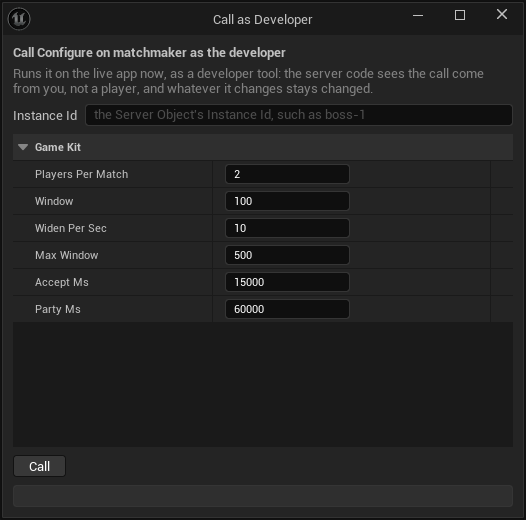
| matchmaker | Configure | A queue's settings (FCrowdyKitMatchmakerConfig): PlayersPerMatch, the rating window, how long players have to accept. |
| leaderboard | Submit | Puts a player's score on the board (FCrowdyKitBoardSubmitInputs: Player, Score), and answers their score now. Other server code, such as a session, submits too; a player never does. |
| leaderboard | Configure | A board's settings (FCrowdyKitBoardConfig): whether it keeps a player's best, sum or latest score, whether high or low ranks first (points or times), its Top Size, a cron schedule that ends each season, and how many players it holds. |
| leaderboard | Roll | Ends the season now: the board keeps its final standings, which GetSeason answers as Last, and starts the next one empty. |
| player | Grant | Gives a player a reward of items and in-game soft currency (FCrowdyKitGrantInputs: Ref, Bundle, Xp, Counters), and answers what it earned them (FCrowdyKitEarned). Items that do not fit wait in their mail. |
| player | Record | Counts something the player did toward quests and achievements (FCrowdyKitRecordInputs: Ref, Counter, N). |
| player | Deposit | Puts items and soft currency into a player's hub without counting anything (FCrowdyKitDepositInputs: Ref, Bundle). |
| territory | Reset | Starts a new war: every point and score starts again and the phase reads Open. Players keep their factions. |
Run them with Call as Developer... in the function's Details in the definition asset, or with -op=call from the command line; see Call a function as the developer. For a one-player test of the ranked queue:
UnrealEditor-Cmd.exe Oakford.uproject -run=CrowdyServerCompute -op=call -type=matchmaker -fn=Configure -key=ranked -inputs=@ranked.json -yes
with {"PlayersPerMatch": 1} in ranked.json; the inputs left out keep their defaults. The world has Only One Instance, so a call to it needs no -key=. A session's Configure is not Developers Only: the session's host calls it in the lobby.
A player's Grant, Record and Deposit each take a Ref, up to 128 characters, that names that one change. The player's hub runs a change once per Ref and, for up to seven days (its last 4096 changes), answers a second call with the same Ref as it answered the first, giving nothing more and saying nothing about it. So give every grant its own Ref, such as quest-reward:4211, and reuse one only to send the same grant again after a lost answer. The -key= of a call to the player is the player's user id.
Grant and deposit soft currency from Studio
On the Server Compute page, the ... menu of the player row has Grant soft currency... and Deposit soft currency.... Each opens Call as Developer on that function, which runs it on the live app now. Fill Player with the player's user id, and the Bundle's Currency and Items with the amounts, such as gold 100. The window says what it gives is in-game soft currency, never real money. Leave Ref empty: each press of Call makes a fresh one, such as studio-grant- and 32 hex digits, so each press gives again, and the answer shows the Ref it sent. To send a grant again after its answer was lost, copy that Ref into the field and press once more: the player's hub answers as it did the first time and gives nothing more.
From the command line, -op=grant and -op=deposit do the same:
UnrealEditor-Cmd.exe Oakford.uproject -run=CrowdyServerCompute -op=grant -player=101910912345678 -bundle=@reward.json -xp=50 -yes
with {"Currency": {"gold": 100}, "Items": {"wood": 5}} in reward.json. Without -ref= a fresh Ref is made, which the result gives as ref.
Both refuse, before sending anything, a call that would give a player nothing they would see: a player id other than their user id as a game reads it ("007 is not a player's user id as a game reads it, ..."; a number above 0, no sign or leading zero), a grant or deposit with an empty bundle and no experience ("this gives the player nothing: fill the Bundle's Currency or Items, such as gold 100"), a -bundle= key other than Items and Currency, and an -xp= that is not a whole number. See From the command line.
Post a session's scores to a leaderboard
A leaderboard ranks scores that your server code decided, never scores a player sends, so a player's Submit comes back Denied with Code forbidden. The session starter posts for you: give it a board and, when a session finishes, it submits each player's score to that leaderboard.
- Add the
leaderboardstarter, if the project does not have it. - In
CSO_Kit_Session, under Game Kit, set Config to{"board": "weekly-score"}, with the board's name. The session's Calls already listsleaderboard, and Deploy sends that link while the project has the leaderboard. - Deploy.
From then on, every session that finishes, by reaching the target score, running out of rounds or losing too many players, submits each player's score once to the weekly-score board. A session sees its board as Config.Board in its variables. Configure leaves the board as the Config set it, so a host cannot send a session's scores elsewhere. To read the board, get CSO_Kit_Leaderboard with weekly-score as its Instance Id: its variables are the top of the board and the season, which On Top Changed follows, and Call GetMyPlace, GetTop, GetAround and GetSeason read more.
A board keeps each player's best score by default, higher ranking first. For other rules, call its Configure as the developer, for example {"Keep": "Sum"} for a total over the season, or {"Order": "Low"} for times. A project with a board in a Config and no leaderboard deploys with a warning: "session: its Config posts scores to the board weekly-score, but the project has no leaderboard, so they go nowhere; add the leaderboard starter". If the leaderboard is not deployed, a finished session's scores go nowhere; when the platform refuses the post, the session's server log says "a score did not reach board weekly-score: ...".
The session checks its Config as Configure checks its inputs: min_players at least 1 and at most max_players, max_players at most 64, turn_ms at least 1000, and every key of the right kind. A Config it refuses stops each of its sessions from starting, so test a new Config on one session before you rely on it.
Find a match and take turns
The matchmaker tells a player nothing on its own: a player in a queue asks its GetStatus to learn they were proposed a match, accepts it, and asks again until they are matched. Find Match does all of that.
In Blueprint, add Find Match (Crowdy SDK, Game Kit). Its Matchmaker is the queue's Server Object: Get Server Object with CSO_Kit_Matchmaker and the queue's name, such as ranked, held by your Owner while the search runs. Set Rating, Auto Accept and Timeout (seconds; 0 waits for as long as it takes). Its pins:
- Queued runs when the player waits in the queue.
- Proposed runs when a match is proposed, and again when who has accepted it changes, with Players and Accepted (user ids).
- Matched runs once, with Session Id: get
CSO_Kit_Sessionwith it as the Instance Id, then Call Join, Call Ready and, as the host, Call Start. - Failed runs once, with Code and Reason: the matchmaker's refusal (such as
full),cancelled,timeout,expired(a proposed match this player did not accept in time) orleft(the player left the queue another way).
With Auto Accept the node accepts each proposed match itself. Without it, call Accept on the node's Search pin from Proposed, for example after the player presses a button; Cancel on the same pin stops the search. A match that falls through after this player accepted, because another player declined or let it expire, is searched for again. Every ending but Matched leaves the queue, so nobody is proposed a match with a player who stopped looking. Cancel and the Timeout wait for a call already sent, and end with Matched if it made the match. A matchmaker that cannot reserve a session puts its players back in the queue, so a search with no Timeout then waits on.
Is My Turn and Get Turn Player read the session's turn: give them the session's Server Object. Is My Turn is true while the session plays and it is the signed-in player's turn; Get Turn Player gives the user id whose turn it is, and is false, with Player 0, in the lobby, once the session finished, and before it is read. Call them from On Turn Changed (CSO_Kit_Session) and On Phase Changed (CSO_Kit_Session) to enable the player's controls: Turn reads 0 in the lobby and on the first turn alike, so it is the phase changing to Playing that starts the first turn. In a widget whose SessionId variable holds the Session Id from Matched, and whose Play button is named PlayButton with Is Variable ticked:
From queue to result, every player of a match runs the same steps. The matchmaker matches two players by default (players_per_match), and each player's Find Match ends Matched with the same Session Id. Each player gets that session, calls Join and then Ready. The session's Host variable is the first player to join: compare it with Get User ID on the Crowdy Game Session, and only that player calls Start. Start is refused with not_ready until every player is ready, so the host calls it again when Ready changes. The other players wait for Phase to read Playing. Then each player calls Act only while Is My Turn is true; a move out of turn is refused with not_your_turn. A player who runs out of the session's turn_ms is skipped. When a player reaches target_score, or the rounds run out, Phase reads Finished with the Winner. If the session's Config names a board, every player's score is posted to that leaderboard exactly once, so a board that keeps a Sum grows by each session's score.
In C++, CrowdyKit::FindMatch in CrowdyGameKitMatch.h is the same search, with a function for each update:
#include "CrowdyGameKitMatch.h"

UCrowdyServerObject* Queue = GetGameInstance()->GetSubsystem<UCrowdyServerObjectSubsystem>()->Acquire(KitMatchmaker, TEXT("ranked"), this, Error);
Search = CrowdyKit::FindMatch(Queue, 1000, /*bAutoAccept*/ true, /*TimeoutSeconds*/ 60.f, [this](const FCrowdyKitMatchProgress& Progress)
{
	if (Progress.Stage == ECrowdyKitMatchStage::Matched)
	{
		JoinSession(Progress.Session);
	}
	UE_CLOG(Progress.Stage == ECrowdyKitMatchStage::Failed, LogTemp, Log, TEXT("No match: %s (%s)"), *Progress.Code.ToString(), *Progress.Reason);
});
Search is a TSharedPtr<FCrowdyKitMatchSearch>, whose Accept() and Cancel() match the node's and whose IsOver() says whether it ended; the search keeps itself going whether or not you hold it. CrowdyKit::IsMyTurn(Session) and CrowdyKit::GetTurnPlayer(Session, Player) read the turn. The Blueprint node is UCrowdyFindMatchAction, whose pins are FCrowdyFindMatchUpdate delegates, and the turn nodes are in UCrowdyGameKitLibrary.
Trade between two players
Two players swap in-game soft currency and items through a market; it is game state, never real money. The market moves nothing until both players accepted both offers, and until then what each player offers waits, held, in their own player hub.
- Both players get
CSO_Kit_Marketwith the same market name, such astown, and their ownCSO_Kit_Playerwith an empty Instance Id, whose Wallet and Inventory they watch. - One player calls OpenTrade with the other player's user id as With. Its answer's Trade is the trade's id. The other player's Trades shows the trade a moment later, so On Trades Changed (CSO_Kit_Market) is where that player learns of it and reads its Id.
- Each player calls Offer with the Trade and a Bundle, such as Currency
gold5. What they offer moves to their wallet's Held at once. A new offer from either player takes back both acceptances, so a player accepts only once the other's offer, in Trades, is what they agreed to. - Each player calls AcceptTrade. The first answer's State is Open; the second's is Settling, and the market moves each offer to the other player. Once it is Done the trade leaves both players' Trades, and each On Wallet Changed (CSO_Kit_Player) brings the new balances.
DeclineTrade calls a trade off, and so does the market when the trade is still open after its trade_ms (five minutes by default); either way each offer goes back to the player who made it. A player can offer only what their wallet and inventory hold; Offer is refused otherwise. A player is in at most 10 open or settling trades, the market's trades_max, so nobody can fill another player's Trades: past that, OpenTrade is refused with limit, whichever of the two players is full. Set another number in CSO_Kit_Market's Config, such as {"trades_max": 3}. Two players have at most one open trade with each other: OpenTrade while one is open answers that trade's id. A trade that is done or called off is gone, so a later Offer, AcceptTrade or DeclineTrade on it is refused not_found.
Run a game mode on a starter
minigame, tactics, director, instance, territory and zone each run one kind of match. Each keeps one hub per Instance Id, which is any name you choose: a table, a battle, a map, a run. Get it as any Server Object, with Get Server Object and the starter's definition, and the Instance Id of the match; the players of one match all get the same one. Every player id in their variables is a user id. A match is read from its variables, which everyone in it sees, and changed with the functions below; the hub decides what a move does, and a refusal comes back with the Code named under each. The deck is a card table and has its own section after these, since it also keeps a value only its player reads. The arena is a real-time fight and has its own section at the end, since a player's client also reports where the player is.
Two of them keep a board, tactics and director, and a board keeps its server's x and z axes: a cell is X and Z (FCrowdyKitGridCell), and z is not height. territory and zone are the world: z is up, as in Unreal, the ground is x and y, and positions are in chunks of 1600 units, as for the npcs. Their definitions have Reads World Data on, since their hubs read where players are in the world: a client never says it stands on a point or inside the circle. A player's position is the chunk the platform tracks, to one chunk, and never the actor state the player's own client writes, so a client cannot place itself inside the circle or on a point.
Duel two players
In Oakford's tavern, two villagers play rock, paper, scissors at the table tavern-1.
- Join seats a player. The second to sit starts the match, and its answer's
bStartedsays so. A third player is refusedfull. Leave stands up before the match starts or once it is over, and is refusedstartedwhile it is under way. A caller who is not seated is refusednot_memberin every phase, and nothing changes. - Throw takes a Hand:
rock,paperorscissors. Nobody sees a throw before both are in, or the round's time runs out:Seatssays only whether each player has thrown (bThrown). ThenLastholds the round'sHandsin seat order, with empty text for a throw that was not in time, and itsWinner, a user id, or 0 for a draw. A player who does not throw in time loses the round. Another hand is refusedbad_request. - The first to win a majority of
BestOfrounds (3 by default) wins:Phasereads Finished andWinneris the user id. Rematch plays again at the same table once it is over, and is refusedconflictbefore. Deadlineis when the round closes, in Unix milliseconds, and 0 while no round waits on throws. A rematch times out its round too, also when the match is a best of 1, which the platform's ownminigamedoes not.
Fight a grid battle
- Join brings a player's unit, up to 4 players. The first to join is the
Host, and only the host calls Start; anyone else is refusedforbidden. The enemies take the far side. - In the players' phase every unit may Move once, to an X and Z it can reach within its
Movesand around obstacles and other units, and Attack once, with the Target unit'sIdwithin itsRange. EndTurn hands over early. A call out of turn is refusednot_your_turn, a second move or attackconflict, and a cell or target too farout_of_reach. - When every player has ended their turn, or
PhaseEndspasses, the hub's enemies move and strike, andRoundgoes up.Phasereads Won or Lost when a side has no unit standing.Logkeeps the last 24 lines of what moved and hit.
Defend against waves
- Join takes up to 8 players. The first to join, or a developer, calls Start; anyone else is refused
forbidden. - Enemies walk one lane from
SpawntoBase, and an enemy that arrives takes fromBaseHp. Build puts a tower on a free cell with X and Z, for gold; its answer is theGoldleft. A cell that is taken is refusedconflict, a cell off the fieldbad_request, too little goldinsufficient, and a tower that would close the laneblocks_lane. Hit strikes the enemy with the Enemy id for itsHpleft, and a player may strike again only after the Config's cooldown, or is refusedcooldown. A hit still answers with the enemy's health at once. - While an encounter runs, the hub publishes only events on a hit or a build; the next tick, at most 500 ms later, carries the snapshot.
Waveis the wave under way,Waveshow many there are, andNextWaveAtwhen the next one starts. The last wave brings a boss, andBossPhasereads 0 to 3 as it weakens.EnemiesandTowersare what is on the field, andKillscounts each player's kills.- Its events arrive as one message, EncounterEvent, described in React to a director's waves.
Send a party down a dungeon
- Open starts the run for the player calling, who becomes its
Owner; opening it again is refusedstarted. Invite adds a player, which only the owner does, and the invited player calls Join (a player who was not invited is refusedforbidden). A developer's Open may name the whole party in Party. - Enter resolves the room the party is at: a fight, a treasure, a rest or the boss. The hub rolls a fight from the party's strength, so
Roomsshows each room'sKindandbDone,Memberseach member'sHp, andLogwhat happened. A member who is down is refusedforbidden, and Enter on a cleared floorconflict. The owner calls Descend when the floor's rooms are done, refusednot_readybefore. Abandon ends the run, by the owner or a developer. - The run ends Cleared when the party clears the last floor, Wiped when nobody is standing, Abandoned, or Expired when nobody touched it for the Config's
idle_ms. A call to a run that is over is refusedfinished, and to one nobody openednot_ready. - Seed decides the floors: the same seed makes the same dungeon. It is 0 to 2^63-1, so it fits an
int64exactly, and a larger one is refusedbad_request. In Open, Has Seed decides whether the Seed is sent: with it set the run uses your seed, and with it unset the hub draws one. Either way the answer'sSeedis the one the run uses. The seed is inSeedfor everyone in the run, so it gives away the whole dungeon. - With a board in its Config, such as
{"board": "oakford-deepest"}, a run that is cleared or wiped posts each member's depth, the floors reached and rooms done as one score, to that leaderboard, once. Add theleaderboardstarter for it, as for a session's scores; when the post fails, the run's server log says "the run's depth did not reach board ...". With avolumein its Config,Gridis the id of the grid of the world reserved for the run, and 0 without one.
Fight over control points
- Join takes a Faction, one of the Config's
factionssuch asred, once: a player keeps theirs, and a different one is refusedconflict. A faction that is not in the Config is refusedbad_request, and a war with all the members it takesfull. Faction names must differ by more than case. - A faction captures a point by having more members standing on it than any other faction has. Each
Pointsentry has itsOwner, the factionCapturingand itsProgressfrom 0 to 1, andPresent, how many of each faction stood on it at the last scan. A point sits at ground x and y with a height z in the Config, in chunks; players within one chunk of its height count. - Points pay income to the faction that holds them;
ScoresandMemberscount by faction. The first faction to the Config'swin_scorewins:Phasereads Won andWinneris the faction. - Reset, for a developer, starts a new war.
Shrink a circle
- Join takes players, and the first to join, or a developer, calls Start; anyone else is refused
forbidden. A match takes two (not_ready), and a full or running match refuses a join (full,started). - The circle holds, then shrinks phase by phase to the radii of the Config's
phases.Centeris its ground x and y,Radiuswhat it is now, andNextRadiuswhat it shrinks to in the phaseStage. Every player outside it loses health, andPlayersshows each one'sHp, whether they arebOutsideat the last scan, and theirPlaceonce they fall, with the winner at 1.Alivecounts those standing, andWinneris the last one. - Players more than one chunk above or below the circle's height, or more than 10 chunks from its centre on either ground axis, count as outside, so the first circle's radius is at most 10 chunks. Each scan makes more world reads than the platform's
zonedoes: 21 at the default radius of 10, fewer as the circle shrinks, and 1 at the end. A scan that cannot read the world carries its damage over to the next good scan, up to 5 scan periods' worth. - The circle is scanned every 2 seconds by default (it was every second), which halves its world reads. Damage scales with the time a player spends outside, so a second outside costs the same as before. Set
scan_msin the Config, at least 250, to scan faster. - Its events arrive as one message, ZoneEvent, in the same way. The realtime ZoneChange event carries
centerZbesidecenterY, both the ground value.
The territory and zone of the platform keep y up. The SDK's keep z up, so a war or a match the platform's starter saved starts again.
Play a card game with a hidden hand
In Oakford's tavern, two to six villagers play crazy eights at the table tavern-2: match the top card's suit or rank, an eight is wild and names the next suit, draw when you cannot play, and the first to empty their hand wins the points left in the others'. Add deck, deploy, and have the players at the table get CSO_Kit_Deck with the Instance Id tavern-2. A table is one game: when it is over, open a new Instance Id for the next one.
- Join seats a player, up to six; a seventh is refused
full, and a table that has started refuses a new playerstarted. Leave stands up. During a game the leaver's cards go to the bottom of the deck, and when only one player is left that player wins. Someone else leaving keeps the current player's clock and their one draw; the last seat leaving on its own turn hands the turn to the first seat. The platform's owndeckresets the clock and the draw instead, and hands the turn back a seat. Start deals five cards to each player and turns the first card up. Only the host, the first to join, calls it, and anyone else is refusedforbidden; with fewer than two players it is refusedtoo_few_players. - Play takes the Card, which is a card's
Id, and, for an eight, the suit it names: set Suit and Has Suit. An eight with Has Suit unset is refusedbad_request. A card that is not in the hand is refusednot_found, one that does not go on the top cardnot_playable, and any move out of turnnot_your_turn. Its answer is Playing, false when that card emptied the hand and ended the game. - Draw takes one card, once a turn, and its answer is the new hand (
FCrowdyKitDeckHand). A second draw is refusedconflict, andemptywhen no cards are left. Pass ends a turn after drawing, and is refusedconflictbefore. - A turn lasts 30 seconds. A player who runs out of time draws, if they had not, and passes;
Last.Actionreads Timeout. - GetState answers the table, and GetHand the caller's own hand, which the object reads for you.
The table's variables are public, and never show a card in anyone's hand:
Phasereads Lobby, Playing or Finished.Playersare the user ids in seat order,Hostthe first to join,Turnthe player whose turn it is andTurnEndswhen it runs out, in Unix milliseconds;TurnandTurnEndsread 0 outside Playing.HandCountssays how many cards each player holds, by user id,DrawCounthow many are left to draw, andTopthe card on the table.Suitis the suit in play, which an eight changes. It has Has Suit beside it, false in the lobby, as for a value that may be none.Lastis the last move (FCrowdyKitDeckPlayed): itsPlayer, itsCard(empty for a draw, a pass or a timeout) and itsAction, Play, Draw, Pass or Timeout.Playerreads 0 before the first move.Winneris the user id of the first to empty their hand, andScoresholds each player's points: the winner is given what the others' hands are worth, eights 50, tens and faces 10, aces 1 and any other card its number.
The Hand is the value only this player reads. It holds Cards, every card in the signed-in player's hand, Playable, and bDrawn, whether they have drawn this turn. Nobody else's cards reach the game, and a player who is not seated reads an empty hand. The object reads it after every read of the table, and again when the table says it changed for the signed-in player: after they play or draw, and also when their turn begins and when it ends, so Playable is always the server's own list of the cards that may go now, and it is empty when it is not their turn. Use it for the controls and do not work the rule out in the game. Right after a turn moves, On Turn Changed can run before the new Hand arrives, and when no card in the hand can go, the Hand does not change at all as the turn begins, so On Hand Changed does not run then: refresh the controls from both.
A card (FCrowdyKitCard) is its Id, the text Play takes, a Rank, 1 for an ace up to 13 for a king, with the jack 11 and the queen 12, and a Suit, Spades, Hearts, Diamonds or Clubs. A Blueprint can Switch on ECrowdyKitCardSuit and pick a card's art from its rank and suit, without reading the text. A card that is none, such as Top in the lobby, has an empty Id.
In Blueprint, in the tavern table's widget:
- Add On Hand Changed (CSO_Kit_Deck) and wire Construct into its Bind, with the Server Object from Get Server Object as its Target. From Changed, add Get Hand and show a card for each of its Cards with For Each Loop, using Break Crowdy Kit Card and a Switch on ECrowdyKitCardSuit to choose its art.
- Add On Turn Changed (CSO_Kit_Deck) bound the same way, and from both events call one function that enables the buttons: Play only for a card that is in the hand's Playable, and Draw while it is this player's turn and bDrawn is false. Pass is for bDrawn true. The table's Turn is a user id, so compare it with Get User ID on the Crowdy Game Session.
- On the button, add Call Play (CSO_Kit_Deck) with Card set to the card's Id. For an eight, set Suit to the suit the player picked and tick Has Suit. Call Draw, Call Pass, Call Join, Call Start and Call Leave are the other buttons. Under On Failed, Code says why, such as
not_playable.
In C++, with KitDeck a UPROPERTY holding CSO_Kit_Deck, the villager's table plays the first card the server says may go:
#include "CrowdyGameKitTypes.h"
#include "CrowdyServerObjectSubsystem.h"

FString Error;
Table = GetGameInstance()->GetSubsystem<UCrowdyServerObjectSubsystem>()->Acquire(KitDeck, TEXT("tavern-2"), this, Error);
Table->WatchValues(FOnCrowdyServerValuesChanged::FDelegate::CreateWeakLambda(this, [this](UCrowdyServerObject* Object, TConstArrayView<FString> Fields)
{
	if (Fields.Contains(TEXT("hand")) || Fields.Contains(TEXT("turn")))
	{
		PlayFirstPlayable();
	}
}));
void ATavernTable::PlayFirstPlayable()
{
	const FCrowdyKitDeckState* State = Table->GetState().GetPtr<FCrowdyKitDeckState>();
	if (!State || State->Phase != ECrowdyKitDeckPhase::Playing || State->Turn != Table->GetSignedInUserId() || State->Hand.Playable.IsEmpty())
	{
		return;
	}

	const FCrowdyKitCard& Card = State->Hand.Playable[0];
	FCrowdyKitDeckPlayInputs Inputs;
	Inputs.Card = Card.Id;
	Inputs.Suit = ECrowdyKitCardSuit::Hearts;
	Inputs.bHasSuit = Card.Rank == 8;
	Table->Call(TEXT("Play"), FInstancedStruct::Make(Inputs), [](const FCrowdyServerCallResult& Result)
	{
		UE_CLOG(!Result.IsSuccess(), LogTemp, Log, TEXT("Not played: %s (%s)"), *Result.Code.ToString(), *Result.Reason);
	});
}
Draw and Pass are Table->Call(TEXT("Draw"), FInstancedStruct()) and Table->Call(TEXT("Pass"), FInstancedStruct()). A draw's Result.Reply holds the new FCrowdyKitDeckHand, and the table's Hand changes with it.
To play another game, replace playable and card_points in the crate's Server/deck/src/lib.rs: playable says which cards may go on the top card, and card_points what a card left in a hand is worth. Keep the function names and the table topic as they are, as for any starter. The platform's Card tables page has the rest of the starter.
Add starter gives the deck's Config a random secret, such as {"secret": "6f1c..."}, and the hub mixes it into every shuffle. Everything else a deal is seeded from, the table's name, the time and the epoch, is something a player can see, so without the secret a modified game could work out every hand. Keep it when you edit the Config, and give the deck one of your own if you add it with a Config of yours. The Config stays in the editor and is never cooked into the game. The player starter's loot rolls use a secret the same way, and Add starter writes one for it too. If a Config of yours leaves the secret out, Deploy warns about it for the deck and the player; a secret that is not a string is a problem that blocks Deploy.
Read a value that may be none
Blueprint cannot leave a value out, so where a variable may be none, the struct has a Has flag beside it, and the value means nothing while the flag is false.
- An index that may be none has a flag. In the director's state, Wave is valid only while Has Wave is true, which is false before the first wave starts and after the last. In the zone's, Stage is valid only while Has Stage is true, which is false until the first warning. In C++ these are
bHasWaveandbHasStage. A flag changes with its value, so it has a Get node and no On Changed of its own: On Wave Changed (CSO_Kit_Director) runs when either changes, and Get bHasWave (CSO_Kit_Director) reads the flag there. - For an input, the flag decides whether the value is sent. Open on the instance sends Seed only when Has Seed is set; with it unset the hub draws a seed and the Seed you set is ignored.
- Anything else that is never 0 reads 0 for none: a user id such as
WinnerorHost. A time reads 0 when nothing is waiting, such asDeadlineandNextWaveAt, and text reads empty, such as a point'sOwner.
In C++, with Gate acquired as below does:
const FCrowdyKitDirectorState* State = Gate->GetState().GetPtr<FCrowdyKitDirectorState>();
if (State && State->bHasWave)
{
	WaveText->SetText(FText::Format(INVTEXT("Wave {0} of {1}"), State->Wave + 1, State->Waves));
}
React to a director's waves
director, territory and zone send their events as a single message each, EncounterEvent, TerritoryEvent and ZoneEvent, rather than a message for each kind of event. Its Type says which event it is, and its other fields carry what that event has: only the fields of its Type are filled, and the rest read 0 or empty. Type has a flag beside it, Has Type (bHasType): it is false when this client does not know the event's type, as when the server is newer than the game, and then you ignore the event. An event arrives just before the snapshot that shows its effect, so read the event's own fields; the State catches up on the next snapshot. The territory's Type is Captured, Income or Won; the zone's is Warning, Shrinking, Settled, Final, Eliminated or Won; the director's is Wave Started, Wave Cleared, Boss Phase, Won or Lost. A message is an event and not a value, so read the variables for what is true now; see Hear its messages.
Oakford's village gate is attacked in waves. Add director, deploy, and have the gate's players get CSO_Kit_Director with the Instance Id gate-defense. The gate rings its bell for each wave and shows the boss's phase.
In Blueprint, in the gate's event graph:
- Add On EncounterEvent Received (CSO_Kit_Director) and wire Event BeginPlay into its Bind, with the Server Object from Get Server Object as its Target, or the actor's Crowdy Server Object component.
- From Received, add a Branch on Has Type, and from its true pin a Switch on ECrowdyKitDirectorEventType wired to the Type pin.
- On Wave Started, ring the bell and show Wave plus 1, since it counts from 0. On Boss Phase, show Phase, 1 to 3. On Won and Lost, show the result. Wave Cleared needs nothing here: the last wave's end is Won, not Wave Cleared.
Here the gate's Crowdy Server Object component holds CSO_Kit_Director, so the node's Target is left empty:
In C++, with KitDirector a UPROPERTY holding CSO_Kit_Director:
#include "CrowdyGameKitTypes.h"
#include "CrowdyServerObjectSubsystem.h"

FString Error;
UCrowdyServerObject* Gate = GetGameInstance()->GetSubsystem<UCrowdyServerObjectSubsystem>()->Acquire(KitDirector, TEXT("gate-defense"), this, Error);
if (!Gate)
{
	return;
}
Gate->WatchMessage(TEXT("EncounterEvent"), FOnCrowdyServerMessage::FDelegate::CreateWeakLambda(this, [this](UCrowdyServerObject* Object, FName Message, const FInstancedStruct& Payload)
{
	const FCrowdyKitDirectorEvent* Event = Payload.GetPtr<FCrowdyKitDirectorEvent>();
	if (!Event || !Event->bHasType)
	{
		return;
	}
	switch (Event->Type)
	{
	case ECrowdyKitDirectorEventType::WaveStarted:
		Bell->Play();
		UE_LOG(LogTemp, Log, TEXT("Wave %d is coming"), Event->Wave + 1);
		break;
	case ECrowdyKitDirectorEventType::BossPhase:
		UE_LOG(LogTemp, Log, TEXT("The boss weakens: phase %d"), Event->Phase);
		break;
	case ECrowdyKitDirectorEventType::Won:
	case ECrowdyKitDirectorEventType::Lost:
		ShowResult(Event->Type == ECrowdyKitDirectorEventType::Won);
		break;
	default:
		break;
	}
}));
The territory and zone work the same way with FCrowdyKitTerritoryEvent and FCrowdyKitZoneEvent: on a zone's Warning, Phase, ToRadius and ShrinksAt say how and when the circle will shrink, and on Eliminated, Player and Place say who fell and where they placed.
Report where the player is
Some starters decide what a player may do from where the player is: the arena, the race and the ball. Their definitions say so in the Game Kit category: Position Function names the Server Function that takes the position (Move on each of the three), and Position Reports Per Second, from 1 to 10 and 5 by default, says how often to send it. A definition is marked as a problem when the function is not there, is Send Once, takes inputs without X and Y doubles, or answers something other than nothing or a struct with X and Y. A starter with no Position Function reports nothing.
You do not call that function. The Crowdy Server Object component on the player's pawn holding such a starter sends it for you, from the moment the Server Object is Ready:
- Position Report (
PositionReport, anECrowdyPositionReport) says who is reported. Player Pawn, the default, reports only when the owner is a pawn this game's player controls, so an AI-controlled pawn, or an actor such as a scoreboard that holds the arena, never reports. This Actor reports any owner, for an actor that stands in for the player, such as a vehicle or a camera rig. Off turns the reports off. - Snap To Kept Position (
bSnapToKeptPosition, on by default) corrects the owner when the server kept another place than the one reported. It moves the owner by the server's correction, the place the server kept minus the place that was sent, from where the owner is now, so movement made while the answer was on its way is kept. - On Position Kept (
OnPositionKept, anFOnCrowdyPositionKept) runs when the server kept another place, with the Location the owner was moved to, in Unreal units, at the owner's own height. It runs after the owner was moved when Snap To Kept Position is on, so a stumble effect or a camera nudge belongs there. - In C++,
ReportsPosition()on a definition (UCrowdyServerObjectDefinition) says whether it has a Position Function, so whether its components report at all.
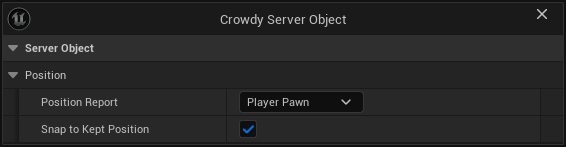
When several components hold the same Server Object, one of them reports; another takes over when it leaves.
How it reports:
- Positions are world metres. The report's X and Y are the owner's location in Unreal units over 100: a pawn at 20000, 12000 reports 200, 120. Only the ground is sent. Height stays the owner's own, also after a snap.
- One report is in flight at a time, and the newest wins. When the last report has not been answered by the time the next is due, that one is skipped, so a slow moment never leaves a queue of old places in front of the new one or in front of the starter's other calls. A player who stands still, moved by less than a centimetre, is reported once a second.
- A refusal holds the reports. When the hub refuses a report, because the player is not a fighter yet, the fight is not running, the fighter is down or was removed, the component sends no more for at least 1 second, and after that until the object's State changes, and at most 5 seconds. When the report did not reach the server, it waits 1 second. Reports stop when the object is released or the player leaves, and start again when it is Ready again.
- With Player Pawn, only a pawn this game controls is reported. A pawn another player drives never is: that player's own game reports it.
- A paused game keeps reporting. The reports run on real time, not game time, so a player who opens a pause menu in the middle of an arena fight is not benched as idle.
- The call budget. The Game Kit's client keeps its calls under 100 every 10 seconds. At 5 reports a second the component uses half of that, which leaves the rest for Cast, Join and the other calls; lower the rate in the definition if your game casts a lot.
Snapping is what keeps a player honest and in the fight. The hub keeps what the player's class allows: it cuts a move that is too fast to the farthest place the class's speed reaches, keeps a fighter where they were after a jump of the Config's teleport metres or more, and answers with the place it kept. When that place is more than 5 centimetres from the one reported, the component teleports the owner by the difference. Without that the pawn would stay ahead of its fighter and every report would be cut again. A jump of teleport metres or more, and a cut of more than 1 metre, each count as a strike against the player. Strikes clear only after 10 seconds without one, and remove_after_strikes of them (8 by default) remove the fighter for the rest of the fight. Turn Snap To Kept Position off only if you move the owner yourself from On Position Kept.
The territory and zone starters do not use reports: they read where players are from the world, as above says.
In Blueprint, there is nothing to wire: add a Crowdy Server Object component to the pawn, give it CSO_Kit_Arena and the arena's Instance Id, and leave Position Report on Player Pawn and Snap To Kept Position on. Until the player has Joined, the hub refuses the reports, and the component holds them for at least a second and then until the State changes, or 5 seconds at most. To react to a snap, select the component and add On Position Kept from its Events.
In C++, the component's event is a dynamic delegate:
#include "CrowdyServerObjectComponent.h"

UCrowdyServerObjectComponent* Reporter = FindComponentByClass<UCrowdyServerObjectComponent>();
if (Reporter)
{
	Reporter->OnPositionKept.AddDynamic(this, &AYardPawn::HandlePositionKept);
}
void AYardPawn::HandlePositionKept(FVector Location)
{
	PlayStumbleEffect(Location);
}
Fight in an arena
In Oakford's practice yard, villagers fight in the arena yard-1. Add arena, deploy, and have the fighters get CSO_Kit_Arena with the Instance Id yard-1. There is one fight for each Instance Id, so a second yard is a second name.
The arena is a rectangle of the world. In CSO_Kit_Arena's Game Kit category, Config places it: origin is its corner in world metres, width runs along X from there and depth along Y, 40 each by default. The yard is a 40 by 40 metre square at 200, 120, so its Config is {"origin": [200, 120]}. The hub keeps fighters inside the rectangle, so build the yard's floor to match, and change the level and the Config together. A fight that is already under way keeps the Config it started with. The other keys, each with the default it keeps when the Config leaves it out:
spawns, offsets from the origin in metres where the fighters stand when the fight starts (the four corners, 5 metres in), andclasses, the classes and their abilities (warriorwithstrikeandslam,magewithboltandignite).players_max(10),kill_target(10),duration_ms(300000, five minutes) andrespawn_ms(3000).teleport(12), the metres a reported move may jump at once, andremove_after_strikes(8), the strikes that remove a fighter for the rest of the fight. A strike is a jump ofteleportmetres or more, or a speed cut of more than 1 metre, and strikes clear only after 10 seconds without one.idle_ms(15000), how long a running, standing fighter may go without a report before they are benched; 0 never does. A paused game keeps reporting, so a pause menu does not bench a fighter.realtime(false) andheight(0): withrealtimeon, casts, impacts and the hub's movement flags are also sent on the realtime channel to the players around the arena's centre, atheightmetres.
The functions:
- Join takes a Hero Class,
warriorormage. Another class is refusedbad_request, a full arenafull, and a different class once the fight is runningstarted. A player may join a fight that is already running. - Start is called by the first to join, or a developer; anyone else is refused
forbidden, and one fighter is refusednot_ready. It puts every fighter at a spawn point. A player's next report, if it comes from farther than the player could have moved, is answered with the spawn point, a success and not a refusal, and the component moves the player there; a player already nearer stays where they are. - Cast takes an Ability, such as
strike, and an aim X and Y in world metres, not Unreal units. Astrikeorignitelands at once on the fighter nearest the aim, within 1.5 metres of it, and the answer'sbHitsays whether it hit someone;boltflies on from the caster, andslamgoes off at the aim after a short delay, so their answer is false and the hits arrive in the State and the events. A cast is refusedcooldown,insufficient(the class's resource),out_of_reach(the aim is farther than the ability reaches),not_found(the class has no such ability),conflictwhile the fighter is down,not_readybefore the fight runs andnot_memberbefore Join. - Leave stands the player down. Move is the position function the component calls for you. GetState answers the State.
The State, which everyone in the fight sees:
Phasereads Waiting, Running or Finished.Origin,WidthandDepthare the Config's, so a client can draw the yard.Fightershas anFCrowdyKitArenaFightereach:Player,HeroClass,XandYin world metres,HpandMaxHp,Resource,Statuses(such asburning),Kills,DeathsandbDown. To place an actor at a fighter, multiplyXandYby 100.Projectilesare the shots in the air (Ability,Caster,X,Y), andAreasthe blasts waiting to go off (Ability,Caster,X,Y,RadiusandAt, in Unix milliseconds).KillTargetis the kills that win.EndsAtis when the time runs out, in Unix milliseconds, and 0 outside Running.Winneris a user id, and 0 until the fight is won, and when the time ran out with the most kills tied.
A fighter whose health runs out is down (bDown) for respawn_ms, and cannot cast or move meanwhile. Then they come back at their spawn point with full health and no statuses, and a burn that kills credits whoever set it. The first to KillTarget wins, or the most kills when EndsAt passes.
The events arrive as one message, ArenaEvent, heard as the director's is: its Type says which event it is, with Has Type false for a type this client does not know, and only the fields of that Type are filled. Cast has Ability, Caster, X and Y; Impact Ability, Caster, Victim and Damage; Kill Killer and Victim; Respawn Player; Violation Player, What and Detail, for a move the hub cut or held back; Removed Player and Why, movement or idle; and Finished Winner. An event arrives just before the snapshot that shows its effect.
Where the SDK's copy differs from the platform's Arenas:
- Positions are world metres, z up. The platform's keep x and z on the ground inside
(0, 0)to(width, depth), and place an arena in the world with ananchorchunk. The SDK'sMove,Cast, State and events are in the world's own metres, ground X and Y, and the arena sits whereoriginsays. - A NaN or infinite aim or move is refused
bad_request, and spends nothing, not even the cooldown. - Leaving and joining again keeps your record. A fighter who leaves while the fight runs is set aside with their class, health, kills, deaths, cooldowns, resource and respawn, and Join brings them back as they were. A fighter removed for movement is set aside as removed: their Join is refused
forbiddenuntil the next Start. - The movement check is a travel budget, and its slack does not grow with the report rate. The platform's allows half a metre more on every report, so a client that reports often could move about twice as fast as its class. The SDK's holds a sustained speed to 1.25 times the class's speed whatever the rate. A late report's unused allowance covers the next one, and that banking stops at about a second of travel, so a player on a slow connection, whose reports arrive further apart, is not cut short. Only a cut of more than 1 metre counts against a player toward being removed.
- The hub's own placements never count against a player. Join, start, a respawn and a rejoin put the fighter somewhere. A report after one from farther than the player could have moved is answered with the placed point, a success and not a refusal, and the component moves the player there; a nearer player stays where they are. A player pressing against the arena's edge is clamped to it without a strike.
- A fighter who leaves stays a target for
respawn_msfor projectiles, areas and burns, at the spot they left, and then is not; a fighter benched as idle is never a target. An instant ability, such asstrike, also needs its target within the ability's range of the caster, not only of the aim. At most four timesplayers_maxset-aside records are kept. - An idle fighter is benched. A running, standing fighter with no report for
idle_msis set aside with a Removed event whoseWhyisidle, and rejoins as they were. The platform's keeps them. Resourceis current. The State shows a fighter's resource with its regeneration up to now. The platform's shows the value from their last cast.
In Blueprint, in the yard pawn's event graph, with the Crowdy Server Object component holding CSO_Kit_Arena and yard-1:
- On the join button, add Call Join (CSO_Kit_Arena) with Hero Class set to
warrior. The first player to join then presses another button wired to Call Start. - On a click in the yard, add Call Cast (CSO_Kit_Arena) with Ability
strikeand the clicked point's X and Y divided by 100 into X and Y. Under On Failed, Code says why, such ascooldown. - Add On ArenaEvent Received (CSO_Kit_Arena) and wire Event BeginPlay into its Bind, with the component as its Target. From Received, add a Branch on Has Type, and a Switch on ECrowdyKitArenaEventType on its true pin. On Kill, show Killer and Victim; on Finished, show Winner.
- To draw the fighters, add On Fighters Changed (CSO_Kit_Arena) on the same object and place an actor at each fighter's X and Y times 100.
In C++, with Arena the acquired CSO_Kit_Arena (Acquire(KitArena, TEXT("yard-1"), this, Error)), the pawn strikes the nearest fighter that is standing. Acquiring the arena this way does not report the pawn's place: the pawn still needs the Crowdy Server Object component holding CSO_Kit_Arena to report, or the game must call Move itself. Otherwise the fighter never moves on the hub and is benched as idle after idle_ms.
void AYardPawn::StrikeNearest()
{
	const FCrowdyKitArenaState* State = Arena->GetState().GetPtr<FCrowdyKitArenaState>();
	if (!State || State->Phase != ECrowdyKitArenaPhase::Running)
	{
		return;
	}

	const FVector2D Me(GetActorLocation().X / 100.0, GetActorLocation().Y / 100.0);
	const FCrowdyKitArenaFighter* Nearest = nullptr;
	double NearestDistance = TNumericLimits<double>::Max();
	for (const FCrowdyKitArenaFighter& Fighter : State->Fighters)
	{
		const double Distance = FVector2D::Distance(Me, FVector2D(Fighter.X, Fighter.Y));
		if (Fighter.Player == Arena->GetSignedInUserId() || Fighter.bDown || Distance >= NearestDistance)
		{
			continue;
		}
		Nearest = &Fighter;
		NearestDistance = Distance;
	}
	if (!Nearest)
	{
		return;
	}

	FCrowdyKitArenaCastInputs Inputs;
	Inputs.Ability = TEXT("strike");
	Inputs.X = Nearest->X;
	Inputs.Y = Nearest->Y;
	Arena->Call(TEXT("Cast"), FInstancedStruct::Make(Inputs), [](const FCrowdyServerCallResult& Result)
	{
		const FCrowdyKitArenaCastReply* Reply = Result.Reply.GetPtr<FCrowdyKitArenaCastReply>();
		UE_CLOG(Reply && Reply->bHit, LogTemp, Log, TEXT("Hit"));
		UE_CLOG(!Result.IsSuccess(), LogTemp, Log, TEXT("Not cast: %s (%s)"), *Result.Code.ToString(), *Result.Reason);
	});
}
The ArenaEvent is heard with WatchMessage and an FCrowdyKitArenaEvent, as the director's is in React to a director's waves. The platform's Arenas page has the rest of the starter.
Run a race
On Oakford's fair day, villagers race their carts around the mill loop, mill-loop-1. Add race, deploy, and have each racer's pawn hold CSO_Kit_Race with that Instance Id in a Crowdy Server Object component, which reports where the racer is. A race runs once for each Instance Id: the next heat is a new name, such as mill-loop-2.
The course is a list of gates in the world. In CSO_Kit_Race's Game Kit category, Config sets it: gates is a list of {"x", "y", "radius"}, each a ring on the ground in world metres, and laps how many times round. The first gate is the start and finish line. A racer passes the gates in order, and a gate counts when the path between two of their reports comes within its radius. The default is a triangle of three gates at 0, 0 and 30, 0 and 15, 25, 3 metres across, twice round. The other keys, each with the default it keeps when the Config leaves it out:
course_id(loop), the course's name in the realtime timing events;countdown_ms(3000) andracers_max(8).rules, the movement check:max_speed(12 metres a second),teleport(20 metres at once),bounds(none: a[x0, y0, x1, y1]rectangle in world metres keeps racers inside) andgrace(1.25). The hub allows up togracetimesmax_speed, so setmax_speedto your cart's top speed over 1.25 for a strict limit.finish_grace_ms(30000), how long the others have once the winner is in, andtime_limit_ms(600000, ten minutes), how long after the start the race closes whoever is still out; 0 is no limit.idle_ms(15000), how long a racer who has not finished may go without a report before they retire; 0 never does.board, a leaderboard's Instance Id: with one, a closed race posts each finisher's time to it in milliseconds. Configure that board withorder: "low", so the fastest time ranks first, and add theleaderboardstarter yourself.realtime(false) andheight(0): withrealtimeon, timing is also sent on the realtime channel to the players around the start line, atheightmetres.
The functions:
- Join puts the player on the start line; it is refused
startedonce the countdown begins, unless the player is already racing, andfullpastracers_max. A player's next report from farther than they could have moved is answered with the line, a success and not a refusal, and the component moves them there. - Start is called by the first to join, or a developer; anyone else is refused
forbidden, and a race with no racersnot_ready. It begins the countdown, which holds every racer on the line: their reports are answered with it. - Leave takes a player off the grid in the lobby. Once the countdown begins, it retires them: they did not finish and cannot join again.
- GetGhost answers the winner's run,
FCrowdyKitRaceGhost:Player,TotalMs, andFrames, each anFCrowdyKitRaceGhostFramewith anAtMsfrom their start and anXandYin world metres, to replay as a ghost cart. Before anyone has won,Playeris 0 andFramesis empty. - Move is the position function the component calls for you. GetState answers the State.
The State, which everyone sees:
Phasereads Lobby, Countdown, Racing or Finished.CourseId,Gates(X,YandRadiuseach) andLapsare the Config's, so a client can draw the course.GoAtis when the countdown ends,ClosesAtwhen the finish grace runs out, andEndsAtwhen the time limit does, in Unix milliseconds, each 0 when there is none.Racershas anFCrowdyKitRacereach:Player,XandYin world metres,Lap,NextGate(the index inGatesof the gate to pass next),BestLapMs,PlaceandTotalMsonce they finish, andbDidNotFinish. A value that is not there yet reads 0.
The events arrive as one message, RaceEvent (FCrowdyKitRaceEvent), heard as the arena's is: Go has At; Timing has a Stage (an ECrowdyKitRaceStage: Started, Checkpoint, Lap or Finished, with Has Stage false for one this client does not know), Player, Checkpoint, Lap and ElapsedMs; Violation has Player, What and Detail, for a report the hub cut or held back; Retired has Player and Why, left or idle; and Finished has Results, an FCrowdyKitRaceResult for every racer with their Player, Place and TotalMs, the finishers first in place order and then, with 0 for both, those who did not finish.
Where the SDK's copy differs from the platform's Races and ball games:
- Positions are world metres, z up, for the gates,
Move, the State, the ghost and the events. The platform's keep x and z in its own units from the course's origin. - A NaN or infinite position is refused
bad_request, and changes nothing. - The movement check is the arena's travel budget, so a client that reports more often does not move faster, a slow connection is not cut short, and the hub's own placements on the line never count against a racer.
- No flying start. The countdown holds racers on the line and the start sets them there with no travel saved, so a racer cannot be past the line at the go.
- A gate between two reports counts, and its time is when the path crossed it, not when the report arrived. The platform's checks only the reported points, so a racer who reports less often could miss a gate, and is timed later.
- A race always ends. It closes when every racer has finished or retired,
finish_grace_msafter the winner, or attime_limit_ms. A racer who leaves or stops reporting retires. The platform's waits for every racer to finish. - Snapshots are not sent for every report: at most five a second, as the arena's, and one at once when the race starts, goes, or closes.
- Results list every racer, the finishers first in place order, and a time reaches the board whatever the length of the race's Instance Id. The ghost covers the whole run, however long.
In Blueprint, with the Crowdy Server Object component holding CSO_Kit_Race and mill-loop-1:
- On the join button, add Call Join (CSO_Kit_Race). The first to join then presses a button wired to Call Start.
- Add On RaceEvent Received (CSO_Kit_Race), bound at Event BeginPlay with the component as its Target. From Received, Switch on ECrowdyKitRaceEventType: on Go, hide the countdown; on Timing, show Lap and Elapsed Ms when Player is the signed-in player; on Finished, show the podium from Results.
- Add On Racers Changed (CSO_Kit_Race), and for the signed-in player's racer, light the gate at Next Gate in the State's Gates.
In C++, with Race the acquired CSO_Kit_Race, the pawn finds the gate to drive to next:
bool AMillCart::NextGate(FVector& OutWhere) const
{
	const FCrowdyKitRaceState* State = Race->GetState().GetPtr<FCrowdyKitRaceState>();
	if (!State || State->Phase != ECrowdyKitRacePhase::Racing)
	{
		return false;
	}

	const int64 Me = Race->GetSignedInUserId();
	const FCrowdyKitRacer* Mine = State->Racers.FindByPredicate([Me](const FCrowdyKitRacer& Racer) { return Racer.Player == Me; });
	if (!Mine || Mine->bDidNotFinish || Mine->Place > 0 || !State->Gates.IsValidIndex(Mine->NextGate))
	{
		return false;
	}

	const FCrowdyKitRaceGate& Gate = State->Gates[Mine->NextGate];
	OutWhere = FVector(Gate.X * 100.0, Gate.Y * 100.0, GetActorLocation().Z);
	return true;
}
Play a ball game
On the village green, two teams play ball in green-1. Add ball, deploy, and have each player's pawn hold CSO_Kit_Ball with that Instance Id in a Crowdy Server Object component.
The pitch is a rectangle of the world. In CSO_Kit_Ball's Game Kit category, Config places it: origin is its corner in world metres, width runs along X from there (60 by default) and depth along Y (40), and each end wall, at origin and at origin plus width, has a goal goal_width wide (12) at its middle. Red attacks the far end, at origin plus width, and blue the near end. To draw the ball, set realtime to true and give Kit Actors' kind ball your ball's class, as Show a starter's actors says: the ball is then shown to every player within reach of the pitch, at height metres (0 by default). With realtime on, the match's Instance Id may be at most 29 characters, with no @ or spaces, since the ball's actor carries it. The other keys, each with its default:
team_max(5),score_to_win(3) andduration_ms(300000, five minutes).claim_radius(1.5 metres), how near the ball a player must be to claim it, andprotect_ms(1500), how long a new holder cannot be robbed.pass_speed(18) andshoot_speed(28) in metres a second, andfriction(0.8), the share of its speed a loose ball loses each second.max_speed(9),teleport(15) andgrace(1.25), the movement check as the race's.idle_ms(15000), how long a player may go without a report while the game is played before they are taken off the pitch; 0 never does.
The functions:
- Join takes a Team (
FCrowdyKitBallJoinInputs), Red or Blue, and puts the player at the middle of their half; a full team is refusedfull. Before the game and after it, Join again changes team. While it is played, a player keeps their team (another is refusedstarted), and one who left comes back where they left, so leaving and joining is not a shortcut across the pitch. - Start is called by the first to join, or a developer, and needs a player on each team (
not_ready). It puts every player at the middle of their half and the ball at the centre. - Claim takes a loose ball within
claim_radius, or the ball from an opponent once theirprotect_msis over. It is refusedout_of_reach,conflictwhen a teammate has it, andcooldownwhile the holder is protected or when claiming twice within half a second. - Pass takes To (
FCrowdyKitBallPassInputs), a teammate's user id (bad_requestfor anyone else), and Shoot an aim X and Y in world metres; both are refusedconflictwhen the player does not have the ball. The ball runs on, slows, and turns off the side and end walls; it scores when it crosses an end wall inside the goal. - Leave takes the player off the pitch; a ball they held drops loose where they were. Move is the position function. GetState answers the State.
The State, which everyone sees:
Phasereads Lobby, Playing or Finished;Origin,Width,DepthandGoalWidthare the Config's.Ballis anFCrowdyKitBall:XandYin world metres,VXandVYin metres a second,Holder(0 when loose),HeldSinceandLastTouch. A held ball is where its holder is.Playershas anFCrowdyKitBallPlayereach:Player,Team,XandY.Scoreis red's then blue's.EndsAtis when time runs out, 0 outside a game being played, andWinnerthe winning team when Has Winner is true (false before the end, and for a draw).
The events arrive as one message, BallEvent (FCrowdyKitBallEvent, whose Type is an ECrowdyKitBallEventType): Claimed (Player, Team, and From, the user id they took it from, 0 for a loose ball), Passed (Player, To, Team), Shot (Player, Team), Goal (Team, Player, the last to touch it, and Score), Violation (Player, What, Detail), Left (Player, Team), Removed (Player, Team, and Why, idle) and Finished (Winner with Has Winner, and Score).
Where the SDK's copy differs from the platform's Races and ball games:
- Positions are world metres, z up, and
originplaces the pitch. The platform's keep the pitch at its own origin, and show the ball at ananchorchunk. - The ball's actor names its match. Its Instance Id on the Crowdy Kit Actor component is the match's, so a client with several games near each other knows which ball is whose; it reaches every player within the pitch's size of it.
- A NaN or infinite position or aim is refused
bad_request, and changes nothing. - There is a Leave, and a player may join a game being played, at their place when they come back. The platform's has no way to leave and refuses a join once the game starts, so a player who dropped could never return.
- A player who stops reporting is taken off the pitch after
idle_ms, with a Removed event, and the ball they held drops loose. The platform's keeps them, and the ball, until the game ends. - The movement check is the arena's travel budget, the pitch's edge is no strike, and Start puts the teams at their halves.
In Blueprint, with the component holding CSO_Kit_Ball and green-1:
- On the team buttons, add Call Join (CSO_Kit_Ball) with Team set to Red or Blue.
- On the kick button, add Call Claim when Holder in the State's Ball is not the signed-in player, and Call Shoot with the goal's X and Y otherwise: red's goal is at Origin X plus Width, and both goals at Origin Y plus Depth over 2.
- Add On BallEvent Received (CSO_Kit_Ball), bound at Event BeginPlay, and on Goal show Score.
In C++, with Ball the acquired CSO_Kit_Ball, the pawn shoots at the goal it attacks:
void AGreenPlayer::ShootAtGoal(ECrowdyKitBallTeam MyTeam)
{
	const FCrowdyKitBallState* State = Ball->GetState().GetPtr<FCrowdyKitBallState>();
	if (!State || State->Phase != ECrowdyKitBallPhase::Playing || State->Ball.Holder != Ball->GetSignedInUserId())
	{
		return;
	}

	FCrowdyKitGroundPosition Aim;
	Aim.X = MyTeam == ECrowdyKitBallTeam::Red ? State->Origin.X + State->Width : State->Origin.X;
	Aim.Y = State->Origin.Y + State->Depth / 2.0;
	Ball->Call(TEXT("Shoot"), FInstancedStruct::Make(Aim), [](const FCrowdyServerCallResult& Result)
	{
		UE_CLOG(!Result.IsSuccess(), LogTemp, Log, TEXT("No shot: %s (%s)"), *Result.Code.ToString(), *Result.Reason);
	});
}
The ball's actor is drawn and moved by the SDK; its Crowdy Kit Actor component's Owner is the holder, so a glow on the held ball listens to On Kit Actor Changed. The platform's Races and ball games page has the rest of both starters.
Show a starter's actors
Some of the platform's starters show actors their server code moves: of the ones Add starter offers, npcs, whose mobs, NPCs and pets are its actors, and ball, whose ball is one when its Config's realtime is on. Such an actor reaches the players near it on the realtime channel, and the SDK draws it like another player's character.
- In the starter's definition, in the Game Kit category, give each kind in Kit Actors the actor class it is drawn as, such as
mobandBP_Wolf.CSO_Kit_Npcscomes with the kindsmob,npcandpetand no classes. While Kit Actors has a kind, the definition is listed in the Game Kit Actor Starters project setting (Crowdy SDK, Server Objects;GameKitActorStartersonUCrowdySDKDeveloperSettings), which a packaged game reads, and which cooks the definition and its classes. A kind with no class that loads is not drawn, and the log says so once for that kind. - Every actor drawn for a kit actor has a Crowdy Kit Actor component, which the SDK adds when the class has none. Its Kit Actor is the actor as its hub last showed it: Kind, Id (its id in its hub, which that hub's calls take), Instance Id (the Instance Id of the hub that shows it, such as the area
2,-1of annpcsmob: the Server Object to call for that actor; empty when the hub's actor id does not name one), Name, Hp and Max Hp when Has Hp is true, Mode, Owner, Location and Rotation. On Kit Actor Changed (OnKitActorChanged, anFOnCrowdyKitActorChangedwith the component and the Kit Actor) runs when the actor starts drawing a kit actor and whenever anything but where it is changes, so a health bar or a nameplate listens there; the actor itself moves smoothly to where it is. To bind the event at Begin Play, add the component to the class yourself. - On a map drawn with Mass, which has no actor per entity, the Crowdy Kit Actor subsystem lists the kit actors this player sees now. Get Kit Actor Count (Kind) says how many, and Get Kit Actor (Kind, Index, and a Kit Actor output) returns true and fills the one at that index, or false when there is none. Kind None means every kind. Get Kit Actors returns them all as a copy, so a Blueprint that reads every tick, such as a Mass map's, uses the count and Get Kit Actor. An actor's index changes as others come and go, so follow an actor by its Id, not its index.
A kit actor leaves when its hub says so, or after Kit Actor Timeout without an update: 1 second by default, a setting of the map profile's actor management beside the timeout for other actors. A kind that no starter's Kit Actors names reads as None. Positions on the wire are in chunks with z up, which the SDK turns into units by the session's chunk size (UCrowdyGameSession::SetChunkSize, 1600 units unless your project changes it). Chunk Position (ChunkPosition) on a Kit Actor holds the raw chunks the hub sent, and Location is in world units. In C++ the subsystem's GetChunkSize() gives the size it uses, and PlaceInWorld(KitActor) turns a Kit Actor's chunks into a place in this world. An update whose Name is over 128 bytes or whose Mode is over 32 bytes is dropped, and so is one whose Id, Hp, Max Hp or Owner is not a whole 64-bit integer.
What the component holds is view state: an actor's health and mode are its hub's to decide, as with any Server Object value. Nothing on the realtime channel proves a hub sent an update, so another player's game can send one under a kit actor's id: show what Kit Actor says, and never decide gameplay from it. Call the hub, which checks every call, as Attack does.
The npcs starter's area
A player is in an area while they stand in its 4 by 4 chunks, within one chunk (1600 units) of the area's ground height, so a Crowdy Server Object component on the player's pawn holding CSO_Kit_Npcs, with its Instance Id set to This Actor's Area, follows the area they are in. The ground height is 0 chunks unless the starter's Config says otherwise: {"z": 3} puts it at 3 chunks, so areas work on a map whose ground is far from Unreal Z 0. z is a whole number of chunks within plus or minus 4294967296. The scan counts players within 1 chunk of that height and the area's actors are drawn at it, so give their classes a way to stand on your ground if it is not flat at that height. An area keeps the height it was created with, so changing z affects only areas made afterwards.
- Its records are the area's members, one FCrowdyKitAreaMember each: its Type (Mob, Npc or Pet), Id, X and Y in chunks, and the fields of its type (a mob's Kind, Hp, Max Hp and Mode; an NPC's Name and Line; a pet's Species, Name and Mode). Its State is empty.
- Mobs live 1.5 chunks from the middle of the area (it was 3). So a player standing beside a mob is always in the area, and Attack never refuses
not_in_areathere, and one mob is always in view and within day aggro range from anywhere in the area: a player at the centre is always chased. An area saved earlier puts its mobs at the new distance when it loads and keeps its pets. - Attack with a mob's Id hits it for 10, once every half second, while the player is within 1.5 chunks of it; its answer is the mob's Hp, and at 0 the mob is down (refused with
down) for 10 seconds. Mobs never hurt players. Talk with an NPC's Id answers that NPC. - Adopt gives the player a pet where they stand (at most 3 a player and 64 an area), and RenamePet, SummonPet (it follows them), DismissPet and ReleasePet take one of their own pets; GetPets answers their pets with each one's Bond, which only its owner reads.
- A refusal's Code is
not_in_area,out_of_reach,cooldown,down,limit,fullorforbidden.
The SDK's npcs keeps x and y on the ground and z up, as Unreal does, so its areas and actors are not where the platform's own npcs starter, which is y up, puts them; an area the platform's starter saved starts again.
#include "Replication/Components/CrowdyKitActorComponent.h"
#include "Replication/Subsystems/CrowdyKitActorSubsystem.h"

// In the wolf's BeginPlay, with the component on the class: its health bar follows its hub.
if (UCrowdyKitActorComponent* Kit = FindComponentByClass<UCrowdyKitActorComponent>())
{
	Kit->OnKitActorChanged.AddDynamic(this, &AWolf::HandleKitActorChanged);
}

// Anywhere in the game world: every mob this player sees now.
const TArray<FCrowdyKitActorState> Mobs = GetWorld()->GetSubsystem<UCrowdyKitActorSubsystem>()->GetKitActors(TEXT("mob"));

// Every tick, without a copy: a reference to the subsystem's own list. A Kind of None is the actors of no named kind.
const TArray<FCrowdyKitActorState>& Wolves = GetWorld()->GetSubsystem<UCrowdyKitActorSubsystem>()->ViewKitActors(TEXT("mob"));
Hit a drawn mob
Two neighbouring areas each number their mobs from 1, so a wolf's Id alone does not say which area it belongs to. Its Instance Id does: the SDK's npcs names each actor M, N or P (mob, NPC or pet), the area's key, @ and the actor's id, such as M2,-1@3, and the SDK reads the area out of it. In Oakford, with BP_Wolf given to the mob kind and CSO_Kit_Npcs added and deployed, a villager hits the wolf they click.
In Blueprint, in BP_Wolf's event graph, on a click:
- Add a Crowdy Kit Actor component to
BP_Wolfin its Components panel, namedCrowdyKitActor, so the graph can read it. Get its Kit Actor, and break it with Break Crowdy Kit Actor State. Its Instance Id is the wolf's area, such as2,-1. - Put that Instance Id into Get Server Object for
CSO_Kit_Npcs, then Call Attack (CSO_Kit_Npcs) on it with Mob set to the Kit Actor's Id. (Or use a Crowdy Server Object component on the wolf holdingCSO_Kit_Npcs, with its Instance Id set from the same pin.) - Under On Success, Hp is the wolf's health after the hit. At 0 the wolf is down: it stops being drawn and comes back after 10 seconds. Under On Failed, Code is
out_of_reachwhen the villager is too far away,cooldownwhen they hit again within half a second, anddownwhen the wolf is already down.
Talk works the same with an NPC: its Instance Id and Call Talk (CSO_Kit_Npcs) with Npc set to its Id.
In C++, with KitNpcs a UPROPERTY holding CSO_Kit_Npcs, in the wolf's click handler:
#include "CrowdyGameKitTypes.h"
#include "CrowdyServerObjectSubsystem.h"
#include "Replication/Components/CrowdyKitActorComponent.h"

const UCrowdyKitActorComponent* Kit = FindComponentByClass<UCrowdyKitActorComponent>();
if (!Kit || Kit->KitActor.InstanceId.IsEmpty())
{
	return;
}

FString Error;
UCrowdyServerObject* Area = GetGameInstance()->GetSubsystem<UCrowdyServerObjectSubsystem>()->Acquire(KitNpcs, Kit->KitActor.InstanceId, this, Error);
if (!Area)
{
	return;
}
FCrowdyKitAttackInputs Inputs;
Inputs.Mob = Kit->KitActor.Id;
Area->Call(TEXT("Attack"), FInstancedStruct::Make(Inputs), [](const FCrowdyServerCallResult& Result)
{
	if (const FCrowdyKitAttackReply* Reply = Result.Reply.GetPtr<FCrowdyKitAttackReply>())
	{
		UE_LOG(LogTemp, Log, TEXT("The wolf has %d left"), Reply->Hp);
		return;
	}
	UE_CLOG(Result.Code == FName(TEXT("out_of_reach")), LogTemp, Log, TEXT("Too far: %s"), *Result.Reason);
});
An empty Instance Id means the hub's actor id does not name one, which a kit actor of the SDK's npcs never does. An npcs added before this keeps the Rust it was added with, and sends the old ids, so Instance Id reads empty until you remove it and add it again, or bring the SDK's Resources/GameKit/npcs/ changes into your Server/npcs/, and deploy.
Change a starter
A starter is a beginning, not a black box, and changing one is changing two things, as for a type of your own:
- Its Rust. A starter's server code is
Server/<Type Name>/src/lib.rs, the starter's own, and the definition asset's Server Code tab shows and edits that file. Its Code Source reads Game Kit Starter, which you cannot choose there: only Add starter makes one. Generate never writes a starter's code, and refuses with "world is a Game Kit starter: its server code is the starter's own Rust in .../src/lib.rs, which Generate never writes; edit that file". Keep the functions' names and the topics as they are, and the SDK keeps reaching them; the platform's Your own version of a starter says what to keep. - Its definition. The functions, their inputs and outputs, and the State struct, which you can point at a struct of your own. A Game Kit category in Details holds what only starters have: State Topic, the topic whose snapshots are the variables (
world,queue,session,board,player,market,duel,battle,encounter,run,territory,zone,table,arena,raceorball); Collection Topic and Record Struct, the topic whose members are the records and the struct each one fills (nodesandFCrowdyKitWorldNodeon the world,areaandFCrowdyKitAreaMemberon the npcs, empty on the others; a field whose server name isidtakes the member's id); Owner Values and Keyed By Player, the values only the player reads; Position Function and Position Reports Per Second, the function the component reports where the player is with, and how often (the arena's areMoveand 5); Parent, the type it runs under (empty makes it the app's root); Calls, the types its Rust calls; and Config, a JSON object the starter reads when one of its Server Objects first starts, such as{"day_ms": 600000}for a ten-minute game day on the world, whose keys areday_ms,nodes,node_amountandregrow_ms. Each must be a whole number written without a decimal point or an exponent, from 0, andnodesat most 65535. A key in another case, such asNodes, is ignored by the starter and by the check. Add starter and Deploy refuse a starter Config that holds two ids of one kind (item, currency, faction, counter or pity group) differing only by case, such asGoldandgold, since the SDK reads them as one. The session's keys are those ofFCrowdyKitSessionConfigin snake_case (min_players,max_players,turn_ms,target_score,max_rounds,lobby_idle_ms) andboard. The player's Config, one for every player, sets the inventory'sslots, theitemscatalog, the softcurrencies, thestartbundle a new player gets,levels,achievements,quests, theclient_countersa client may report with Step,recipes,loottables, idleproductionand asecretmixed into loot rolls; the market's sets itsvendors, thebook_itemswith an order book, thebook_currencythey trade in,orders_maxper player,trade_msbefore an open trade is called off, andplayer_type, the Type Name of the players' hubs. The platform's Player and Market pages give each key's shape. The deck's Config holds one key, thesecretmixed into every shuffle, which Add starter writes for you, as it writes the player's. The matchmaker and leaderboard read no Config. The other game-mode starters do: the minigame'sbest_ofandround_ms; the tactics battle's board size, obstacles, phase time and units; the director's field, lane, towers,kinds,wavesandboss; the instance'sfloors,rooms_per_floor,party_max,idle_msandboard; the territory'spoints,factions,win_scoreand income; the zone'scenter,radius,phasesand damage; and the arena'sorigin,width,depth,spawns,classes,players_max,kill_target,duration_ms,respawn_ms,teleport,remove_after_strikes,idle_ms,realtimeandheight, as Fight in an arena lists them; the race's and the ball's are in Run a race and Play a ball game. The platform's Duels, Grid battles, Waves and bosses, Private runs and Control points and circles and Arenas pages give each one's shape. The settings a starter's Rust decides for itself are hidden: Readable By, the visibility of each variable, Members, Records, Timers and Events, Callable By, Required Feature and Cooldown.
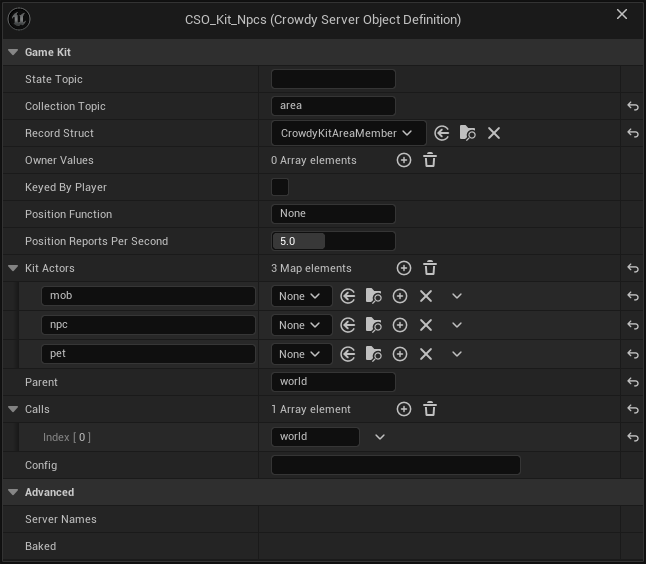
On the Overview tab a changed starter reads Changed like any type, and lists config or parent when those changed. A starter is marked Problem when its Config is not a JSON object ("its Game Kit Config is not a JSON object; correct it, or empty it to keep the starter's defaults"), when two starters have no Parent ("... an app has one root; give one of them a Parent"), when Parents run in a circle, when a Parent is a Server Function Library, when the world starter's Config has a day_ms, nodes, node_amount or regrow_ms that is not a whole number as described above, or when a player or deck starter's secret is not a string, since the starter would refuse its Config. A problem blocks Deploy. Deploy also warns, without stopping, when a player or deck starter's Config has no secret (exactly that key, a non-empty string), since players could then work out loot rolls and deals; see Play a card game with a hidden hand. It is marked Needs generating when its crate lost a file: "its server code is missing ...; restore it, or remove the type in Server Compute and add the starter again".
Remove starters
From the command line, -op=removestarter takes a starter out of the project together with every starter that runs under it or calls it:
UnrealEditor-Cmd.exe Oakford.uproject -run=CrowdyServerCompute -op=removestarter -starter=world -yes
Removing world removes every starter, since they all run under it; removing matchmaker removes the matchmaker and the session; removing session removes the session and the matchmaker, which calls it, and leaves the leaderboard; removing leaderboard removes only the leaderboard, since a session or an instance calls it only when its Config names a board; removing player removes the player and the market, which calls it, and removing market removes only the market. Removing npcs, minigame, tactics, director, instance, territory, zone, deck or arena removes only that starter, since nothing else calls it. For each it deletes the definition and the whole Server/<Type Name>/ folder, your edits to its Rust included, and it clears Game Kit World when that named one of them. Without -yes it names what it would remove and changes nothing: "This deletes session, matchmaker, world: their definitions and server code, edits included; pass -yes to confirm." It logs "removing session, matchmaker, world", then "removed session, matchmaker, world", and its result has starter and removed.
Before it changes anything it checks, and removes nothing when:
- a starter's folder is, or holds, a link to somewhere else, since deleting it could delete what the link points to;
- a definition's file is read-only, for example checked in to source control without a checkout: make it writable and run it again;
- something else uses a definition, such as a Blueprint whose Server Object component holds
CSO_Kit_World: the message names each one, so remove those uses first.
If a file is held open while it deletes, for example by an IDE or cargo, the message ends "run -op=removestarter again to finish", which picks up where it stopped.
On the Server Compute page, Remove from project... in a starter's ... menu does the same, after a dialog naming every starter it removes and what the next deploy takes offline.
Either way the server is not touched until your next deploy, which no longer sends the starters and removes them. Without world, that deploy sends the Crowdy SDK's root again, and Get Players Online reads it.
In the example world
Oakford's lantern posts light up at night, and villagers gather oil from the world's resource nodes. Add the world starter on Server Compute and deploy.
In Blueprint, in the lantern post's event graph:
- Add On bNight Changed (CSO_Kit_World) and wire Event BeginPlay into its Bind. It needs no Target, since the world has Only One Instance. From Changed, wire its bNight to Set Visibility on the lantern's Point Light component, named
Light. - To gather oil, add Call Harvest (CSO_Kit_World) and set its Node input to a node's id. The world's resource nodes are its records: from the world's Get Server Object, Get Record Ids lists them, and Watch Record on the oil node's id runs with what it holds now and after each harvest, read with Find Record and Get Server Value
Amount. - Under On Success, its Left output is what the node holds now. Under On Failed, show the arrow at the bottom of the node: Outcome is Denied with Retryable true and Code
cooldownwhen the villager harvests too soon, and Refused with Codeemptywhen the node is bare until it grows back.
In C++, with KitWorld a UPROPERTY holding CSO_Kit_World, the lantern post follows the night and a villager harvests:
#include "CrowdyGameKitTypes.h"
#include "CrowdyServerObjectSubsystem.h"

FString Error;
UCrowdyServerObject* World = GetGameInstance()->GetSubsystem<UCrowdyServerObjectSubsystem>()->Acquire(KitWorld, FString(), this, Error);
World->WatchValues(FOnCrowdyServerValuesChanged::FDelegate::CreateWeakLambda(this, [this](UCrowdyServerObject* Object, TConstArrayView<FString> Fields)
{
	const FCrowdyKitWorldConditions* Conditions = Object->GetState().GetPtr<FCrowdyKitWorldConditions>();
	if (Conditions && Fields.Contains(TEXT("night")))
	{
		Light->SetVisibility(Conditions->bNight);
	}
}));

FCrowdyKitHarvestInputs Inputs;
Inputs.Node = NodeId;
World->Call(TEXT("Harvest"), FInstancedStruct::Make(Inputs), [](const FCrowdyServerCallResult& Result)
{
	if (const FCrowdyKitHarvestReply* Reply = Result.Reply.GetPtr<FCrowdyKitHarvestReply>())
	{
		UE_LOG(LogTemp, Log, TEXT("The node holds %d"), Reply->Left);
		return;
	}
	UE_CLOG(Result.Code == FName(TEXT("empty")), LogTemp, Log, TEXT("Bare until it grows back: %s"), *Result.Reason);
});

const FString OilNode = LexToString(NodeId);
World->WatchRecord(OilNode, FOnCrowdyServerValuesChanged::FDelegate::CreateWeakLambda(this, [OilNode](UCrowdyServerObject* Object, TConstArrayView<FString> Fields)
{
	const FCrowdyServerRecord* Record = Object->GetRecord(OilNode);
	const FCrowdyKitWorldNode* Node = Record ? Record->Values.GetPtr<FCrowdyKitWorldNode>() : nullptr;
	UE_CLOG(Node != nullptr, LogTemp, Log, TEXT("Oil left: %d"), Node ? Node->Amount : 0);
}));
The world's Instance Id is ignored, since it has Only One Instance. For a match, Find Match on CSO_Kit_Matchmaker with the queue's name, then acquire CSO_Kit_Session with its Session Id and call Join, Ready and, as its host, Start; Is My Turn says when to let the player move.
Oakford also keeps a weekly board of its lantern-lighting matches. Add the leaderboard starter, set CSO_Kit_Session's Config to {"board": "oakford-weekly"} and deploy. Each finished match then posts its players' scores, and the village notice board, with KitLeaderboard a UPROPERTY holding CSO_Kit_Leaderboard, reads them:
UCrowdyServerObject* Board = GetGameInstance()->GetSubsystem<UCrowdyServerObjectSubsystem>()->Acquire(KitLeaderboard, TEXT("oakford-weekly"), this, Error);
Board->Call(TEXT("GetMyPlace"), FInstancedStruct(), [](const FCrowdyServerCallResult& Result)
{
	const FCrowdyKitBoardPlace* Place = Result.Reply.GetPtr<FCrowdyKitBoardPlace>();
	UE_CLOG(Place && Place->Rank > 0, LogTemp, Log, TEXT("This week you are number %d with %lld"), Place ? Place->Rank : 0, Place ? Place->Score : 0LL);
});
In Blueprint the same is Call GetMyPlace (CSO_Kit_Leaderboard) on the object Get Server Object gives for CSO_Kit_Leaderboard and oakford-weekly, with its Rank and Score outputs; On Top Changed (CSO_Kit_Leaderboard) keeps the notice board's top ten current.
At Oakford's market, villagers swap the planks they craft for gold. Add the market starter, which brings player, and deploy. Trade between two players is the whole exchange; in C++, with KitMarket and KitPlayer UPROPERTYs holding CSO_Kit_Market and CSO_Kit_Player, the villager selling planks offers them on the trade the buyer opened, and the purse follows the wallet:
UCrowdyServerObjectSubsystem* Objects = GetGameInstance()->GetSubsystem<UCrowdyServerObjectSubsystem>();
UCrowdyServerObject* Market = Objects->Acquire(KitMarket, TEXT("oakford"), this, Error);
UCrowdyServerObject* Me = Objects->Acquire(KitPlayer, FString(), this, Error);

FCrowdyKitTradeOfferInputs Offer;
Offer.Trade = TradeId;
Offer.Bundle.Items.Add(TEXT("plank"), 3);
Market->Call(TEXT("Offer"), FInstancedStruct::Make(Offer), [](const FCrowdyServerCallResult& Result)
{
	UE_CLOG(!Result.IsSuccess(), LogTemp, Log, TEXT("Not offered: %s (%s)"), *Result.Code.ToString(), *Result.Reason);
});

Me->WatchValues(FOnCrowdyServerValuesChanged::FDelegate::CreateWeakLambda(this, [this](UCrowdyServerObject* Object, TConstArrayView<FString> Fields)
{
	const FCrowdyKitPlayerState* State = Object->GetState().GetPtr<FCrowdyKitPlayerState>();
	if (State && Fields.Contains(TEXT("wallet")))
	{
		Purse->SetText(FText::AsNumber(State->Wallet.Balances.FindRef(TEXT("gold"))));
	}
}));
In Blueprint the offer is Call Offer (CSO_Kit_Market) with the trade's id and a Bundle made with Make Crowdy Kit Bundle, and the purse is On Wallet Changed (CSO_Kit_Player) on the player's own CSO_Kit_Player. Gold here is in-game soft currency, never real money.
Related
- Game Kit, The starter hubs and Deploying the starters on the platform
- Deploy it with Server Compute: deploying the starters with your types, and the command line
- Create a Server Object type and Write its server logic
- Call its functions, from Blueprint and from C++: the Code pin and
FCrowdyServerCallResult::Code - Troubleshooting: every outcome, Refused included