Loot for the Hollow Giant
Server Objects run on ck-exec. Server Function Libraries are new in v2.20.0; see What's Changed.
The Hollow Giant should drop something when it falls, and a chest on Oakford's north road should hand out a trinket to anyone who walks into it. Both want the same rule: turn a seed and a tier into an item. The rule keeps nothing between calls and needs no members, timers or values to watch, so it is not a Server Object but a Server Function Library, CSO_LootRoller. Players can call it, so can the boss's server code, and it answers several calls at once.
This page builds it end to end, on top of the boss from Shared boss fight. If you have not made a Server Object before, start with Tip jar: your first Server Object.
The rules:
- A roll takes a
Seed, an Integer64, and aTier, an Integer from 0 to 4, and answers an item name such asSilverRing:t1. - The same
SeedandTieralways give the same item. A game that wants variety passes a different seed each time. - The chest rolls tier 1. The Hollow Giant rolls tier 3 when it falls, with the user id of the player who landed the last hit as the seed, and keeps the item where every player can see it.
What the server keeps
The library keeps nothing. That is what makes it a library.
The boss gains one value, LastDrop, a String that starts empty and is Visible to Players. The structs, if you use them:
USTRUCT(BlueprintType)
struct FLootRollInputs
{
	GENERATED_BODY()
	UPROPERTY(EditAnywhere, BlueprintReadWrite) int64 Seed = 0;
	UPROPERTY(EditAnywhere, BlueprintReadWrite, meta = (ClampMin = 0, ClampMax = 4)) int32 Tier = 1;
};

USTRUCT(BlueprintType)
struct FLootRollOutputs
{
	GENERATED_BODY()
	UPROPERTY(EditAnywhere, BlueprintReadWrite) FString Item;
};
With no C++, add Seed and Tier as the function's Inputs in the asset, with a Value Range of 0 to 4 on Tier, and Item as its Output; the generated names are then RollLootParams and RollLootReply in place of LootRollInputs and LootRollOutputs; see The Rust names.
The asset
Make a Crowdy Server Object Definition, CSO_LootRoller, as on Make a Server Function Library. With Type Settings selected, in Details:
| Setting | Value |
|---|---|
| Type Name | loot_roller |
| Kind | Server Function Library |
| Description | Turns a seed and a tier into an item name. |
The Server Object panel now shows only Type Settings and Functions. Add the function RollLoot:
| Setting | Value |
|---|---|
| Callable By | Players |
| Inputs | FLootRollInputs (Use Struct), or Seed Integer64 and Tier Integer starting at 1 with a Value Range of 0 to 4 |
| Outputs | FLootRollOutputs (Use Struct), or one String, Item |
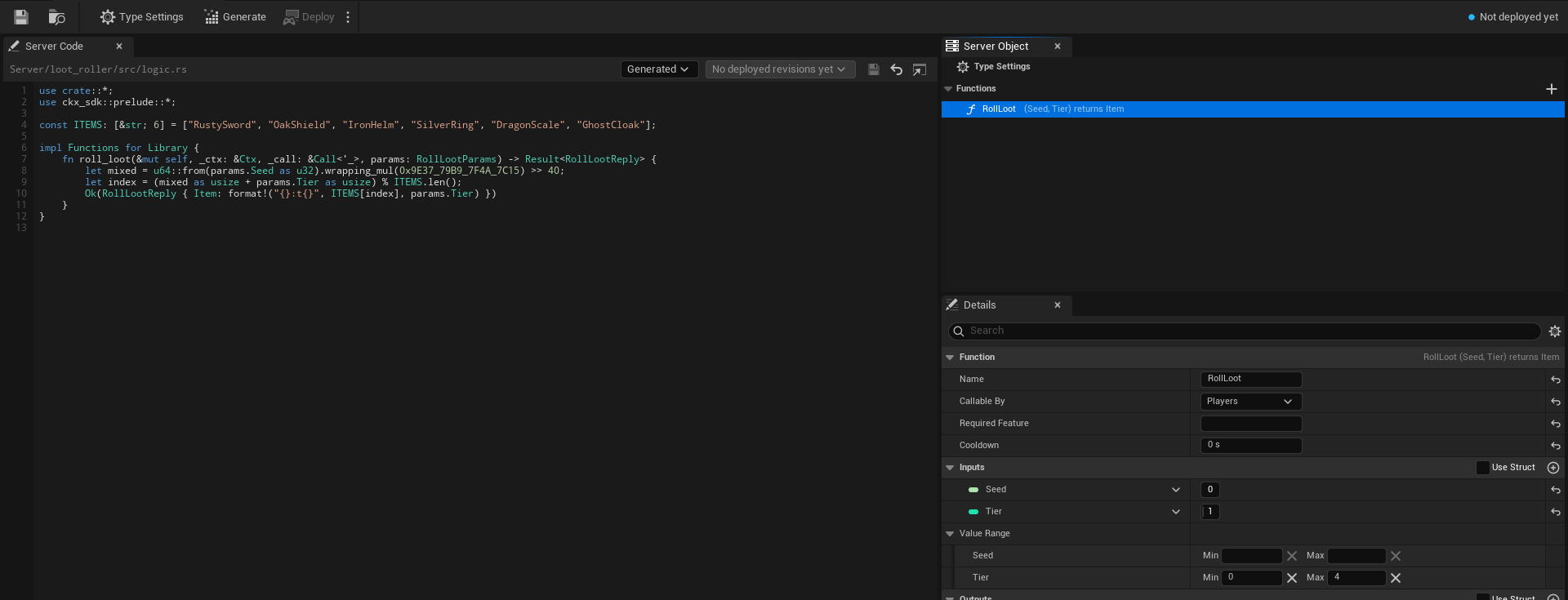
Leave Scaling at its defaults: 1 Min Instance, 1 Max Instance and 16 Parallel Calls per Instance. A chest and one boss never need more; see Scaling for when to raise them. Save the asset.
The server code
Click Generate, which writes Server/loot_roller/. The function arrives in logic.rs as a method that refuses with "not written yet". Replace the file with this:
use crate::*;
use ckx_sdk::prelude::*;

const ITEMS: [&str; 6] = ["RustySword", "OakShield", "IronHelm", "SilverRing", "DragonScale", "GhostCloak"];

impl Functions for Library {
    fn roll_loot(&mut self, _ctx: &Ctx, _call: &Call<'_>, params: LootRollInputs) -> Result<LootRollOutputs> {
        let mixed = u64::from(params.Seed as u32).wrapping_mul(0x9E37_79B9_7F4A_7C15) >> 40;
        let index = (mixed as usize + params.Tier as usize) % ITEMS.len();
        Ok(LootRollOutputs { Item: format!("{}:t{}", ITEMS[index], params.Tier) })
    }
}
What it does:
- It is a pure calculation. The item depends on the seed and the tier and on nothing the library remembers, so any instance gives the same answer. There is no state to read or change;
selfis the emptyLibrarystruct. - It trusts the range.
Tieris 0 to 4 because the Value Range on the asset is enforced beforeroll_lootruns; the function does not check it again. - It uses the low 32 bits of the seed, which is plenty to spread the six items.
See A Server Function Library for the parts of logic.rs that are different from a Server Object's.
The boss rolls on its fall
Open CSO_Boss. Add CSO_LootRoller to Can Call, in the Can Call category, and add the LastDrop variable. Generate the boss's server code again; it gains a calls::loot_roller module whose roll_loot takes no key, since a library has no Instance Id. Change the hit of the boss's server code where it starts the respawn:
if self.Health == 0 {
    timers::start(ctx, timers::RESPAWN)?;
    let roll = calls::loot_roller::LootRollInputs { Seed: self.LastHitBy, Tier: 3 };
    if let Ok(loot) = calls::loot_roller::roll_loot(ctx, &roll) {
        self.LastDrop = loot.Item;
    }
}
The roll is allowed to fail. The first call to a library that has been idle can take over a second, and a call from server code that outlasts the call deadline fails with "call deadline passed" although the library may still finish; see A call to a library from server code fails. A missing drop must not undo the kill, so the boss keeps the item only when the roll came back.
Put it on the server
Open Server Compute. The Overview tab lists loot_roller with the badge New and a line that reads Server Function Library, 1 function and 1 instance, and boss as Changed. Click Deploy, read the dialog, which should say it adds loot_roller and changes boss, and click Yes. A deploy sends every type together, so the library and the boss go out as one version. See Deploy.

The chest
The chest is an actor, BP_Chest, with no component: a library has no object to hold. Build it from Blueprint on Call a Server Function Library, or from C++ on Call a Server Function Library, from C++. Both roll Seed 7 at Tier 1 when the player walks into it. The Blueprint is this graph, with a Print String each for the item and the reason:
Pan a Blueprint figure with the right mouse button. Press Copy nodes, then Ctrl+V in your own event graph.
Show the drop
On BP_Boss from Shared boss fight, add On LastDrop Changed (CSO_Boss) and wire Event BeginPlay, or the Then pin of the last On Changed you added, into its Bind. From Changed, add a Print String that shows the LastDrop pin. Compile and save.
Try it
- Play with two players as on Two players in Play In Editor. Walk one player into the chest. That window prints
SilverRing:t1, and the other window prints nothing, since the call was that player's own. - Walk the other player into the chest. It prints
SilverRing:t1too, and so does the first player on a second visit, since the seed and the tier have not changed. - Hit the boss down to 0 with either player. Both windows print an item of tier 3, such as
GhostCloak:t3, the same in both, since the boss kept it inLastDropand everyone watches that. Which item it is depends on who landed the last hit. - Let the boss respawn and bring it down again with the other player. A different seed usually gives a different item, and both windows print the change.
If the item is empty, the boss's roll failed once, typically on the first fall after the library was idle: the boss still fell, and its next fall tries again.
Related
- Make a Server Function Library: Kind, Scaling and what a library cannot have
- A Server Function Library: the server code
- Call a Server Function Library and from C++: the chest
- Shared boss fight: the boss this page extends
- Call other Server Objects: Can Call and the typed helpers
- Troubleshooting: a cold first call