Create a Server Object type
Server Objects run on ck-exec.
Each type of Server Object is described by one data asset of the class UCrowdyServerObjectDefinition. The asset names the variables the server keeps, which of them players may see, the functions players may call, and the messages the server sends to everyone listening. The SDK reads it at runtime to encode and decode every value, and the type's server code is generated from it, so both sides agree on every name.
A type that needs functions only, with nothing to remember between calls, sets its Kind to Server Function Library; see Make a Server Function Library. The rest of this page is about the default, Server Object.
Make the asset
In the Content Browser, choose Add, then Crowdy, then Server Object. The new asset is named CSO_NewServerObject; rename it after the type, for example CSO_VillageBeacon, and double-click it. Server Object assets take the prefix CSO_ (Crowdy Server Object), the way Blueprints take BP_; an older asset named DA_ works the same. Add, Miscellaneous, Data Asset, then Crowdy Server Object Definition makes the same asset. It opens in an editor laid out like the Blueprint editor (see The asset editor), with the type's variables, functions and messages in the Server Object panel and whatever you select there in Details.
The village beacon keeps its oil, whether it is lit, and who fed it last; feeding it sends an amount of oil and gets back how much the beacon holds afterwards.
- Add the variables. In the Variables section of the Server Object panel, clear Use Struct in its header if it is ticked, then click +. A new variable is an Integer named
NewVar, and it is selected, so Details shows it. Set its Variable Name toOiland its starting value, under Default Value, to 50. Click + twice more forbLit, a Boolean that starts ticked, andLastFedBy, an Integer64 that starts at 0; change each one's type with Variable Type. - Choose what players see. Each variable has an eye at the end of its row. Leave it open on
OilandbLit: Visible to Players, so players can read and watch them. Click it onLastFedByto close it: Server Only, so it never leaves the server. - Add the function. Click + in the Functions section. The new function,
NewFunction, is selected; set its Name toFeedBeaconand leave Callable By on Players. Click + in the Inputs header, rename the newNewParamtoOil, leave it an Integer and give it the default value 10. Click + in the Outputs header and name that oneOiltoo. - Name the type. Select Type Settings, the first row of the Server Object panel, and Details shows the type's own settings: set Type Name to
village_beacon, the Description, and Readable By.
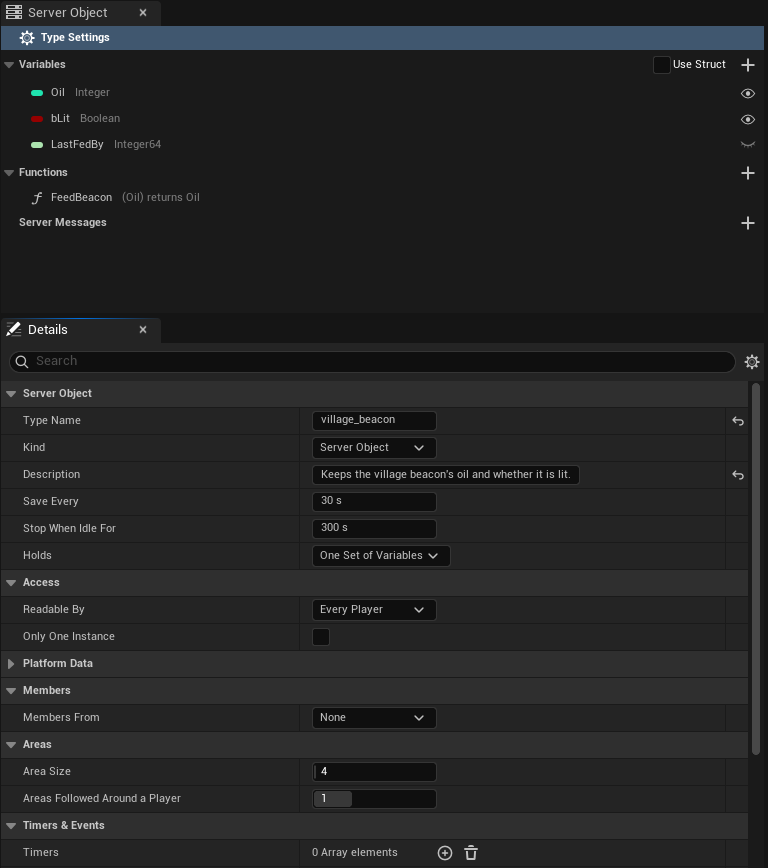
The panel now reads:
| Server Object panel | The beacon |
|---|---|
| Variables | Oil Integer (open eye), bLit Boolean (open eye), LastFedBy Integer64 (closed eye) |
| Functions | FeedBeacon with (Oil) returns Oil beside it |
and, with Type Settings selected, Details:
| Setting | The beacon's value |
|---|---|
| Type Name | village_beacon |
| Description | Keeps the village beacon's oil and whether it is lit. |
| Readable By | Every Player |
Then pick the asset in the beacon's Beacon Definition slot in the level's Details panel; see Get a Server Object.
Variables, inputs and outputs, or a struct
The variables, and each function's inputs and outputs, can each be added right in the asset, as above, or taken from a USTRUCT of your own. Tick Use Struct in the section's header to take a struct: for the Variables, pick it as State Struct in Details with Type Settings selected; for a function's Inputs or Outputs, the list gives way to an Input Struct or Output Struct picker, where None sends or replies nothing. The beacon's structs:
// VillageBeacon.h
// Everything the server keeps for one village's beacon; only the watched fields ever reach a player.
USTRUCT(BlueprintType)
struct FVillageBeaconState
{
	GENERATED_BODY()
	UPROPERTY() int32 Oil = 50;
	UPROPERTY() bool bLit = true;
	UPROPERTY() int64 LastFedBy = 0;
};

USTRUCT(BlueprintType)
struct FFeedBeaconParams
{
	GENERATED_BODY()
	UPROPERTY() int32 Oil = 10;
};

USTRUCT(BlueprintType)
struct FFeedBeaconReply
{
	GENERATED_BODY()
	UPROPERTY() int32 Oil = 0;
};
With Use Struct ticked, the Server Object panel lists the struct's fields as the variables, each with its type and eye, but they are renamed and retyped in the struct, not in the asset.
Both travel exactly alike, so the server code and the saved data do not care which you chose. The generated server code gives the ones added in the asset the names the structs would have, VillageBeaconState, FeedBeaconParams and FeedBeaconReply, so the beacon's logic.rs is the same either way.
The C++ on the following pages uses these structs. With variables, inputs and outputs added in the asset there is no struct, so C++ reads and sends them by name instead: see Read and follow its variables and Call its functions. Keep a struct when the same values are shared by several types or functions, when you may rename a field and want to keep its saved value with Field Names, or when your C++ uses the struct elsewhere.
The asset editor
Double-click a definition in the Content Browser and it opens in its own editor, laid out like the Blueprint editor and using its words, not as a plain property list. The editor has a toolbar and three tabs.
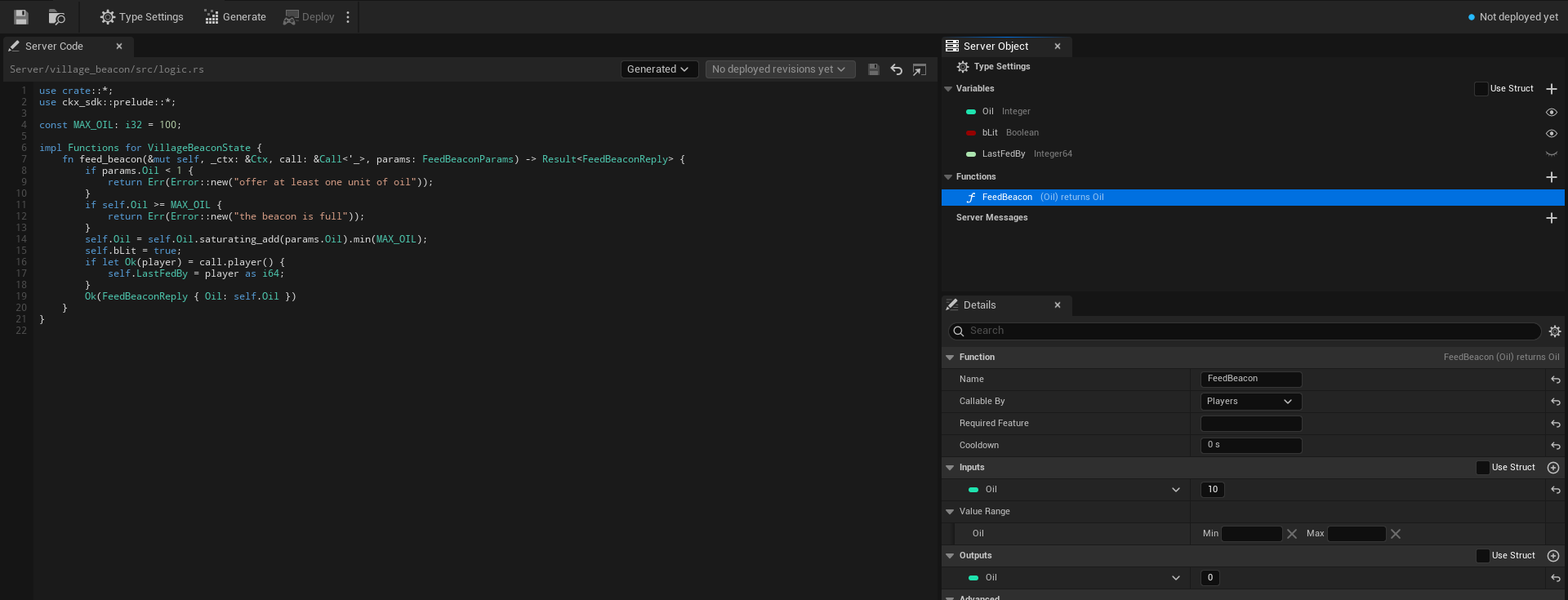
The toolbar
After the usual Save and Browse buttons the toolbar holds:
- Type Settings, a toggle that selects the Type Settings row of the Server Object panel from anywhere, so Details shows the type's own settings.
- Generate writes the type's server code, the same as the Content Browser command. Its tooltip reads "Writes this type's server code under
Server/<Type Name>; your logic file is never replaced". - Deploy builds and deploys every Server Object type in the project together, since a deploy replaces the app's whole version, and asks first. See Server Compute.
- A small arrow beside Deploy opens a menu with two entries. Open Server Compute opens Crowdy Studio on the Server Compute page itself (it opens on Sign In first when nobody is signed in, and shows the page after). Show build output opens a Build Output window with what the last build of this session printed; it is disabled until a build has printed something.
- A status readout at the right: a coloured dot and one line saying where the type stands. Hover it for the reason.
Generate is disabled until the Type Name is valid. Deploy is disabled until the Type Name is valid, while another definition has the same Type Name, while another operation runs, and while nothing in the project has changed since the live version. While a deploy runs, its progress line takes the place of the status readout.
The readout says:
| Readout | Meaning |
|---|---|
| Ready | The server code on disk matches this definition. It is compared with the live version once Server Compute has read it, which needs you signed in to Crowdy Studio. |
| No changes, then "live in version 7" (green dot) | The live version runs this code with these settings. |
| Changed since version 7 (server code, save interval) (yellow dot) | Version 7, the live one, runs something else. The brackets say what: server code, save interval or idle timeout. |
| Not deployed yet (blue dot) | The live version does not run this type. Deploy adds it. |
| Live code unknown, then "app version 7" (yellow dot) | The live version runs code this project has no record of, for example deployed from another copy of the project. |
| Needs generating, Out of date (yellow dot) | The type's server code has to be generated, or generated again; see Write its server logic. |
| Problem: ... (red dot) | The definition fails its checks, or another definition has the same Type Name (see Two definitions with one Type Name). The reason follows the colon. |
The three tabs
- Server Code, the large tab on the left: the path of the Server Functions file, the Code Source choice (Generated or My Own File), the deployed revisions, and the code itself with line numbers, Rust colouring, Save, Revert and an external-editor button. It is described on Write its server logic.
- Server Object, top right, where My Blueprint is in the Blueprint editor: the type's variables, functions and messages.
- Details, bottom right: the settings of whatever is selected in the Server Object panel.
The tabs dock and rearrange like any editor tab, for example to put the code above the rest; the editor remembers the layout.
The Server Object panel
The panel starts with a pinned row, Type Settings, with a gear icon. It is selected when the asset opens, and selecting it shows the type's own settings in Details. Below it are three sections.
- Variables, with a Use Struct check-box and a + button in its header. Each row shows the variable's type as a coloured pill, the way a Blueprint variable does, its name, its type name (Integer, Boolean, String) and an eye. An open eye is Visible to Players: players can read and watch it. A closed eye is Server Only: it never leaves the server. Click the eye to switch it. With Use Struct ticked the + button is hidden and the rows are the struct's fields.
- Functions, with a + button in its header. Each row shows the function's name and its pins the way its node reads, inputs in brackets, then "returns" and the outputs, so
FeedBeaconreads(Oil) returns Oil; a struct shows as its name. A Server Only tag follows when only server code may call it (see Callable By). Double-click a function to jump the Server Code tab to itsfninlogic.rs. When Members From is This Object, a Built-in section lists Join, Leave, Add Member, Remove Member, Make Leader and Set Open for Joining, greyed out: they cannot be edited or deleted. Each shows its inputs the way a function row does, such as Add Member (Player). See Members. - Server Messages, with a + button in its header, below the functions. Each row shows the message's name and its payload the way its Received node reads, so
BossDefeatedreads(Winner, Hits)beside it; a message that players cannot listen to carries "(server only)". See Server messages.
Right-click a section's header for Add Variable (while Use Struct is clear), Add Function or Add Message, a function or a message for Duplicate and Delete, and a variable added in the asset for Delete. The Delete key deletes the one selected. New variables are Integers named NewVar, then NewVar_1 and on; new functions are named NewFunction, new messages NewMessage, and new inputs and outputs NewParam.
A warning icon after a name means the variable, function or message fails a check made when you save; hover it to read the problem.
The Details tab
Details follows the selection in the Server Object panel.
With Type Settings selected it shows the type's own settings: Type Name, Kind (Server Object or Server Function Library; a library shows only Type Name, Kind, Description, Platform Data, Can Call, Scaling and Server Limits, and Details rebuilds when you change it), Description, State Struct (only when the Variables use a struct), Save Every and Stop When Idle For, both always in seconds (such as 300 s), and a collapsed Advanced group with Server Names (Field Names and Enum Value Names) and Baked. Six categories hold the settings for who may do what: Access (Readable By: Every Player, Owner Only or Members; Only One Instance), Platform Data (Reads Players, Changes Players' App State, Reads World Data, Changes the World, Reads Grids, Manages Grids, Grants Grid Permissions, Reads Players' Access, Manages Players' Access), Members (Members From, Max Members, Show Members to Players, Remove Members Who Leave), Timers & Events, Can Call and Listen To. They are described on Access, members and timers. Holds sits with the type's other settings, and two more categories belong to a record per entity: Records (Max Records, Send Changes Every, Team From), shown only when Holds is A Record per Entity, and Areas (Area Size, Areas Followed Around a Player). A collapsed Server Limits category holds what the server allows each Server Object of the type: Memory per Instance, Time per Call, Fuel per Call (Millions) and Calls Waiting. When the type has messages that players can listen to and some players may read less than every player can, a Server Messages category with a warning follows. See Every setting.
A variable shows Variable Name, where you rename it, Variable Type, and Visible to Players, the same switch as the eye. In a type whose Holds is A Record per Entity, Visible to Players is a drop-down of who receives the variable: Server Only, Everyone, Owner Only or Team Only; the eye then switches between Server Only and Everyone. See Who receives a value. Variable Type is Unreal's Blueprint type picker, offering only the types a Server Object can carry (see Field types). Below them a Default Value section holds the variable's starting value, where a new Server Object starts. A variable from a struct shows its name and type read only; change them in the struct.
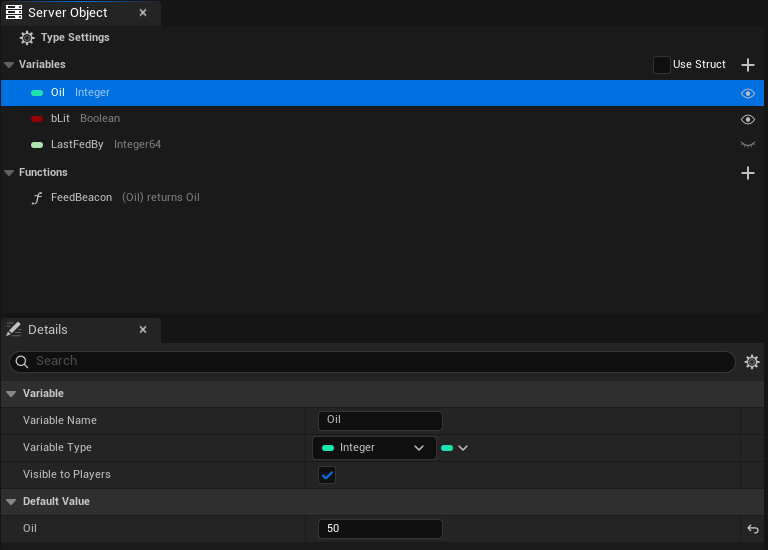
A function shows:
- a Function section whose header reads the node line, for example
FeedBeacon (Oil) returns Oil, with Name, the name your C++ passes toCall, Callable By (Players, Members, Leader, Server Only or Developers Only) and Cooldown, in seconds, and for a Server Only or Developers Only function a Call as Developer... button (see Call a function as the developer); - Inputs, what the caller sends, and Outputs, what the server answers with. Each has a Use Struct check-box and a + button in its header, and lists its pins the Blueprint way: type pill, name and default value on each row, with a drop-down to change the type, and rename, delete and drag to reorder. An empty one says "No inputs: the caller sends nothing. Add one with the + button." or "No outputs: the function replies nothing. Add one with the + button." Ticking Use Struct swaps the list for an Input Struct or Output Struct picker. A number input also gets a Value Range under Inputs, two boxes labelled Min and Max that the server holds callers to; see Value Range;
- a collapsed Advanced section with the Server Name, the name the function has on the server.
A message shows a Message section whose header reads the node line, for example BossDefeated (Winner, Hits), with the message's Name and Players Can Listen; a Payload section with a Use Struct check-box and a + button, listing the values the message carries the way a function's Inputs are listed (an empty one says "No payload: listeners are told it happened and receive nothing. Add a value with the + button."); and a collapsed Advanced section with the Server Name, the topic the message has on the server.
Code Source and the logic file are not in Details: they are on the Server Code tab, beside the code they choose.
Type Name
The Type Name box checks what you type as you type it and says what is wrong: "Needed: the type's name on the server.", "At most 48 characters.", "Start with a lowercase letter." or "Use only lowercase letters, digits and underscores." The problem appears under the box with a warning icon. The value is stored when you press Enter or leave the box. When there is a problem and the asset's name gives a better idea, a Use village_beacon link beside it sets the Type Name from the asset name ("Sets the Type Name from the asset's name"): CSO_VillageBeacon becomes village_beacon, dropping the CSO_ (or the DA_ of an older asset) and putting an underscore where each word starts.
Callable By
Callable By, in a function's Details, decides whether a player may call it.
| Choice | What happens |
|---|---|
| Players | Players can call it, and so can other server code and developer tools. |
| Members | Members of the Server Object can call it. Needs Members From; see Members. |
| Leader | Only its leader can. Needs Members From. |
| Server Only | Only other server code and developer tools can. A player's call is refused, and the caller's OnDone sees the Denied outcome, with a Reason such as "players may not call this function"; see Troubleshooting. The function's row in the Server Object panel carries a Server Only tag. |
| Developers Only | Only developer tools can, such as Call as Developer: players and other server code are refused, with the Reason "only developer tools may call this function". The row carries a Developers Only tag. |
Other server code and developer tools may call every function whatever it says, except that a Developers Only function refuses other server code too.
Server Only is for functions that should never be reachable from a game client, such as a payout your own server code triggers or an administrative reset. Developers Only is for the ones only a person should run, such as a repair or a data fix you call by hand. The check is made on the server, so a modified game client cannot get around it.
Two definitions with one Type Name
Two definitions cannot use the same Type Name, since both would write the same Server/<Type Name>/ folder and become the same type on the server. When another definition has the Type Name, the Type Name row says "Another definition already uses this Type Name; give this one its own.", the status readout reads Problem followed by the same text, Generate and Deploy are disabled, and the list of deployed revisions is hidden, until one of them is renamed. Server Compute refuses to deploy too, naming both assets: "Two Server Object types are named village_beacon (...) and (...); each needs its own Type Name".
Server messages
A Server Function answers the player who called it, and the variables tell everyone what a value is now. A message is for the third thing: telling everyone listening that something happened. Your server code sends it, and each player listening to that Server Object, and each Server Object type that listens to this one, hears it once. A message is not a value and nothing keeps it: a player who was not listening, or whose connection was closed at that moment, never hears it, so a fact players must be able to look up later belongs in a variable.
The Hollow Giant, the shared boss, announces its fall with a BossDefeated message that names the player who landed the last hit and the hits it took. On CSO_Boss, in the Server Messages section of the Server Object panel:
- Click +. The new message,
NewMessage, is selected. Set its Message toBossDefeated. - Leave Players Can Listen ticked.
- Under Payload, click + twice. Name the first value
Winner, an Integer64, and the secondHits, an Integer. To carry a struct of your own instead, tick Use Struct and pick it as the Payload Struct.
The row reads BossDefeated (Winner, Hits). A message with no values is allowed: listeners are told it happened and receive nothing, such as a BossRespawned message.
| Setting | The boss's value |
|---|---|
| Message | BossDefeated |
| Players Can Listen | ticked |
| Payload | Winner Integer64, Hits Integer |
The message is sent from the type's server code; see Send a message. It is heard from Blueprint with On BossDefeated Received and Watch Message, and from C++ with WatchMessage; see Hear its messages, from Blueprint and from C++. The message is the struct FCrowdyServerMessage in the definition's Messages.
Who hears a message
- Players Can Listen, ticked, the default: any player who can connect to the type may listen to the message, whatever the type's Readable By says.
- Players Can Listen cleared: only the server code of a type that listens to this one hears it. Watching it from Blueprint or C++ logs a warning and does nothing, and a Received node for it does not compile. A message players cannot listen to does not open the type to players: a type whose only messages are these is still closed to players.
Readable By and the Owner Only and Team Only variables decide who may read the variables. They do not decide who hears a message. So when the type has a message players can listen to and Readable By is not Every Player, or any variable is Owner Only or Team Only, the Server Messages section and the type's settings show a warning: "Every player who can connect to this type hears its messages, whoever may read its variables. Keep private data out of messages." Put what only some players may know in a variable, and send a message only for what anyone may hear.
What a message carries
The payload takes the same types as a variable (see Field types) and is held to the same limits as a reply: nothing a client could not read, at most 1 MiB and 65,536 list, set and map entries. A message that breaks them is not sent: the send returns an error, which fails the function that made it when its code passes the error on; see What the generated code does for you.
A message's Name is what Blueprint and C++ use and must be unique in the type. Its Server Name in the Advanced section is its topic on the server: empty uses the name in snake case, so BossDefeated becomes boss_defeated. A topic is lowercase letters, digits and underscores, starts with a letter, is at most 64 characters, is not state (the topic the variables use), and is not used by another message.
After you add, rename or change a message, generate the server code and deploy the type again, since the server code carries it.
Every setting
The platform term is in brackets, for when you read the platform's own ck-exec pages or its logs. Where the editor labels a setting differently from its C++ name, the label is given too.
Server Object
- Type Name [node type]: the type's name on the server. Lowercase letters, digits and underscores, starting with a letter, at most 48 characters, and unique in your project.
- Kind (
ECrowdyServerObjectKind): Server Object, the default, keeps variables and has one instance for each Instance Id. Server Function Library (FunctionLibrary) has functions only, saves nothing between calls and is answered by several instances at once. The settings a library cannot have stay on the asset, hidden and ignored. See Make a Server Function Library. - Description: what this type is for, in a sentence. It is shown beside the type on the Server Compute page. It is for you and your team: it is not sent to the server, and it is not part of a packaged game.
- Visibility (
ECrowdyServerObjectVisibility, labelled Readable By): who may see the values.- Public (Every Player): every player can read the variables visible to players and is told of each change.
- Owner Only: each Server Object belongs to one player. Its Instance Id is that player's user id, and only that player can read its values or call its functions. See Owner Only types.
- Members: only the Server Object's members read its values; anyone can still see who the members are and join. Needs Members From. See Readable By.
- Only One Instance (
bOnlyOneInstance): one shared instance for every player, like a registry or a world event; nothing picks an instance. See Only One Instance. - Platform Data: Reads Players (
bReadsPlayers), Changes Players' App State (bWritesPlayerState), Reads World Data (bReadsWorld), Changes the World (bWritesWorld), Reads Grids (bReadsGrids), Manages Grids (bManagesGrids), Grants Grid Permissions (bGrantsGridPermissions), Reads Players' Access (bReadsAccess) and Manages Players' Access (bManagesAccess): what the type's server code may read and change of players, the world, grids and players' access to the app. All off by default. Deploy asks the platform for a permission [scope] for each one ticked, the way Required Feature asks forplayers.read; without it the platform refuses those calls. They work for any type. See Platform data and, for reading who stands in an area, Count who stands in the area. - Holds (
ECrowdyServerObjectHolds): One Set of Variables, the default, keeps the variables once for the Server Object. A Record per Entity (RecordPerEntity) keeps them once for each entity, keyed by the entity's id, such as the health of every member of a crowd. See Keep a record per entity.- Visible to Players (
OwnerFieldsandTeamFieldshold the Owner Only and Team Only variables): who receives each variable of a record, Server Only, Everyone, Owner Only or Team Only. A variable is in at most one of the two lists, and must be Visible to Players. - Max Records (
MaxRecords): the most records one Server Object keeps. 2048 unless you change it, 1 to 4096. - Send Changes Every (
PushIntervalMs): how often the server sends what changed, in milliseconds. 250 unless you change it, 50 to 5000. Changes in between are sent together, and the last value wins. - Team From: where a record's team comes from. This Object's Records, the default: a player's team is the team of a record they own in the same Server Object. Crowdy Team: a record's team is a Crowdy Team id in digits, and the server checks the player's membership through the platform, so deploying asks for
players.read. - A record type needs Readable By set to Every Player and Members From set to None.
- Visible to Players (
- Area Size (
AreaSizeChunks) and Areas Followed Around a Player (InterestRadiusAreas): for a component or a crowd row in This Actor's Area mode, in any type (see Draw a crowd with Mass). Area Size is how many chunks one area measures on each side of the ground, 4 unless you change it, 1 to 64. Areas Followed Around a Player is how many areas out from a player's own a crowd follows, 1 unless you change it, 0 to 3. See Pick the object. - Members From, Max Members, Show Members to Players, Remove Members Who Leave, Timers, On Player Joined, On Player Left, Can Call, Can Call Any Type (
bCanCallAnyType) and Listen To: the settings on Access, members and timers. Members From is None, This Object or Crowdy Team. Can Call Any Type lets the server code call every type in the app and deployscalls: ["*"]; see Call any type. - State Form (
StateForm, anECrowdyServerValuesForm, shown as the Variables' Use Struct check-box): Struct (Use Struct ticked) or Variables (Listin C++), added in the asset. The one not chosen is kept but not used. - State (labelled State Struct) [the hub's state, kept in its snapshots]: the struct holding everything the server keeps for one Server Object, when the Variables use a struct.
- State List (
StateList, anFInstancedPropertyBag, labelled Variables): the variables added in the asset, each with its default value, where a new Server Object starts. In the generated server code they are a struct named after the Type Name in PascalCase plusState, sovillage_beacongivesVillageBeaconState. - Watched Fields [the
statetopic] (labelled Visible to Players; the eyes): the variables players can read and watch, by the name the editor gives them. The others never leave the server. In a record type, the Owner Only and Team Only variables are listed here too. - Functions [methods]: what players, other server code and developer tools can ask the Server Object to do. Each, an
FCrowdyServerFunction, has:- Name: the name your C++ passes to
Call. - Server Name (in the function's Advanced section) [method name]: the function's name on the server. Empty uses Name in snake case, so
FeedBeaconbecomesfeed_beacon. Lowercase letters, digits and underscores, starting with a letter, at most 64 characters;readis reserved. - Params Form (
ParamsForm, shown as the Inputs' Use Struct check-box): Struct or Variables, added in the asset. - Params (labelled Input Struct): the struct the caller sends, when the Inputs use a struct. None sends nothing.
- Params List (
ParamsList, labelled Inputs): the inputs the caller sends, with their default values. No inputs sends nothing. In the generated server code they are a struct named after the function plusParams, such asFeedBeaconParams, with the default values as its defaults. - Reply Form (
ReplyForm, shown as the Outputs' Use Struct check-box): Struct or Variables. - Reply (labelled Output Struct): the struct the server answers with, when the Outputs use a struct. None answers nothing.
- Reply List (
ReplyList, labelled Outputs): the outputs the server answers with. No outputs answers nothing. In the generated server code they are a struct named after the function plusReply, such asFeedBeaconReply. - Who Can Call (
ECrowdyServerFunctionCaller, labelled Callable By): Players lets players call it; Members and Leader limit it to the members or the leader; Server Only refuses a player's call, and only other server code and developer tools can call it; Developers Only lets only developer tools call it. See Callable By. - Cooldown (
CooldownSeconds): how long one player waits between two calls that succeeded; 0 for none. See Cooldown.
- Name: the name your C++ passes to
- Messages [topics other than
state]: what the server code sends to everyone listening. Each, anFCrowdyServerMessage, has:- Name: the name Blueprint and C++ use, such as the
MessagethatWatchMessagetakes. Unique in the type. - Server Name (in the message's Advanced section) [topic]: the message's name on the server. Empty uses Name in snake case, so
BossDefeatedbecomesboss_defeated. Lowercase letters, digits and underscores, starting with a letter, at most 64 characters;stateis reserved. - Players Can Listen (
bPlayersCanListen): on by default. Off, only a type that Listens To this one hears the message. See Who hears a message. - Payload Form (
PayloadForm, shown as the Payload's Use Struct check-box): Struct or Variables, added in the asset. - Payload (labelled Payload Struct): the struct the message carries, when the payload uses a struct. None carries nothing.
- Payload List (
PayloadList, labelled Payload): the values the message carries, with their default values. No values carries nothing. In the generated server code they are a struct named after the message plusMessage, such asBossDefeatedMessage.
- Name: the name Blueprint and C++ use, such as the
- Listen To (
ListenTo) [calls]: other Server Object types whose messages this type's server code listens to. Each is also in Can Call. See Listen to other Server Objects.
A function added with + starts with its inputs and outputs added in the asset, and none of either. A message added with + starts with its payload added in the asset, and no values.
Variables, inputs and outputs added in the asset can be any type the Blueprint type picker offers there: booleans, integers, floats and doubles, names, strings, enums, structs, soft object and soft class paths, and arrays, sets and maps of those. Text, object, class and interface references, FInstancedStruct and FGameplayTagContainer are not offered, since a Server Object cannot carry them.
Variables, inputs or outputs share one struct in the generated server code when they have the same names, types and order and one was copied from the other, which keeps each value's hidden id. Lists you built separately in the editor never share, even if they look alike. The first of the sharing Lists keeps the struct, counting the variables first, then the functions in order with inputs before outputs. Each of the others that starts with the same values gets its own name as a type alias, so logic.rs can still use it: in the tip jar, the Tip output (Total, starting at 0) is pub type TipReply = TipJarState;, because the jar's Total also starts at 0. A List that has the same shape but starts with different values gets its own struct with its own defaults. In the village beacon, the beacon's Oil starts at 50, so the FeedBeacon input (Oil, starting at 10) and output (Oil, starting at 0) are each their own struct, and code that used one for the other no longer builds. Generate shows a notice when a List switches between the two, such as "TipReply is now its own struct, since its starting values differ from those of TipJarState; code that uses one for the other no longer builds." In Unreal each function keeps its own default values: Make Inputs, the call nodes and a reply that leaves a value out use that function's. In the generated server code the defaults matter only when an older client leaves out a value it does not know yet.
Save and stop (with the type's own settings)
- Save Interval Seconds [
persist_every_ms] (labelled Save Every): how often the server saves a running Server Object, 5 to 60 seconds, default 30. After a crash it starts again from its last save, so at most this much is lost. - Idle Timeout Seconds [
evict_after_ms] (labelled Stop When Idle For): how long a Server Object nobody uses keeps running before the server stops it, 1 to 1800 seconds, default 300. The next use starts it again from its last save.
Scaling (a Server Function Library only)
- Min Instances (
MinInstances) [replicas]: how many instances run all the time, 1 to 64, default 1. - Max Instances (
MaxInstances) [max_replicas]: the most instances the server adds when calls have waited 2 seconds, 1 to 64, default 1. It removes an added one after about 30 seconds nearly idle. It must be at least Min Instances. - Parallel Calls per Instance (
ParallelCallsPerInstance) [concurrency]: how many calls one instance answers at the same time, 1 to 256, default 16.
Each running instance counts toward the app's limit on running Server Objects. See Scaling.
Server Limits (collapsed; the defaults suit most types)
- Memory Megabytes [
memory_mb] (labelled Memory per Instance): how much memory each running Server Object may use, 1 to 512 MB, default 64. Each one reserves it from the app's memory limit, so a type that needs less fits more Server Objects. An app with no funds has 1 GB in all, so at 512 MB only two run at once and the next is answered Unavailable; a funded app has 64 GB. An app with no funds can also run only 16 Server Objects at once, a funded app 16,384. - Call Time Limit Ms [
deadline_ms] (labelled Time per Call): how long one Server Function call may run before the server stops it and the caller gets Timeout, 10 to 10,000 ms, default 2,000. A player's connection waits up to 20 seconds for an answer: the longest Time per Call (10 seconds) plus time the call waits behind others at the Server Object. The limit covers only the function itself, not that waiting. A call that runs past it is answeredDeadlineExceeded(the SDK reports Timeout, with a reason such as "AttackBoss ran past its Time per Call on the server: handler exceeded its deadline"; if no answer reaches the game at all, the reason is "The server sent no answer in time; the connection may be slow or lost"), and the platform also restarts that Server Object from its last save, so changes since the last save are lost. Keep functions short, and set Save Every low on a type whose recent changes matter. - Fuel Per Call Millions [
fuel_per_call] (labelled Fuel per Call (Millions)): how much work one call may do before the server stops it, 1 to 1,000 million, default 50 million. - Max Waiting Calls [
mailbox] (labelled Calls Waiting): how many calls may wait at one Server Object, 1 to 4,096, default 1,024. Past that a call is answered Busy.
Deploy sends a limit only once you change it, so a type that keeps the defaults deploys exactly as before. A value outside its range is brought into it.
Server Names (in the Advanced group)
- Field Names: keeps a field's name on the server when you rename the field in Unreal. Each entry, an
FCrowdyServerFieldName, names the struct, the field as the struct now names it, and the Server Name to keep. You pick the struct, then the field from a list of that struct's fields, so there is nothing to spell. For variables, inputs and outputs added in the asset, use List Value Names. - Enum Value Names: the same for an enum value, each entry an
FCrowdyServerEnumValueName: pick the enum, then the value from a list of its values. - List Value Names: the same for a variable, input or output added in the asset, each entry an
FCrowdyServerListValueName: pick the List (the variables, or a function's inputs or outputs), then the value, and the Server Name to keep. An entry follows its value through later renames, since it records the value's id, not its name. You rarely add one yourself: Generate Server Code adds it when you choose to keep a renamed value's old name (see After you change the definition). An entry stops applying when its function is renamed; Generate then asks again.
In both, the second list stays empty until the first is chosen ("Choose the struct first", "Choose the enum first"), a list with nothing to offer says "Nothing to pick", an entry still to be filled in reads "None", and one whose struct, field, enum, value or List is gone reads its name followed by "(missing)" ("Unknown value (missing)" for a List value, which is kept by its id). A Blueprint enum's values are listed by the names the editor shows.
Server Code (set on the editor's Server Code tab, not in Details)
- Code Source: where this type's Server Functions come from. Generated (the default) uses
Server/<Type Name>/src/logic.rs, the file Generate Server Code writes once and never replaces. My Own File uses a.rsfile of your own instead, for example one shared in your repo. It is the combo beside the file's path on the tab. In C++ the choice is the enumECrowdyServerCodeSource, with the valuesGeneratedandOwnFile, and a third,GameKitStarter(Game Kit Starter), which only Add starter sets; see Use the Game Kit starters. - Logic File: your
.rsfile, relative to the project folder, chosen with the folder button on the Server Code tab. The button is shown, and the file used, only when Code Source is My Own File; with My Own File and no file chosen, the type cannot be generated or deployed, and the messages say "Code Source is My Own File but no file is chosen". The tab shows the file's state and code; see Write its server logic and Use your own logic file. The Logic File is editor-only, like the Description; Code Source is kept in a packaged game, which reaches a Game Kit starter differently from other types.
Baked (in the Advanced group, read only)
- Baked Structs and Baked Enums: the field and value tables the SDK uses at runtime, rebuilt every time you save the asset. You never edit them.
Checks when you save
Saving the asset, and the editor's Validate Data, check the whole definition and list every problem at once, naming the struct and field (or the function or message) each is about: a Type Name or Server Name that breaks the rules, two functions or two fields with the same name on the server, a message with no Name, two messages with one Name or one topic, a topic that is state, a variable visible to players that is not in the State struct, and any field of a type a Server Object cannot carry. For a record type it also names an Owner Only or Team Only variable that is not a field of the State or not Visible to Players, a variable that is both Owner Only and Team Only, Readable By other than Every Player, Members From other than None, a function named changes, Max Records or Send Changes Every out of range, and Area Size or Areas Followed Around a Player out of range. The Server Object panel puts a warning icon on the variable, function or message a problem is about. A definition with a problem cannot be used until it is fixed.
A Server Function Library is checked on what it shows only, and needs no State struct or variable. It is also refused when a function is Members or Leader, when a function has a Cooldown, and when Max Instances is below Min Instances; see Checks when you save.
Variables, inputs and outputs added in the asset are checked the same way, named by the name the server code gives them, for example "FeedBeaconParams.Label: text is not supported; use FString". Two more checks are about them only:
- "Add at least one variable, or use a State struct": the Variables are added in the asset and there are none.
- "Two lists are named FeedBeaconParams; give their functions different names": two functions with the same Name both have inputs (or outputs) added in the asset, which would give the server two structs with one name.
Field names on the server are your C++ member names (Oil, bLit), or a Blueprint struct's field names with every character other than letters, digits and underscores removed (Max Health becomes MaxHealth). Two fields whose names differ only in case are refused.
The tables in the asset describe the structs as they were when it was saved. If a struct gains or loses a field and the asset is not saved again, acquiring a Server Object of that type fails with a message saying the struct has changed since the definition was saved. Every cook saves it again, so this bites in the editor, not in a packaged game.
Field types
| Type | Notes |
|---|---|
bool, uint8, int32, int64, float, double | C++ also allows int8, int16, uint16, uint32, uint64. |
FString, FName | Use FString for text the server makes up or players choose (names, messages). |
| Enums | Travel by the value's name, so reordering values is safe. |
Nested USTRUCTs | |
TArray, TSet, TMap | Set elements and map keys must be strings, names, integers or enums. |
TOptional | C++ only. |
FVector, FVector2D, FIntPoint, FIntVector, FRotator, FQuat, FLinearColor, FColor | |
FDateTime, FTimespan | To the millisecond. |
FGuid, FGameplayTag | A tag this build does not know fails to decode. |
TSoftObjectPtr, TSoftClassPtr, FSoftObjectPath | The path only; nothing is loaded. |
Every FName and soft object path the server sends becomes a permanent name in the engine, never freed, so a client accepts at most 1 Mi (1,048,576) characters of new names (Name values and soft object path parts it has not seen before) from the server per run. Past that, a new Name reads as None and an object path made of new names reads as empty; the rest of the message still applies, a map or set entry whose key was skipped is dropped, and the client logs one warning. The text "None" never counts. A variable holding player-chosen names or free text should be a String (FString). Keep FName, enums, gameplay tags and soft paths for values drawn from a fixed set your game already knows.
Refused: object, class, weak and interface references, FText, FInstancedStruct, FGameplayTagContainer (use a TArray of FGameplayTag), fixed-size arrays, delegates, and field paths. Editor-only, deprecated and Transient properties never travel.
Changing a type later
A Server Object's state outlives the code that wrote it, so some changes are safe and some are not.
| Change | What happens |
|---|---|
| Add a field | Safe. Older saves and older clients leave it at its default. |
| Remove a field | Safe. The server drops it from its saves. |
| Rename a field | The server sees one field removed and another added, and the old value is lost. Keep the old name under Field Names instead. |
| Rename a variable, input or output added in the asset | Generate Server Code notices the rename and asks whether to keep the old name on the server. Keep it and saved values carry over (a List Value Names entry holds the old name); rename it on the server and the old value is lost, as with a field. |
| Change a field's type | Refused when the value is read, and a save holding the old type cannot be loaded. Add a new field instead. |
| Reorder enum values | Safe: values travel by name. |
| Change Kind | Safe both ways. To a Server Function Library the saved data is kept, unused, and comes back if the type becomes a Server Object again; the deploy says so. See Switch Kind. |
| Rename or remove a message | A Received node for the old name no longer compiles ("has no message ... any more"), and WatchMessage of it logs a warning and does nothing. Other types that listen to it need their server code generated again. |
| Add an enum value | An older client reads the new value as the field's default and logs a warning; older server code refuses it. |
| Remove or rename an enum value | A save holding it cannot be loaded. Keep the old name under Enum Value Names, or stop using the value before you remove it. |
After any change, the server code has to be generated and deployed again for the server to know it; see After you change the definition.
Related
- Make a Server Function Library: a type with functions only, answered by several instances at once
- Access, members and timers: who may read and call, members, timers, and calling other types
- Keep a record per entity: a Server Object that holds values for every entity of a crowd
- Write its server logic: generating the type's server code from this asset, and the Server Code tab
- Get a Server Object, from Blueprint and from C++: using the type in a game
- Hear its messages, from Blueprint and from C++: listening to the messages defined above
- Unreal and ck-exec names
- ck-exec overview: hubs, snapshots and the manifest these settings become